
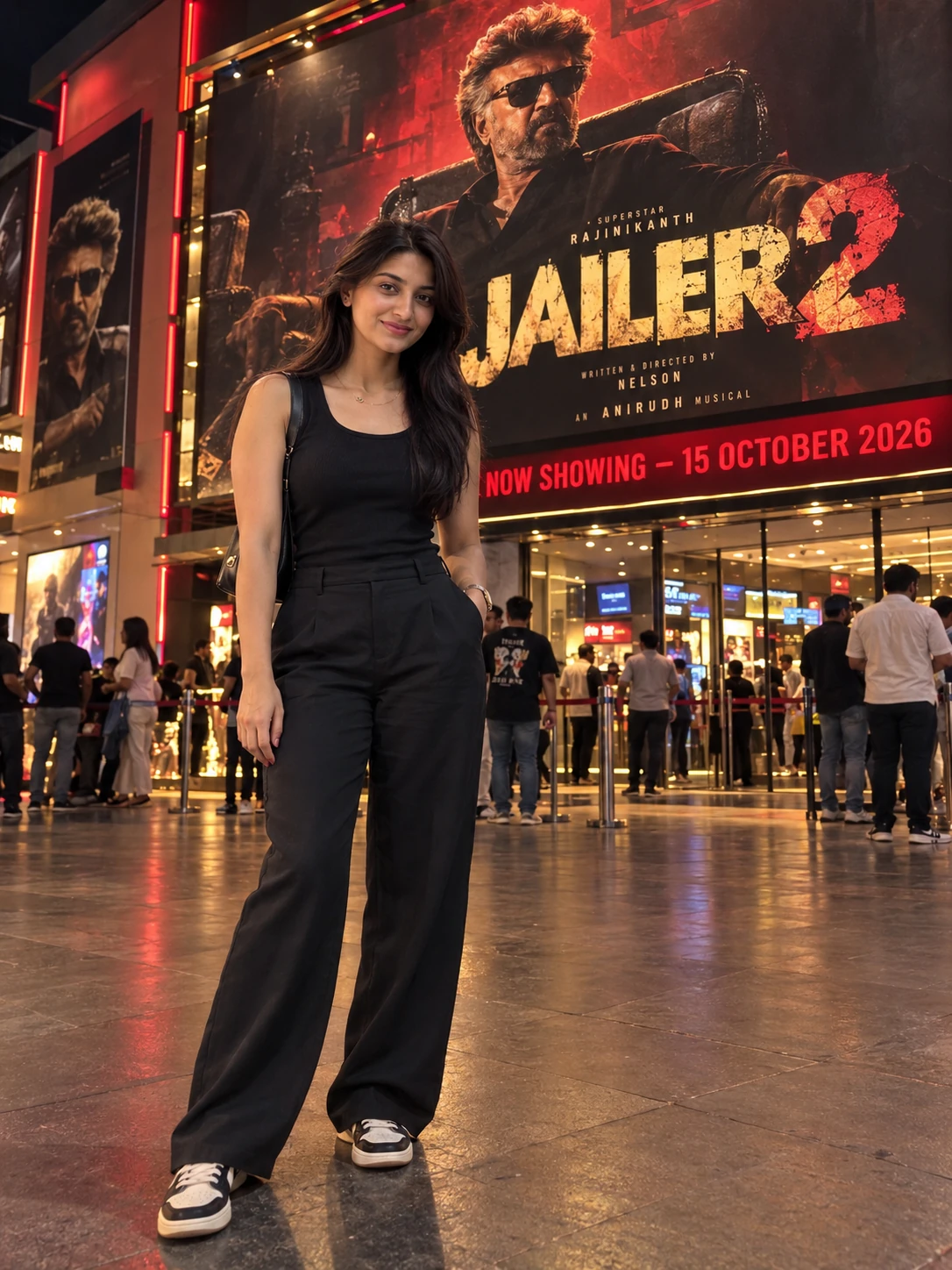
Jailer 2 Release Day Cinema Hall AI Photo Prompt for Girls
Copy this photo prompt below and paste it into ChatGPT with your own photo.
Create an ultra-realistic, cinematic DSLR photograph using the uploaded image as the face reference. Show the same girl or woman from the uploaded photo standing elegantly outside an Indian cinema hall on 15 October 2026, in front of a huge, illuminated Jailer 2 movie promotional poster.

STRICT FACE IDENTITY LOCK: Preserve the exact face and identity from the uploaded reference image. Maintain the original facial features, skin tone, hairstyle, eyes, eyebrows, nose, lips, and natural expression. Do not beautify, reshape, replace, or alter the face. Preserve the person's original appearance and recognizable identity.

SCENE AND BACKGROUND: A realistic Indian cinema hall entrance at night, featuring a massive illuminated Jailer 2 promotional poster displayed on a theatre wall or large LED billboard. Include glowing cinema signage, glass entrance doors, realistic reflections, dramatic red and golden lighting, and a few moviegoers in the background. Make the atmosphere feel lively and authentic, like a movie release celebration.

POSE AND OUTFIT: The woman stands naturally facing the camera with a confident, relaxed expression. One hand rests casually in a pocket, if appropriate for the outfit, while the other hangs naturally by her side. Dress her in a stylish black top with elegant dark trousers and fashionable sneakers, or a modern black outfit that complements her original style. Keep the outfit tasteful and realistic. Adjust her height, body proportions, and size naturally according to the cinema background.

MOVIE POSTER: Display a large, dramatic Jailer 2 promotional poster behind her, featuring a dark action-movie atmosphere, smoky textures, red highlights, golden accents, dramatic shadows, and bold cinematic typography. Add a realistic theatre banner reading “NOW SHOWING — 15 OCTOBER 2026.” Keep the poster clearly visible without covering the person.

PHOTOGRAPHY AND QUALITY: Professional DSLR photography, 85mm portrait lens aesthetic, realistic skin texture, natural hair details, sharp facial features, accurate perspective, lifelike shadows, balanced exposure, high dynamic range, and premium cinematic color grading. Match the lighting on the subject to the theatre's red and golden illumination.

STRICT REALISM: Do not change the original face, skin tone, or identity. Avoid excessive makeup, artificial skin smoothing, distorted hands, extra fingers, unnatural body proportions, unrealistic reflections, blurry facial details, and cartoon effects. Ensure seamless blending between the person and the cinema environment.

COMPOSITION: Vertical 3:4 portrait orientation, full-body framing, with the woman positioned naturally in front of the cinema poster. Keep the Jailer 2 title and cinema entrance clearly visible.

FINAL RESULT: A high-quality, photorealistic cinematic photograph that looks like a professional picture taken outside an Indian cinema hall during the Jailer 2 release-day celebrations on 15 October 2026.
Best with: ChatGPT
This photo prompt turns an ordinary photo into a polished cinematic image in a single generation. You get the same look you see above — no editing skills needed. It leans on neon lighting and a cinematic finish.
What this prompt creates
The instruction lights them with neon lighting, finishes with a cinematic finish and frames it as a portrait 3:4 frame. At roughly 415 words it is a detailed prompt, so expect the model to follow it closely — either way, the result stays recognisably you because the source photo drives the likeness.
How to use this photo prompt
- Tap Copy prompt above to copy the full text.
- Open ChatGPT and start a new chat.
- Upload the photo you want to transform.
- Paste the prompt and send it.
- If the first result is not quite right, regenerate once or twice — small changes in wording shift the style a lot.
Tips for a better result
- Match the light. This prompt asks for neon lighting, so a source photo shot in similar conditions needs far less correction.
- Shoot for the crop. The output is a portrait 3:4 frame, so leave headroom in your original rather than filling the frame.
- Crop before you generate. Removing clutter from the edges usually beats asking the model to remove it.
- Say what you don’t want. Adding “no text, no watermark” at the end removes most stray artefacts.
- Keep the face unchanged. Add “keep my face exactly the same” if the likeness drifts.
Who this cinematic prompt suits
This one works especially well for Girls. It suits Instagram posts, profile pictures, and WhatsApp display photos, and it holds up on both phone and desktop screens.
More prompts like this
Browse every cinematic prompt in this collection, or head back to the PromptPin homepage for the newest AI photo prompts. All of them are free to copy and use.
Want the theory behind the look? Read up on the golden hour.
What makes this cinematic style work
Three things do most of the heavy lifting here. The lighting is described precisely rather than left to chance. The framing and camera angle are stated up front, which keeps the subject in proportion. And the finish — grain, contrast, and colour grade — is spelled out at the end, which is what separates a snapshot from something that looks deliberately shot.
You can reuse this structure for your own ideas. Keep the sentence order — subject, setting, lighting, camera, finish — and swap the descriptive words. Prompts written this way behave far more predictably than one long sentence.
More prompts like this
- Bold Horizon Cinematic AI Photo Prompt for Girls
- Honey & Fire Cinematic AI Photo Prompt for Girls
- Scarlet Reflections Cinematic AI Photo Prompt for Girls
- Midnight Minimal Cinematic AI Photo Prompt for Girls
- The Mind Unleashed Cinematic AI Photo Prompt for Girls
- Whispers of Strings Cinematic AI Photo Prompt for Girls
- Horror Photo Prompt AI Photo Prompt for Boys
