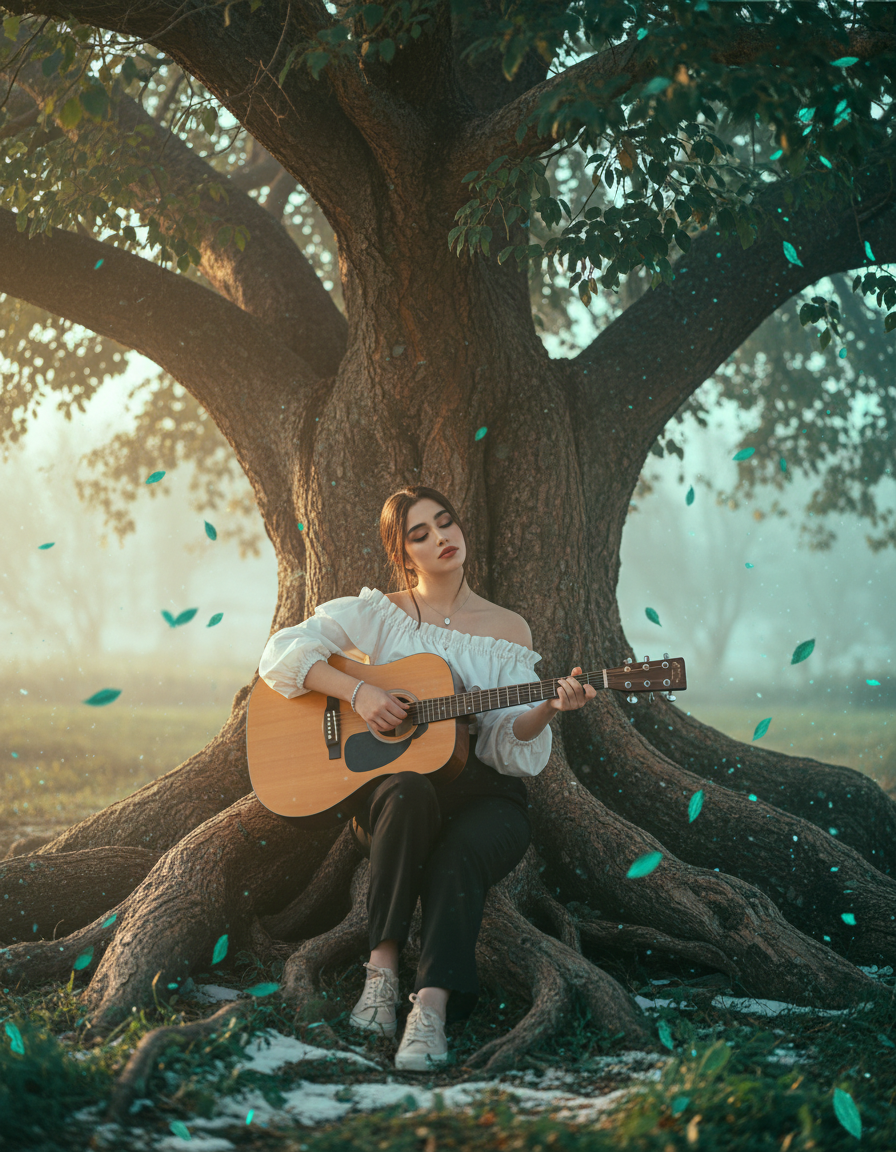
The story behind this one: this is one of the most technically detailed prompts on the site, it specifies an exact hex code to shift red foliage to emerald green while explicitly protecting her crimson cloak from that same colour shift, treating the edit as a precise, masked instruction rather than a single scene description. Playing guitar with closed eyes rather than posing with the instrument is what makes this a moment of someone actually making music, not just holding a prop.
इस तस्वीर के पीछे की कहानी: यह इस साइट के सबसे तकनीकी रूप से विस्तृत प्रॉम्प्ट में से एक है, यह लाल पत्तों को पन्ना हरे में बदलने के लिए एक सटीक हेक्स कोड बताता है जबकि उसके सुर्ख लबादे को उसी रंग बदलाव से साफ तौर पर बचाता है, इस एडिट को एक सीन वर्णन के बजाय एक सटीक, मास्क किया निर्देश मानते हुए। बंद आंखों से गिटार बजाना, वाद्य के साथ पोज़ देने के बजाय, ही इसे किसी के सच में संगीत बनाने का पल बनाता है, सिर्फ प्रॉप पकड़े रहना नहीं।
આ ફોટા પાછળની વાત: આ આ સાઇટના સૌથી ટેકનિકલ રીતે વિગતવાર પ્રોમ્પ્ટમાંનું એક છે, આ લાલ પાંદડાંને પન્ના લીલામાં બદલવા માટે એક ચોક્કસ હેક્સ કોડ જણાવે છે જ્યારે તેના લાલચટક ઝભ્ભાને એ જ રંગ ફેરફારથી સ્પષ્ટપણે બચાવે છે, આ એડિટને એક દ્રશ્ય વર્ણનને બદલે એક ચોક્કસ, માસ્ક કરેલી સૂચના ગણતાં. બંધ આંખોથી ગિટાર વગાડવો, વાદ્ય સાથે પોઝ આપવાને બદલે, જ તેને કોઈના ખરેખર સંગીત બનાવવાની પળ બનાવે છે, ફક્ત પ્રોપ પકડી રાખવો નહીં.
Copy this cinematic ai photo prompt below and paste it into ChatGPT with your own photo.
नीचे दिया गया cinematic ai photo prompt कॉपी करें और अपनी फ़ोटो के साथ ChatGPT में पेस्ट करें।
નીચે આપેલ cinematic ai photo prompt કૉપિ કરો અને તમારા ફોટા સાથે ChatGPT માં પેસ્ટ કરો.
Prompt
Edit this image to show a young woman sitting gracefully on the roots of a massive old tree, playing an acoustic guitar as golden sunlight spills through the leafy canopy above. She wears a loose white blouse tucked into high-waisted dark trousers, with light sneakers and a few delicate accessories like a pendant or bracelet.
Her long hair flows naturally, brushing her shoulders as she leans slightly over the guitar, strumming softly with closed eyes. The background is bathed in a hazy morning glow, with hints of green foliage and drifting light particles creating a dreamy, peaceful aura.
Add subtle movement to the leaves and a warm breeze, suggesting a gentle song carried on the wind — a moment of harmony between nature and melody.
Color swap: change every red foliage pixel → emerald green (#0FAE6A) using selective HSL/hue-shift with preserve luminance so existing highlights/shadows on leaves remain realistic. Clamp saturation to avoid neon (max +22%).

Subject & clothing: keep the subject’s crimson cloak as-is (warm contrast to greens). Protect face, hands, hair and cloak details — allow only micro-retouch (skin texture preserved). Mask name: mask_subject.png (protect).

Foliage mask: mask_foliage.png — apply hue shift, preserve leaf edge detail, sharpen leaf veins +10% after shift. For foreground bokeh leaves, recolor and preserve blur.

Snow interaction: mask_snow.png — paint very low-opacity green specks where leaves meet snow (Overlay 10–15%) so the color integrates without bleaching white snow.

Lighting & grade: teal–green cool shadows, warmed highlights on the subject. Add a faint cyan rim on leaf edges (Screen, 8–12% opacity) to imply cold reflection. Keep subject catchlight +20%.

Depth & focal: keep subject tack-sharp; preserve foreground bokeh and background haze — simulate 50–85mm compression with natural optical blur.

Texture & finishing: subtle film grain 3–6%, retain crisp linework (no painterly smoothing), sharpen foreground leaves +12, reduce distant saturation -12 to push depth.

Output: vertical 4k (2160 × 3840), sRGB, compositing-ready layers.

Negative prompt (one line): no neon glow, no skin color shift, no extra limbs, no watercolor/cartoon look, no text/watermark.
Best with:ChatGPT
सबसे अच्छा चलता है:ChatGPT
સૌથી સારું ચાલે છે:ChatGPT
This cinematic ai photo prompt turns an ordinary photo into a polished cinematic image in a single generation. You get the same look you see above — no editing skills needed. It leans on moody low light, an urban backdrop and a cinematic finish.
What this prompt creates
The instruction places the subject in an urban backdrop, lights them with moody low light, finishes with a cinematic finish and and frames it as a vertical 9:16 frame. At roughly 330 words it is a detailed prompt, so expect the model to follow it closely — either way, the result stays recognisably you because the source photo drives the likeness.
How to use this cinematic ai photo prompt
Tap Copy prompt above to copy the full text.
Open ChatGPT and start a new chat.
Upload the photo you want to transform.
Paste the prompt and send it.
If the first result is not quite right, regenerate once or twice — small changes in wording shift the style a lot.
Tips for a better result
Match the light. This prompt asks for moody low light, so a source photo shot in similar conditions needs far less correction.
Mind the background. It replaces your backdrop with an urban backdrop — a source photo with a plain or blurred background swaps over most cleanly.
Shoot for the crop. The output is a vertical 9:16 frame, so leave headroom in your original rather than filling the frame.
Change one thing at a time. Edit the colour, outfit, or background separately rather than all at once.
Try it twice. Image models are random — a second run often looks noticeably better.
Who this cinematic prompt suits
This one works especially well for Girls. It suits Instagram posts, profile pictures, and WhatsApp display photos, and it holds up on both phone and desktop screens.
More prompts like this
Browse every cinematic prompt in this collection, or head back to the PromptPin homepage for the newest AI photo prompts. All of them are free to copy and use.
Three things do most of the heavy lifting here. The lighting is described precisely rather than left to chance. The framing and camera angle are stated up front, which keeps the subject in proportion. And the finish — grain, contrast, and colour grade — is spelled out at the end, which is what separates a snapshot from something that looks deliberately shot.
You can reuse this structure for your own ideas. Keep the sentence order — subject, setting, lighting, camera, finish — and swap the descriptive words. Prompts written this way behave far more predictably than one long sentence.
यह cinematic ai photo prompt एक साधारण फ़ोटो को एक ही बार में शानदार cinematic इमेज में बदल देता है। आपको ऊपर दिखने वाला वैसा ही लुक मिलेगा — किसी एडिटिंग स्किल की ज़रूरत नहीं। It leans on moody low light, an urban backdrop and a cinematic finish.
यह प्रॉम्प्ट क्या बनाता है
The instruction places the subject in an urban backdrop, lights them with moody low light, finishes with a cinematic finish and and frames it as a vertical 9:16 frame. At roughly 330 words it is a detailed prompt, so expect the model to follow it closely — either way, the result stays recognisably you because the source photo drives the likeness.
इस प्रॉम्प्ट का उपयोग कैसे करें
ऊपर Copy prompt पर टैप करके पूरा टेक्स्ट कॉपी करें।
ChatGPT खोलें और नई चैट शुरू करें।
जिस फ़ोटो को बदलना है उसे अपलोड करें।
प्रॉम्प्ट पेस्ट करें और भेज दें।
अगर पहला रिज़ल्ट सही न लगे तो एक-दो बार दोबारा जनरेट करें — शब्दों में छोटा बदलाव भी स्टाइल काफ़ी बदल देता है।
बेहतर रिज़ल्ट के लिए टिप्स
रोशनी मिलाएँ। यह प्रॉम्प्ट moody low light माँगता है, इसलिए वैसी ही रोशनी में ली गई फ़ोटो में बहुत कम सुधार करना पड़ता है।
बैकग्राउंड का ध्यान रखें। यह आपके बैकग्राउंड को an urban backdrop से बदल देता है — सादा या धुंधला बैकग्राउंड वाली फ़ोटो सबसे साफ़ बदलती है।
क्रॉप का ध्यान रखें। आउटपुट a vertical 9:16 frame होता है, इसलिए फ़्रेम पूरा भरने के बजाय ऊपर थोड़ी जगह छोड़ें।
एक बार में एक ही चीज़ बदलें। रंग, कपड़े या बैकग्राउंड — सब एक साथ बदलने के बजाय अलग-अलग बदलें।
दो बार आज़माएँ। इमेज मॉडल हर बार अलग रिज़ल्ट देते हैं — दूसरी बार अक्सर बेहतर आता है।
यह प्रॉम्प्ट किसके लिए सही है
यह ख़ास तौर पर Girls के लिए अच्छा है। यह इंस्टाग्राम पोस्ट, प्रोफ़ाइल फ़ोटो और व्हाट्सऐप डीपी के लिए सही रहता है, और फ़ोन व कंप्यूटर दोनों पर अच्छा दिखता है।
इसमें तीन चीज़ें सबसे ज़्यादा काम करती हैं। रोशनी को अंदाज़े पर नहीं छोड़ा गया, साफ़-साफ़ बताया गया है। फ़्रेमिंग और कैमरा एंगल पहले ही तय है, जिससे चेहरा सही अनुपात में रहता है। और आख़िर में फ़िनिश — ग्रेन, कंट्रास्ट और कलर ग्रेड — बताया गया है, यही आम फ़ोटो और प्रोफ़ेशनल दिखने वाली फ़ोटो का फ़र्क़ है।
आप इसी ढाँचे को अपने आइडिया के लिए भी इस्तेमाल कर सकते हैं। क्रम वही रखें — सब्जेक्ट, जगह, रोशनी, कैमरा, फ़िनिश — और सिर्फ़ शब्द बदलें। इस तरह लिखे प्रॉम्प्ट एक लंबे वाक्य से कहीं बेहतर काम करते हैं।
આ cinematic ai photo prompt સામાન્ય ફોટાને એક જ વારમાં સુંદર cinematic ઇમેજમાં ફેરવે છે. તમને ઉપર દેખાય છે તેવો જ લુક મળશે — કોઈ એડિટિંગ સ્કિલની જરૂર નથી. It leans on moody low light, an urban backdrop and a cinematic finish.
આ પ્રોમ્પ્ટ શું બનાવે છે
The instruction places the subject in an urban backdrop, lights them with moody low light, finishes with a cinematic finish and and frames it as a vertical 9:16 frame. At roughly 330 words it is a detailed prompt, so expect the model to follow it closely — either way, the result stays recognisably you because the source photo drives the likeness.
આ પ્રોમ્પ્ટનો ઉપયોગ કેવી રીતે કરવો
ઉપર Copy prompt પર ટૅપ કરીને આખો ટેક્સ્ટ કૉપિ કરો.
ChatGPT ખોલો અને નવી ચેટ શરૂ કરો.
જે ફોટો બદલવો છે તે અપલોડ કરો.
પ્રોમ્પ્ટ પેસ્ટ કરો અને મોકલો.
જો પહેલું પરિણામ બરાબર ન લાગે તો એક-બે વાર ફરી જનરેટ કરો — શબ્દોમાં નાનો ફેરફાર પણ સ્ટાઇલ ઘણી બદલે છે.
વધુ સારા પરિણામ માટે ટિપ્સ
પ્રકાશ મેળવો. આ પ્રોમ્પ્ટ moody low light માંગે છે, તેથી તેવી જ રોશનીમાં લીધેલા ફોટામાં ઘણું ઓછું સુધારવું પડે છે.
બૅકગ્રાઉન્ડનું ધ્યાન રાખો. તે તમારા બૅકગ્રાઉન્ડને an urban backdrop થી બદલે છે — સાદા કે ધૂંધળા બૅકગ્રાઉન્ડવાળો ફોટો સૌથી સાફ બદલાય છે.
ક્રૉપનું ધ્યાન રાખો. આઉટપુટ a vertical 9:16 frame હોય છે, તેથી ફ્રેમ આખી ભરવાને બદલે ઉપર થોડી જગ્યા છોડો.
એક વખતે એક જ વસ્તુ બદલો. રંગ, કપડાં કે બૅકગ્રાઉન્ડ — બધું એકસાથે બદલવાને બદલે અલગ અલગ બદલો.
બે વાર અજમાવો. ઇમેજ મૉડલ દર વખતે અલગ પરિણામ આપે છે — બીજી વાર ઘણી વાર વધુ સારું આવે છે.
આ પ્રોમ્પ્ટ કોના માટે યોગ્ય છે
આ ખાસ કરીને Girls માટે સારું છે. તે ઇન્સ્ટાગ્રામ પોસ્ટ, પ્રોફાઇલ ફોટો અને વૉટ્સઍપ ડીપી માટે યોગ્ય છે, અને ફોન તથા કમ્પ્યુટર બંને પર સારું દેખાય છે.
આમાં ત્રણ વસ્તુઓ સૌથી વધુ કામ કરે છે. પ્રકાશ અંદાજ પર છોડ્યો નથી, સ્પષ્ટ રીતે જણાવ્યો છે. ફ્રેમિંગ અને કૅમેરા ઍન્ગલ પહેલેથી નક્કી છે, જેથી ચહેરો યોગ્ય પ્રમાણમાં રહે. અને અંતે ફિનિશ — ગ્રેન, કૉન્ટ્રાસ્ટ અને કલર ગ્રેડ — જણાવ્યું છે, એ જ સામાન્ય ફોટા અને પ્રોફેશનલ દેખાતા ફોટા વચ્ચેનો ફરક છે.
તમે આ જ ઢાંચો તમારા આઇડિયા માટે પણ વાપરી શકો છો. ક્રમ એ જ રાખો — સબ્જેક્ટ, જગ્યા, પ્રકાશ, કૅમેરા, ફિનિશ — અને ફક્ત શબ્દો બદલો. આ રીતે લખેલા પ્રોમ્પ્ટ એક લાંબા વાક્ય કરતાં ઘણું સારું કામ કરે છે.