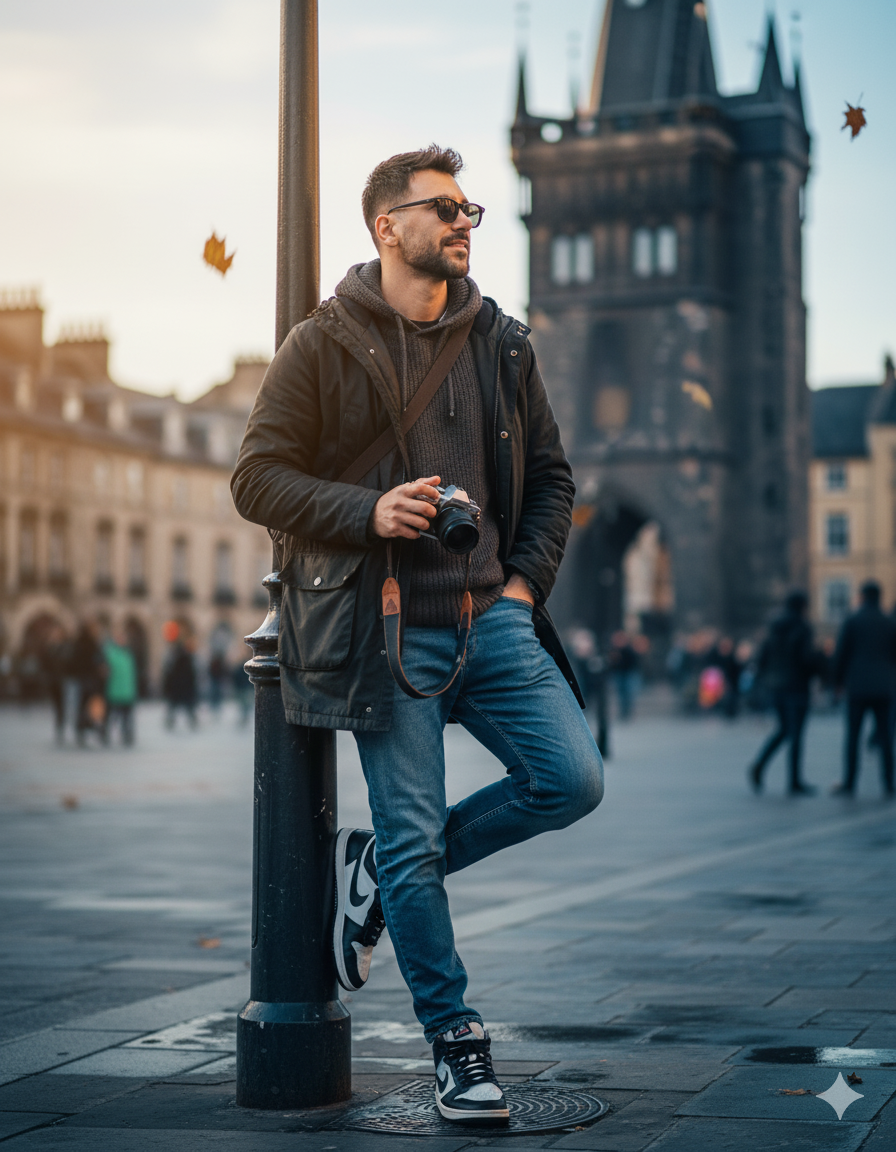
Street Photographer Travel AI Photo Prompt for Boys
The story behind this one: this prompt goes as far as specifying a wet-pavement sheen and a few falling autumn leaves ‘to suggest recent rain,’ small environmental details that exist purely to add believability to an otherwise studio-styled street portrait. Naming the exact aperture range needed to turn a historic tower and passing crowd into ‘painterly bokeh’ while keeping the subject ‘razor-sharp’ is real lens-technique language, treating this like an actual editorial photo brief rather than a mood description.
Copy this travel ai photo prompt below and paste it into ChatGPT with your own photo.
edit this image — transform the photo into a high-end street-photography portrait of a traveler/photographer leaning casually on a lamp post in front of a historic tower. Keep the original pose and composition: standing with left leg bent and foot on the lamp base, right leg relaxed, left hand in jacket pocket, right hand holding a camera down by the thigh, shoulders slightly turned to camera, chin up and gaze off-frame. Preserve the camera, beard and textured jacket but enhance and stylize as follows:

Wardrobe & accessories: keep the dark parka/jacket but enrich fabric texture (subtle waxed canvas look), change inner hoodie to a soft charcoal knit, keep blue jeans but slightly deepened to rich indigo with natural creasing. Emphasize the high-top sneakers — boost contrast on black-and-white panels and add faint scuff details for realism. Add a small messenger bag strap across the chest and a compact leather wrist strap on the camera.
Lighting & color: cinematic cool-tone grade (soft blue shadows) with warm golden rim light hitting the left side of the face and shoulder (suggest late-afternoon sun). Slightly boost contrast and midtones to create punch without losing skin detail. Add subtle film grain and gentle vignette to focus on the subject.
Camera & optics: emulate 35mm–50mm prime look, shallow DOF (f/1.8–2.8) so the tower and crowd become painterly bokeh while the subject remains razor-sharp. Slight perspective correction to emphasize the tower peek behind his shoulder. Enhance catchlight/reflection in the eyes (or sunglasses reflection if present) and sharpen camera details.
Background & atmosphere: keep the busy pedestrian scene but soften and desaturate it so the subject pops; raise clarity and texture on the stone tower so it reads as a strong architectural anchor. Add a few falling autumn leaves and a faint wet-pavement sheen to suggest recent rain (subtle reflections under shoes).
Final touches: natural skin retouching (preserve stubble and pores), boost micro-contrast on jacket and jeans, accentuate lens/glass reflections on the camera. Export as photorealistic, vertical 4K editorial crop with high detail.
Position (short): standing, left foot on lamp base, leaning against lamppost, camera in right hand, left hand in pocket, gaze off-frame.
Best with: ChatGPT
This travel ai photo prompt turns an ordinary photo into a polished travel image in a single generation. You get the same look you see above — no editing skills needed. It leans on moody low light, an outdoor setting and a cinematic finish.
What this prompt creates
The instruction places the subject in an outdoor setting, lights them with moody low light, finishes with a cinematic finish and and frames it as a vertical 9:16 frame. At roughly 355 words it is a detailed prompt, so expect the model to follow it closely — either way, the result stays recognisably you because the source photo drives the likeness.
How to use this travel ai photo prompt
- Tap Copy prompt above to copy the full text.
- Open ChatGPT and start a new chat.
- Upload the photo you want to transform.
- Paste the prompt and send it.
- If the first result is not quite right, regenerate once or twice — small changes in wording shift the style a lot.
Tips for a better result
- Match the light. This prompt asks for moody low light, so a source photo shot in similar conditions needs far less correction.
- Mind the background. It replaces your backdrop with an outdoor setting — a source photo with a plain or blurred background swaps over most cleanly.
- Shoot for the crop. The output is a vertical 9:16 frame, so leave headroom in your original rather than filling the frame.
- Say what you don’t want. Adding “no text, no watermark” at the end removes most stray artefacts.
- Keep the face unchanged. Add “keep my face exactly the same” if the likeness drifts.
Who this travel prompt suits
This one works especially well for Boys. It suits Instagram posts, profile pictures, and WhatsApp display photos, and it holds up on both phone and desktop screens.
More prompts like this
Browse every travel prompt in this collection, or head back to the PromptPin homepage for the newest AI photo prompts. All of them are free to copy and use.
What makes this travel style work
Three things do most of the heavy lifting here. The lighting is described precisely rather than left to chance. The framing and camera angle are stated up front, which keeps the subject in proportion. And the finish — grain, contrast, and colour grade — is spelled out at the end, which is what separates a snapshot from something that looks deliberately shot.
You can reuse this structure for your own ideas. Keep the sentence order — subject, setting, lighting, camera, finish — and swap the descriptive words. Prompts written this way behave far more predictably than one long sentence.
More prompts like this
- Omar Faruk Jafree Travel AI Photo Prompt for Boys
- Desert Nomad – Sahara’s Whisper Travel AI Photo Prompt for Girls
- Blue Dreams of Morocco 🇲🇦 Travel AI Photo Prompt for Girls
- Arctic Warrior: Cinematic Snowstorm Portrait
- Midnight Dreams in Shibuya Travel AI Photo Prompt for Girls
- Trending Black Devil Photo Editing Prompt