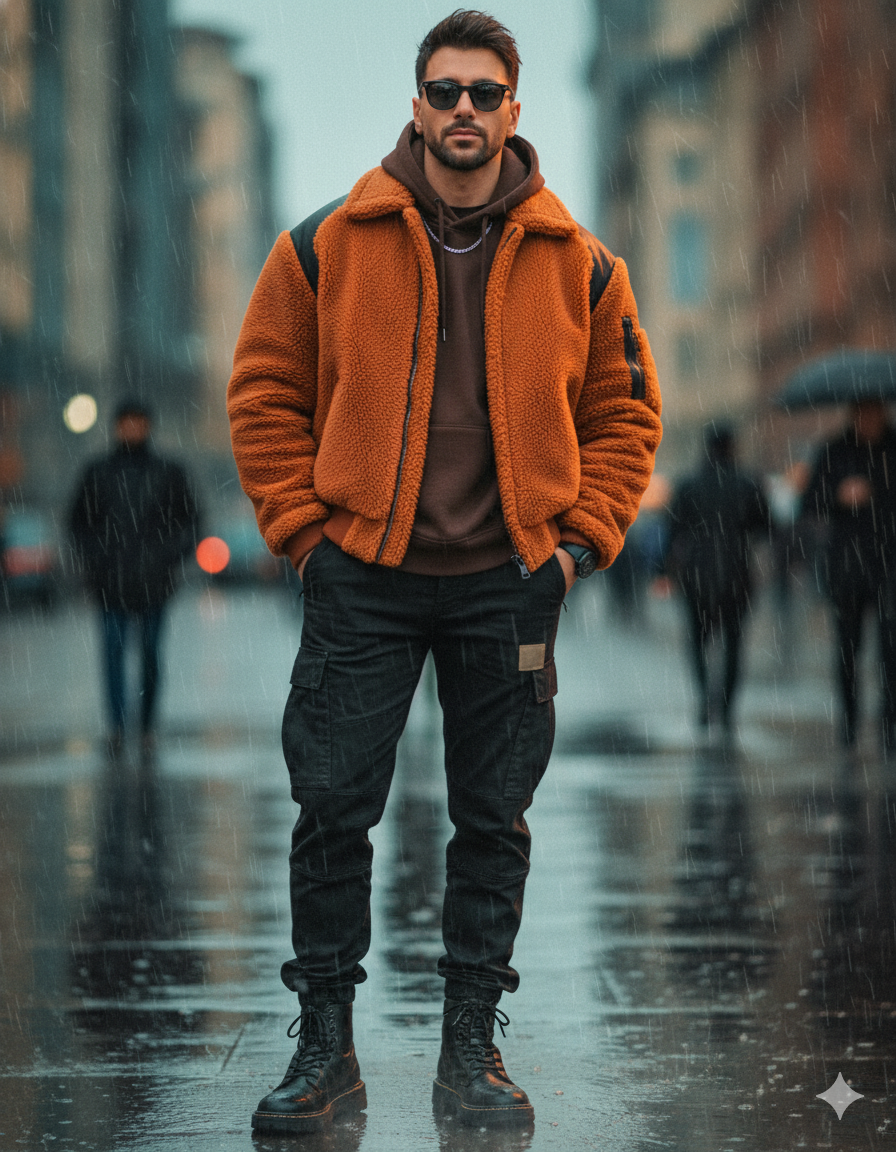
Cinematic street portrait Travel AI Photo Prompt for Boys
The story behind this one: this reads less like a scene description and more like an actual production spec sheet — precise hex colour codes, layer-by-layer masking instructions, camera metadata down to the ISO. It’s clearly written by someone thinking in terms of a real editing pipeline (inpainting masks, blend modes, frequency separation) rather than describing a photo in plain language, which makes it closer to a technical brief than a typical AI-prompt on this site.
Copy this travel ai photo prompt below and paste it into ChatGPT with your own photo.
edit this image — turn the full-body street shot into a highly detailed, cinematic fashion edit while preserving the original pose (feet ~shoulder-width, slight weight on back leg, hands in pockets, confident direct gaze, chin level). Apply these precise swaps, layers and finishing steps so the image is ready for an inpainting/edit tool or an image-editing API.
Clothing & styling (swap + fabric guidance)

Replace current jacket with a heavy sherpa/ shearling bomber in burnt-orange (#E06B00) with matte black technical panels on shoulders and inside collar. Make the sherpa visibly thick — emphasize fleece fibers and soft pile.
Keep the hoodie underneath but change to a structured dark espresso brown merino hoodie (#3B2F2B) with a subtle ribbed cuff visible at wrists. Slightly tuck the hem into pants for a cleaner silhouette.
Change cargo pants to mid-weight washed black ripstop cargos with reinforced knee panels and matte black metal zipper/patch details. Add a small tonal utility patch on the left thigh.
Boots: chunky black leather combat trainers with reflective welt and textured rubber sole. Add wet-sheen specular highlights to show raindrops.
Accessories: thin silver chain, low-profile black beanie tucked in back (optional), a simple matte black watch peeking from sleeve.
Pose & anatomy

Keep exact stance. Slightly nudge shoulders back via subtle warp/puppet transform (<=2–3°) to increase posture confidence. Preserve face/head position and hair tousle.
Lighting & atmosphere

Key grade: cinematic teal–orange:
Shadows shifted to teal/cool (#2A6B7A), highlights warmed to amber (#FFB36B).
Add a warm rim light (amber) behind subject at camera-right to separate him from background — soft 45° rim with subtle bloom.
Add a faint cool fill from camera-left (softbox feel) to reveal texture of jacket and face planes.
Environment: intensify wet-surface reflections. Duplicate layer of scene, flip vertically, mask to ground, gaussian blur 6–12px, set to Overlay 40–60% and reduce opacity where unrealistic. Add realistic specular streaks on pavement (small brush, motion blur length ~10–20px).
Add very fine falling rain (layer: small vertical streaks, motion blur 6–12px, opacity 20–30%) and micro-mist near feet.
Focus & depth

Keep subject tack-sharp. Create depth map using subject mask and z-blur background progressively (bokeh stronger toward top/edges). Background pass: heavy optical blur simulating f/1.8–2.8 (use an aperture blur tool) to turn passersby into soft silhouettes and enlarge existing circular light bokeh.
Camera & technical metadata (useful for generative API)

Focal length: 35–50mm equivalent (choose 50mm for compression), aperture: f/1.8–2.8, shutter: 1/200s, ISO: 200–400. Perspective: slightly low (camera ~waist height) to emphasize stature.
Color & texture edits (layer-by-layer)

Base color grade: global curves — S-curve (lift blacks slightly, boost highlights +15).
Selective saturation mask: increase jacket saturation +25, vibrance +15; decrease background saturation -20 to emphasize subject.
Clarity & texture: apply texture boost +18 on jacket and boots (high-pass sharpening 1–2px on those areas).
Skin retouch: frequency separation — low-frequency color layer preserve natural tone, high-frequency skin texture keep pores; remove blemishes only; subtle dodge & burn to enhance cheekbones and jaw.
Eye work: increase catchlight intensity +30, sharpen iris +10, slightly raise contrast in eyes to draw attention.
Finishing

Film grain 6–10% (size medium), gentle vignette (-10 to -18 exposure), subtle chromatic aberration removed on subject, slight lens haze for atmosphere. Final output sharpen at 150% for web/print depending on resolution.
Inpainting / mask instructions (for exact API use)

Mask A: jacket area — replace texture with target sherpa material; preserve zipper/hood silhouette.
Mask B: pants and boots — enhance fabric texture and add wet reflections.
Mask C (protect): face, hands — do not alter proportions; only retouch skin & eyes.
Use blend modes: overlay for warm rim light, multiply for shadow deepen, screen for added highlights on wet pavement.
Negative prompts / avoid

no extra limbs, no warped anatomy, no heavy smoothing/“plastic” skin, no text or watermark, avoid cartoon/comic look, avoid over-saturated neon colors beyond the teal–orange grade.
Best with: ChatGPT
This travel ai photo prompt turns an ordinary photo into a polished travel image in a single generation. You get the same look you see above — no editing skills needed. It leans on soft studio lighting, an outdoor setting and a cinematic finish.
What this prompt creates
The instruction places the subject in an outdoor setting, lights them with soft studio lighting, finishes with a cinematic finish and and frames it as a vertical 9:16 frame. At roughly 622 words it is a detailed prompt, so expect the model to follow it closely — either way, the result stays recognisably you because the source photo drives the likeness.
How to use this travel ai photo prompt
- Tap Copy prompt above to copy the full text.
- Open ChatGPT and start a new chat.
- Upload the photo you want to transform.
- Paste the prompt and send it.
- If the first result is not quite right, regenerate once or twice — small changes in wording shift the style a lot.
Tips for a better result
- Match the light. This prompt asks for soft studio lighting, so a source photo shot in similar conditions needs far less correction.
- Mind the background. It replaces your backdrop with an outdoor setting — a source photo with a plain or blurred background swaps over most cleanly.
- Shoot for the crop. The output is a vertical 9:16 frame, so leave headroom in your original rather than filling the frame.
- Change one thing at a time. Edit the colour, outfit, or background separately rather than all at once.
- Try it twice. Image models are random — a second run often looks noticeably better.
Who this travel prompt suits
This one works especially well for Boys. It suits Instagram posts, profile pictures, and WhatsApp display photos, and it holds up on both phone and desktop screens.
More prompts like this
Browse every travel prompt in this collection, or head back to the PromptPin homepage for the newest AI photo prompts. All of them are free to copy and use.
What makes this travel style work
Three things do most of the heavy lifting here. The lighting is described precisely rather than left to chance. The framing and camera angle are stated up front, which keeps the subject in proportion. And the finish — grain, contrast, and colour grade — is spelled out at the end, which is what separates a snapshot from something that looks deliberately shot.
You can reuse this structure for your own ideas. Keep the sentence order — subject, setting, lighting, camera, finish — and swap the descriptive words. Prompts written this way behave far more predictably than one long sentence.
More prompts like this
- Omar Faruk Jafree Travel AI Photo Prompt for Boys
- Desert Nomad – Sahara’s Whisper Travel AI Photo Prompt for Girls
- Blue Dreams of Morocco 🇲🇦 Travel AI Photo Prompt for Girls
- Arctic Warrior: Cinematic Snowstorm Portrait
- Midnight Dreams in Shibuya Travel AI Photo Prompt for Girls
- Trending Black Devil Photo Editing Prompt