
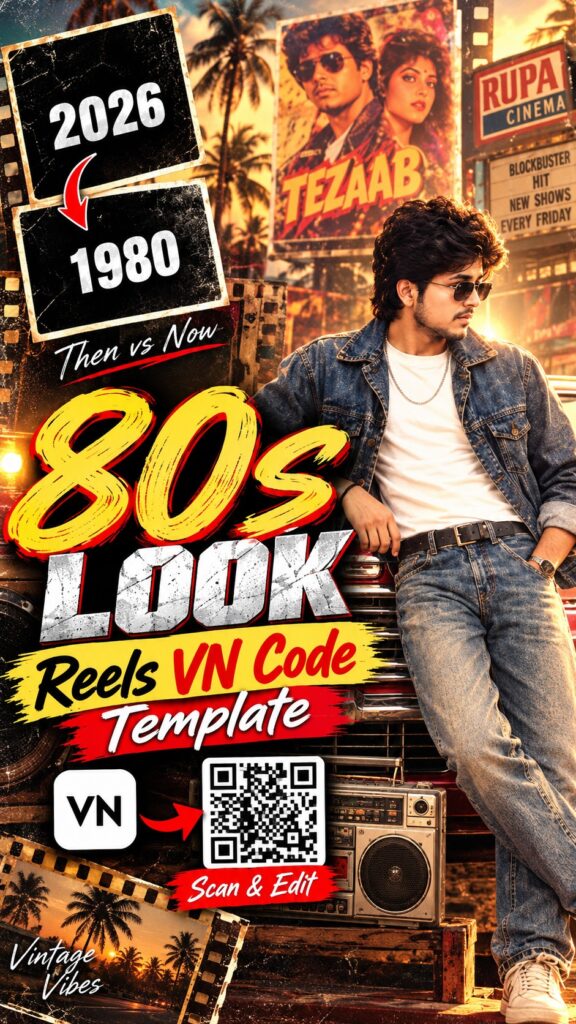
Pair the viral 1980s AI photo trend with this retro VN Code — your vintage-look photos play with old-film grain, filmy transitions and a classic Bollywood feel. Make the photos with our 1980s prompts, then scan and export. Full guide in English, Hindi and Gujarati.
VN Code
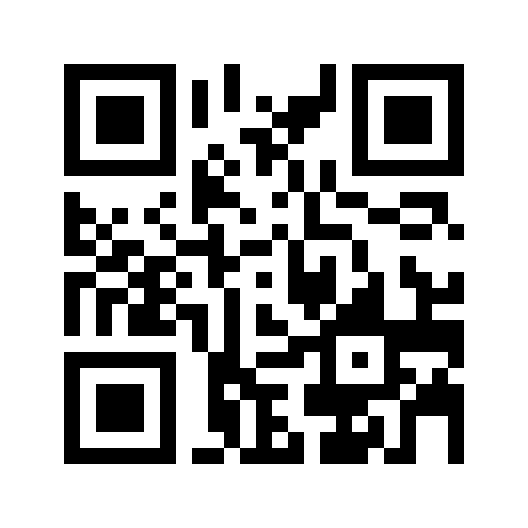
Screenshot or save this code, then scan it inside the VN app.
Free · Available on the Play Store
Template details
| Template name | 1980s Look Retro Edit |
| App | VN Video Editor (VN Code / QR) |
| Aspect ratio | 9:16 |
| Media type | Photos |
| Editing style | Retro Bollywood-inspired vintage edit |
| Best for | Instagram Reels, WhatsApp status |
| Difficulty | Beginner — no editing skill needed |
English — Full Guide
What this template does
The template is designed for retro portraits: bell-bottoms, big collars, saree looks and film-studio backdrops all shine in it.
How to use this VN Code, step by step
-
Install or update VN
Get VN Video Editor from the Play Store (button above) or update it, so the template opens correctly.
-
Save the QR code
Take a screenshot of the VN Code above or long-press it and save the image to your gallery.
-
Scan it in VN
Open VN, tap the scan / QR icon and choose the saved QR image. The project opens inside VN.
-
Add your media
Create 4–6 retro photos with our 1980s AI photo prompts before you start. Replace the sample media with your own.
-
Check the framing
Tap each clip and adjust it so your face stays centred and on-screen text does not cover it.
-
Export and share
Tap export, choose the quality and save the reel — ready for Instagram Reels, WhatsApp status or YouTube Shorts.
Tips for a better reel
- Create 4–6 retro photos with our 1980s AI photo prompts before you start.
- Use high-resolution, vertical (9:16) media so nothing gets cropped or blurry.
- Keep faces near the centre so effects and text never cut them off.
- Post while the trend is hot — timing matters as much as editing.
VN Code not working?
If the code does not open, update VN to the latest version and scan again from a clear, uncropped screenshot. If it still fails, the creator may have removed the template — it is not a problem with your phone.
Stay safe: install VN only from the official Play Store and never download modified APK files.
हिंदी — पूरी जानकारी
यह टेम्पलेट क्या है?
1980s लुक VN टेम्पलेट रेट्रो बॉलीवुड स्टाइल की रील बनाता है — पुरानी फ़िल्म जैसा ग्रेन और फ़िल्मी ट्रांज़िशन। पहले हमारे 1980s प्रॉम्प्ट से फ़ोटो बनाएँ, फिर स्कैन करें।
इस्तेमाल करने का तरीका
-
VN इंस्टॉल या अपडेट करें
Play Store से VN Video Editor इंस्टॉल करें (ऊपर बटन) या अपडेट करें।
-
QR कोड सेव करें
ऊपर दिए VN Code का स्क्रीनशॉट लें या उसे गैलरी में सेव करें।
-
VN में स्कैन करें
VN खोलें, स्कैन / QR आइकन दबाएँ और सेव की हुई QR इमेज चुनें।
-
अपनी फ़ोटो या क्लिप डालें
सैंपल मीडिया को अपनी फ़ोटो या क्लिप से बदलें।
-
फ़्रेमिंग ठीक करें
हर क्लिप दबाकर पोज़िशन ठीक करें ताकि चेहरा बीच में रहे।
-
एक्सपोर्ट करके शेयर करें
एक्सपोर्ट दबाएँ, क्वालिटी चुनें और रील सेव करें।
VN Code काम नहीं कर रहा?
VN को लेटेस्ट वर्ज़न में अपडेट करें और साफ़, बिना कटे स्क्रीनशॉट से दोबारा स्कैन करें। फिर भी न खुले तो क्रिएटर ने टेम्पलेट हटा दिया हो सकता है।
सावधानी: VN सिर्फ़ ऑफिशियल Play Store से ही इंस्टॉल करें।
ગુજરાતી — સંપૂર્ણ માહિતી
આ ટેમ્પલેટ શું છે?
1980s લુક VN ટેમ્પલેટ રેટ્રો બોલિવૂડ સ્ટાઇલની રીલ બનાવે છે — જૂની ફિલ્મ જેવી ગ્રેન અને ફિલ્મી ટ્રાન્ઝિશન. પહેલા અમારા 1980s પ્રોમ્પ્ટથી ફોટા બનાવો, પછી સ્કેન કરો.
વાપરવાની રીત
-
VN ઇન્સ્ટોલ કે અપડેટ કરો
Play Storeમાંથી VN Video Editor ઇન્સ્ટોલ કરો (ઉપર બટન) અથવા અપડેટ કરો.
-
QR કોડ સેવ કરો
ઉપર આપેલા VN Codeનો સ્ક્રીનશોટ લો અથવા ગેલેરીમાં સેવ કરો.
-
VNમાં સ્કેન કરો
VN ખોલો, સ્કેન / QR આઇકન દબાવો અને સેવ કરેલી QR ઇમેજ પસંદ કરો.
-
તમારા ફોટા કે ક્લિપ ઉમેરો
સેમ્પલ મીડિયાને તમારા ફોટા કે ક્લિપથી બદલો.
-
ફ્રેમિંગ ગોઠવો
દરેક ક્લિપ દબાવીને પોઝિશન ગોઠવો જેથી ચહેરો વચ્ચે રહે.
-
એક્સપોર્ટ કરીને શેર કરો
એક્સપોર્ટ દબાવો, ક્વોલિટી પસંદ કરો અને રીલ સેવ કરો.
VN Code કામ નથી કરતો?
VNને લેટેસ્ટ વર્ઝનમાં અપડેટ કરો અને સ્પષ્ટ સ્ક્રીનશોટથી ફરી સ્કેન કરો. તો પણ ન ખૂલે તો ક્રિએટરે ટેમ્પલેટ હટાવી દીધો હોઈ શકે.
સાવચેતી: VN ફક્ત ઑફિશિયલ Play Storeમાંથી જ ઇન્સ્ટોલ કરો.
Need photos for this template?
Good photos make this edit work. If you need some, create them with these AI photo prompts:
