Waiting on the Steps Portrait AI Photo Prompt for Boys
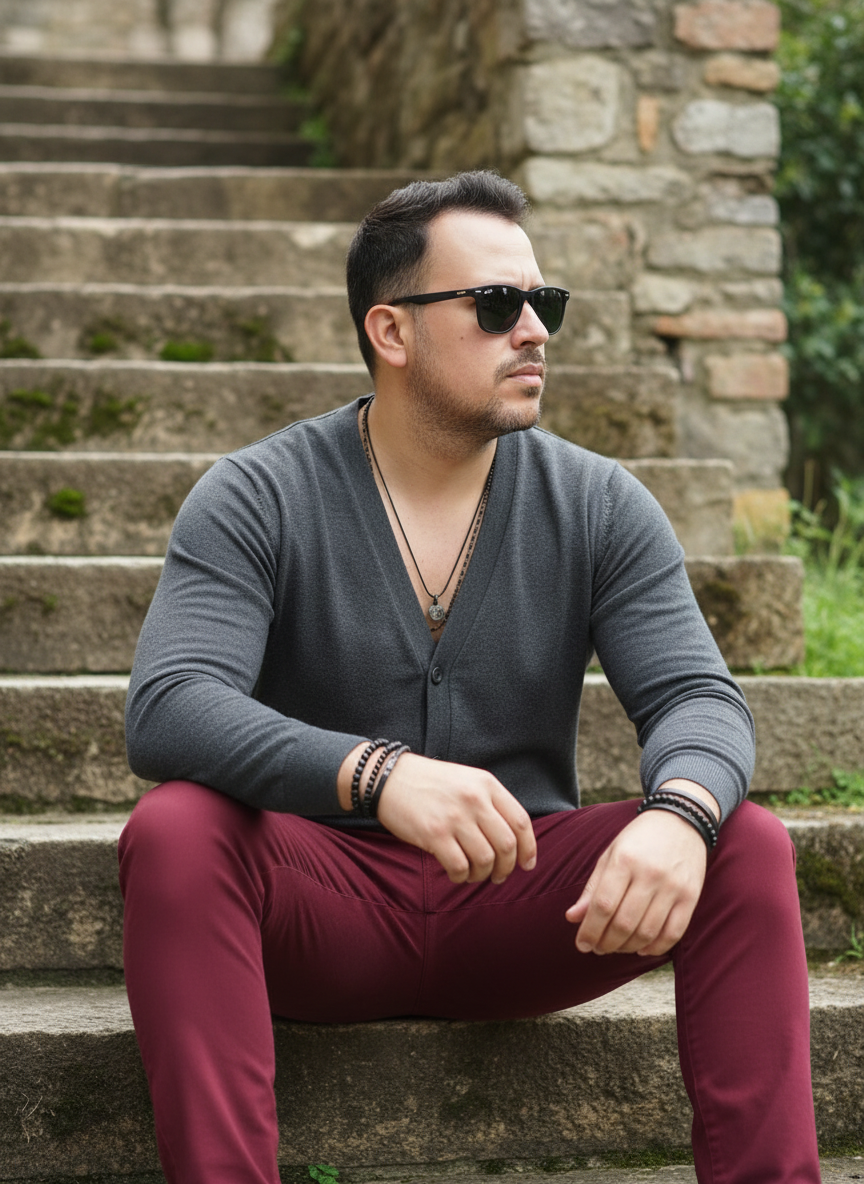
The story behind this one: pairing a muted dark-grey cardigan with trousers in a ‘striking shade of wine or burgundy’ is the one bold colour decision in an otherwise entirely neutral, stone-and-moss setting, that one warm tone is what keeps the whole look from reading as flat or monochrome. A specific technical instruction tells the AI not to invent hair or beard details and to rely only on the reference photo for those, an unusual bit of restraint compared to most prompts here, which spell out hairstyle in detail rather than leaving it to the uploaded photo.
Copy this portrait ai photo prompt below and paste it into ChatGPT with your own photo.
An outdoor lifestyle photograph featuring a male figure seated on a rustic stone staircase, exuding a laid-back, urban vibe. The subject is positioned at the bottom of the staircase, facing right and looking out of the frame, with a serious, thoughtful expression behind sunglasses. His legs are bent, with his arms resting on his thighs, conveying a relaxed yet attentive attitude.

He wears a light, dark gray cardigan or sweater with a V-neck and buttons, over a no-show or collarless T-shirt. Skinny or slim-fit pants in a striking shade of wine or burgundy create an elegant contrast to the gray top. Various accessories, such as discreet necklaces and multiple leather bracelets and beads on the wrists, add a touch of personal style. Dark, square sunglasses cover his eyes, intensifying the aura of mystery.

The background consists of an old stone wall or staircase, with rustic blocks and subtle green moss in some crevices, creating a natural, aged texture. On the right, a touch of green vegetation complements the ambiance. The lighting is natural and diffuse, typical of a clear day outdoors, creating soft shadows and a natural glow on skin and fabrics.

Camera Settings: Captured with a standard lens (e.g., 50mm or 35mm) on a full-frame camera for a natural perspective and a well-balanced full-body portrait. Aperture set between f/2.8 and f/4.0 to create a soft background blur (bokeh) that isolates the subject while maintaining sharpness on the face and clothing. ISO 100-200 for maximum image quality in natural light. Shutter speed of 1/250s to 1/500s to ensure sharpness and freeze any subtle movement. White balance should be set to "Daylight" for accurate, natural colors.

Instructions for the "nano banana":

"Please use the user's reference image to capture and apply all of their facial features, facial structure, and hair color with maximum fidelity. The goal is to create a version of the user in this scenario. The pose (sitting on the stairs, sideways gaze), clothing (gray cardigan, burgundy pants, accessories, sunglasses), natural lighting, and the stone staircase background should be generated as described, creating a seamless fusion between the user's identity and the aesthetics of the image. Do not describe or generate specific details about the subject's hair or beard; focus only on the other visual characteristics described and those in the reference image, applying them to the user's facial features."
Best with: ChatGPT
This portrait ai photo prompt turns an ordinary photo into a polished portrait image in a single generation. You get the same look you see above — no editing skills needed. It leans on moody low light and an outdoor setting.
What this prompt creates
The instruction places the subject in an outdoor setting, lights them with moody low light and and frames it as a square crop. At roughly 392 words it is a detailed prompt, so expect the model to follow it closely — either way, the result stays recognisably you because the source photo drives the likeness.
How to use this portrait ai photo prompt
- Tap Copy prompt above to copy the full text.
- Open ChatGPT and start a new chat.
- Upload the photo you want to transform.
- Paste the prompt and send it.
- If the first result is not quite right, regenerate once or twice — small changes in wording shift the style a lot.
Tips for a better result
- Match the light. This prompt asks for moody low light, so a source photo shot in similar conditions needs far less correction.
- Mind the background. It replaces your backdrop with an outdoor setting — a source photo with a plain or blurred background swaps over most cleanly.
- Shoot for the crop. The output is a square crop, so leave headroom in your original rather than filling the frame.
- Keep the face unchanged. Add “keep my face exactly the same” if the likeness drifts.
- Change one thing at a time. Edit the colour, outfit, or background separately rather than all at once.
Who this portrait prompt suits
This one works especially well for Boys. It suits Instagram posts, profile pictures, and WhatsApp display photos, and it holds up on both phone and desktop screens.
More prompts like this
Browse every portrait prompt in this collection, or head back to the PromptPin homepage for the newest AI photo prompts. All of them are free to copy and use.
What makes this portrait style work
Three things do most of the heavy lifting here. The lighting is described precisely rather than left to chance. The framing and camera angle are stated up front, which keeps the subject in proportion. And the finish — grain, contrast, and colour grade — is spelled out at the end, which is what separates a snapshot from something that looks deliberately shot.
You can reuse this structure for your own ideas. Keep the sentence order — subject, setting, lighting, camera, finish — and swap the descriptive words. Prompts written this way behave far more predictably than one long sentence.
More prompts like this
- Scarlet Confidence Portrait AI Photo Prompt for Girls
- Radiant Autumn Romance Portrait AI Photo Prompt for Girls
- Steel & Silk Contrast Portrait AI Photo Prompt for Girls
- Midnight Royalty Portrait AI Photo Prompt for Girls
- Black & White Portrait AI Photo Prompt for Boys
- Ivory Calm Portrait AI Photo Prompt for Girls
- Trending Black Devil Photo Editing Prompt