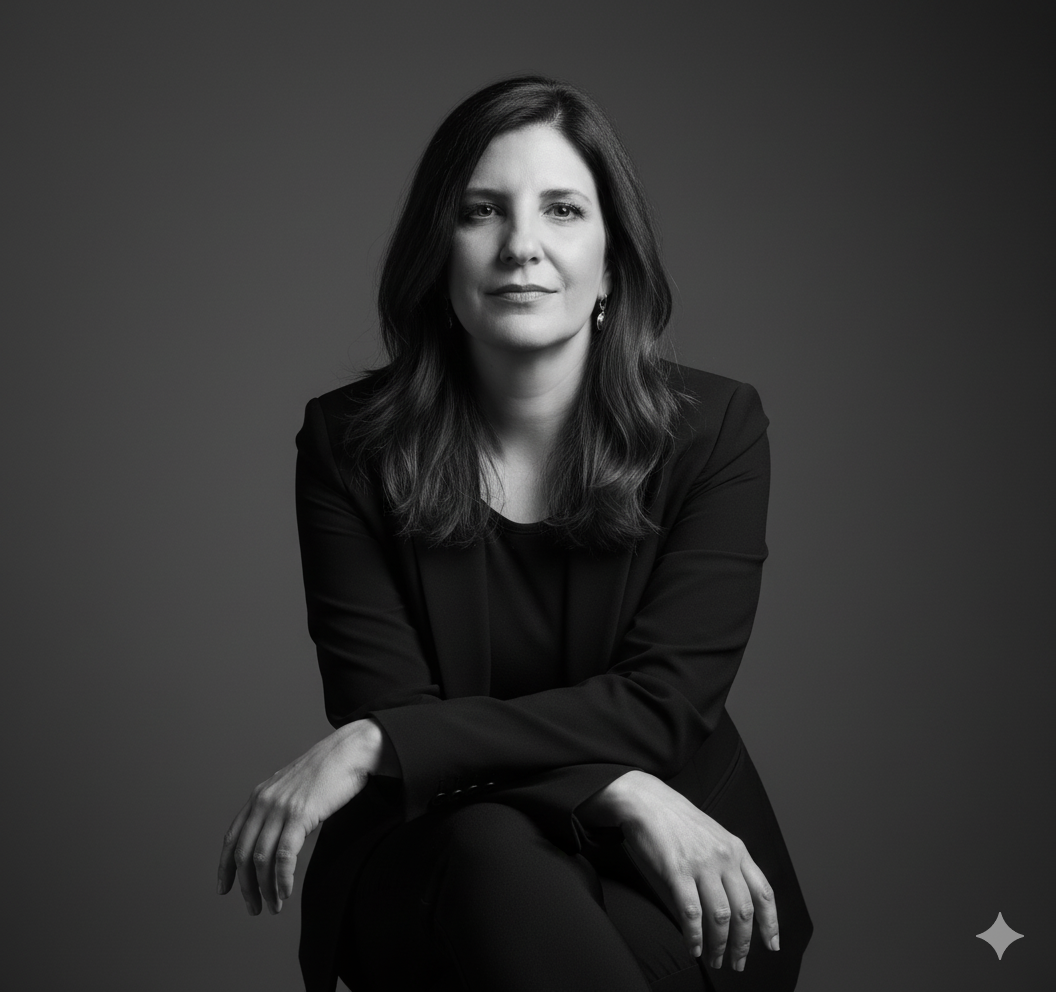
The story behind this one: written in Portuguese, this shares the exact same seated, arm-crossed pose and Rembrandt-style lighting as the men’s version of this template elsewhere on the site, down to the same dark studio background, but swaps the styled-back hair for hair worn loose over one shoulder, the one deliberate change that shifts the whole look from structured to natural. ‘Levemente enigmática’ (slightly enigmatic) describing the expression is the same word used in the male version, proof this is one shared brief translated and adapted rather than two separately written concepts.
इस तस्वीर के पीछे की कहानी: पुर्तगाली में लिखा यह इस साइट पर कहीं और बने पुरुष वर्ज़न के इस टेम्पलेट की बिल्कुल वही बैठी, बांह क्रॉस की पोज़ और Rembrandt-स्टाइल रोशनी साझा करता है, वही डार्क स्टूडियो बैकग्राउंड तक, लेकिन पीछे बंधे बालों की जगह एक कंधे पर खुले गिरते बाल रखता है, वह इकलौता जानबूझकर किया बदलाव जो पूरे लुक को बनावटी से प्राकृतिक की तरफ ले जाता है। एक्सप्रेशन बताता ‘Levemente enigmática’ (हल्का रहस्यमयी) वही शब्द है जो पुरुष वर्ज़न में इस्तेमाल हुआ, यह साबित करते हुए कि यह दो अलग सोचे गए कॉन्सेप्ट के बजाय एक साझा ब्रीफ का अनुवाद और ढलाव है।
આ ફોટા પાછળની વાત: પોર્ટુગીઝમાં લખાયેલું આ આ સાઇટ પર બીજે બનેલા પુરુષ વર્ઝનના આ ટેમ્પલેટની બિલકુલ એ જ બેઠેલી, બાવડું ક્રોસ કરેલી પોઝ અને Rembrandt-સ્ટાઇલ રોશની સહિયારી કરે છે, એ જ ડાર્ક સ્ટુડિયો બેકગ્રાઉન્ડ સુધી, પણ પાછળ બાંધેલા વાળની જગ્યાએ એક ખભા પર ખુલ્લા પડતા વાળ રાખે છે, એ એકમાત્ર ઈરાદાપૂર્વક કરેલો ફેરફાર જે આખા લુકને બનાવટીથી કુદરતી તરફ લઈ જાય છે. એક્સપ્રેશન કહેતું ‘Levemente enigmática’ (હળવું રહસ્યમય) એ જ શબ્દ છે જે પુરુષ વર્ઝનમાં વપરાયો, એ સાબિત કરતાં કે આ બે અલગ વિચારેલા કોન્સેપ્ટને બદલે એક સહિયારા બ્રીફનું ભાષાંતર અને ઢાળણ છે.
Copy this portrait ai photo prompt below and paste it into ChatGPT with your own photo.
नीचे दिया गया portrait ai photo prompt कॉपी करें और अपनी फ़ोटो के साथ ChatGPT में पेस्ट करें।
નીચે આપેલ portrait ai photo prompt કૉપિ કરો અને તમારા ફોટા સાથે ChatGPT માં પેસ્ટ કરો.
Prompt
Recrie essa cena usando minha foto enviada como referência, mantendo o mesmo enquadramento, pose, iluminação e estilo da imagem de exemplo.

A composição deve mostrar um retrato feminino de meio corpo, com a modelo sentada e levemente inclinada para a frente. O braço direito deve cruzar o corpo, com a mão esquerda apoiada suavemente no braço oposto, transmitindo elegância e confiança.

A expressão facial deve ser serena, confiante e levemente enigmática. O olhar deve estar direcionado à câmera, com os lábios suavemente fechados e postura firme.

A roupa é composta por um conjunto escuro e sofisticado — blazer preto estruturado, usado sobre uma blusa preta justa. O cabelo deve estar solto, liso e bem alinhado, caindo sobre um dos ombros de forma natural.

A iluminação deve ser de estúdio, com luz direcional suave e contrastada (estilo Rembrandt ou luz lateral), destacando o contorno do rosto, criando sombras elegantes e um degradê sutil no fundo.

O fundo deve ser liso e neutro, em tons de cinza escuro, com profundidade leve e sem elementos de distração.

O estilo final deve ser preto e branco, com contraste refinado, textura suave da pele e aparência realista de retrato editorial.

Formato vertical (1080x1920), proporção retrato, qualidade fotográfica de estúdio profissional, acabamento cinematográfico e realista.
Best with:ChatGPT
सबसे अच्छा चलता है:ChatGPT
સૌથી સારું ચાલે છે:ChatGPT
This portrait ai photo prompt turns an ordinary photo into a polished portrait image in a single generation. You get the same look you see above — no editing skills needed. It leans on a high-fashion editorial feel.
What this prompt creates
The instruction finishes with a high-fashion editorial feel and and frames it as a vertical 9:16 frame. At roughly 226 words it is a detailed prompt, so expect the model to follow it closely — either way, the result stays recognisably you because the source photo drives the likeness.
How to use this portrait ai photo prompt
Tap Copy prompt above to copy the full text.
Open ChatGPT and start a new chat.
Upload the photo you want to transform.
Paste the prompt and send it.
If the first result is not quite right, regenerate once or twice — small changes in wording shift the style a lot.
Tips for a better result
Shoot for the crop. The output is a vertical 9:16 frame, so leave headroom in your original rather than filling the frame.
Keep the face unchanged. Add “keep my face exactly the same” if the likeness drifts.
Change one thing at a time. Edit the colour, outfit, or background separately rather than all at once.
Try it twice. Image models are random — a second run often looks noticeably better.
Who this portrait prompt suits
This one works especially well for Girls. It suits Instagram posts, profile pictures, and WhatsApp display photos, and it holds up on both phone and desktop screens.
More prompts like this
Browse every portrait prompt in this collection, or head back to the PromptPin homepage for the newest AI photo prompts. All of them are free to copy and use.
Three things do most of the heavy lifting here. The lighting is described precisely rather than left to chance. The framing and camera angle are stated up front, which keeps the subject in proportion. And the finish — grain, contrast, and colour grade — is spelled out at the end, which is what separates a snapshot from something that looks deliberately shot.
You can reuse this structure for your own ideas. Keep the sentence order — subject, setting, lighting, camera, finish — and swap the descriptive words. Prompts written this way behave far more predictably than one long sentence.
यह portrait ai photo prompt एक साधारण फ़ोटो को एक ही बार में शानदार portrait इमेज में बदल देता है। आपको ऊपर दिखने वाला वैसा ही लुक मिलेगा — किसी एडिटिंग स्किल की ज़रूरत नहीं। It leans on a high-fashion editorial feel.
यह प्रॉम्प्ट क्या बनाता है
The instruction finishes with a high-fashion editorial feel and and frames it as a vertical 9:16 frame. At roughly 226 words it is a detailed prompt, so expect the model to follow it closely — either way, the result stays recognisably you because the source photo drives the likeness.
इस प्रॉम्प्ट का उपयोग कैसे करें
ऊपर Copy prompt पर टैप करके पूरा टेक्स्ट कॉपी करें।
ChatGPT खोलें और नई चैट शुरू करें।
जिस फ़ोटो को बदलना है उसे अपलोड करें।
प्रॉम्प्ट पेस्ट करें और भेज दें।
अगर पहला रिज़ल्ट सही न लगे तो एक-दो बार दोबारा जनरेट करें — शब्दों में छोटा बदलाव भी स्टाइल काफ़ी बदल देता है।
बेहतर रिज़ल्ट के लिए टिप्स
क्रॉप का ध्यान रखें। आउटपुट a vertical 9:16 frame होता है, इसलिए फ़्रेम पूरा भरने के बजाय ऊपर थोड़ी जगह छोड़ें।
चेहरा वैसा ही रखें। अगर चेहरा बदलने लगे तो “keep my face exactly the same” जोड़ दें।
एक बार में एक ही चीज़ बदलें। रंग, कपड़े या बैकग्राउंड — सब एक साथ बदलने के बजाय अलग-अलग बदलें।
दो बार आज़माएँ। इमेज मॉडल हर बार अलग रिज़ल्ट देते हैं — दूसरी बार अक्सर बेहतर आता है।
यह प्रॉम्प्ट किसके लिए सही है
यह ख़ास तौर पर Girls के लिए अच्छा है। यह इंस्टाग्राम पोस्ट, प्रोफ़ाइल फ़ोटो और व्हाट्सऐप डीपी के लिए सही रहता है, और फ़ोन व कंप्यूटर दोनों पर अच्छा दिखता है।
इसमें तीन चीज़ें सबसे ज़्यादा काम करती हैं। रोशनी को अंदाज़े पर नहीं छोड़ा गया, साफ़-साफ़ बताया गया है। फ़्रेमिंग और कैमरा एंगल पहले ही तय है, जिससे चेहरा सही अनुपात में रहता है। और आख़िर में फ़िनिश — ग्रेन, कंट्रास्ट और कलर ग्रेड — बताया गया है, यही आम फ़ोटो और प्रोफ़ेशनल दिखने वाली फ़ोटो का फ़र्क़ है।
आप इसी ढाँचे को अपने आइडिया के लिए भी इस्तेमाल कर सकते हैं। क्रम वही रखें — सब्जेक्ट, जगह, रोशनी, कैमरा, फ़िनिश — और सिर्फ़ शब्द बदलें। इस तरह लिखे प्रॉम्प्ट एक लंबे वाक्य से कहीं बेहतर काम करते हैं।
આ portrait ai photo prompt સામાન્ય ફોટાને એક જ વારમાં સુંદર portrait ઇમેજમાં ફેરવે છે. તમને ઉપર દેખાય છે તેવો જ લુક મળશે — કોઈ એડિટિંગ સ્કિલની જરૂર નથી. It leans on a high-fashion editorial feel.
આ પ્રોમ્પ્ટ શું બનાવે છે
The instruction finishes with a high-fashion editorial feel and and frames it as a vertical 9:16 frame. At roughly 226 words it is a detailed prompt, so expect the model to follow it closely — either way, the result stays recognisably you because the source photo drives the likeness.
આ પ્રોમ્પ્ટનો ઉપયોગ કેવી રીતે કરવો
ઉપર Copy prompt પર ટૅપ કરીને આખો ટેક્સ્ટ કૉપિ કરો.
ChatGPT ખોલો અને નવી ચેટ શરૂ કરો.
જે ફોટો બદલવો છે તે અપલોડ કરો.
પ્રોમ્પ્ટ પેસ્ટ કરો અને મોકલો.
જો પહેલું પરિણામ બરાબર ન લાગે તો એક-બે વાર ફરી જનરેટ કરો — શબ્દોમાં નાનો ફેરફાર પણ સ્ટાઇલ ઘણી બદલે છે.
વધુ સારા પરિણામ માટે ટિપ્સ
ક્રૉપનું ધ્યાન રાખો. આઉટપુટ a vertical 9:16 frame હોય છે, તેથી ફ્રેમ આખી ભરવાને બદલે ઉપર થોડી જગ્યા છોડો.
ચહેરો એવો જ રાખો. જો ચહેરો બદલાવા લાગે તો “keep my face exactly the same” ઉમેરો.
એક વખતે એક જ વસ્તુ બદલો. રંગ, કપડાં કે બૅકગ્રાઉન્ડ — બધું એકસાથે બદલવાને બદલે અલગ અલગ બદલો.
બે વાર અજમાવો. ઇમેજ મૉડલ દર વખતે અલગ પરિણામ આપે છે — બીજી વાર ઘણી વાર વધુ સારું આવે છે.
આ પ્રોમ્પ્ટ કોના માટે યોગ્ય છે
આ ખાસ કરીને Girls માટે સારું છે. તે ઇન્સ્ટાગ્રામ પોસ્ટ, પ્રોફાઇલ ફોટો અને વૉટ્સઍપ ડીપી માટે યોગ્ય છે, અને ફોન તથા કમ્પ્યુટર બંને પર સારું દેખાય છે.
આમાં ત્રણ વસ્તુઓ સૌથી વધુ કામ કરે છે. પ્રકાશ અંદાજ પર છોડ્યો નથી, સ્પષ્ટ રીતે જણાવ્યો છે. ફ્રેમિંગ અને કૅમેરા ઍન્ગલ પહેલેથી નક્કી છે, જેથી ચહેરો યોગ્ય પ્રમાણમાં રહે. અને અંતે ફિનિશ — ગ્રેન, કૉન્ટ્રાસ્ટ અને કલર ગ્રેડ — જણાવ્યું છે, એ જ સામાન્ય ફોટા અને પ્રોફેશનલ દેખાતા ફોટા વચ્ચેનો ફરક છે.
તમે આ જ ઢાંચો તમારા આઇડિયા માટે પણ વાપરી શકો છો. ક્રમ એ જ રાખો — સબ્જેક્ટ, જગ્યા, પ્રકાશ, કૅમેરા, ફિનિશ — અને ફક્ત શબ્દો બદલો. આ રીતે લખેલા પ્રોમ્પ્ટ એક લાંબા વાક્ય કરતાં ઘણું સારું કામ કરે છે.