
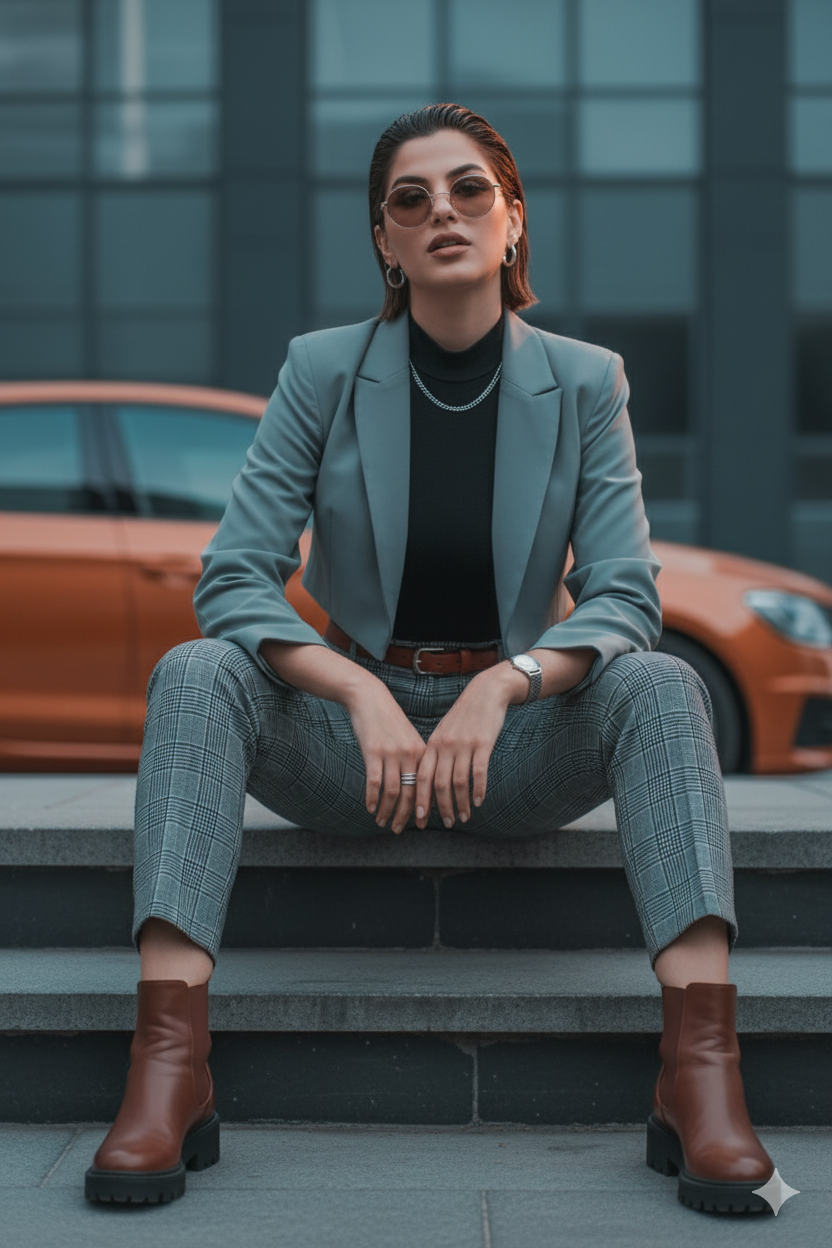
The story behind this one: like a few other prompts on this site, this one is written as an actual production and masking brief rather than a scene description, listing out separate inpainting masks for clothing, hair, accessories, and background, plus exact camera and lighting specs. It’s built for someone using a real image-editing pipeline rather than a single-shot AI generation, treating the photo as something assembled in layers rather than created all at once.
Copy this portrait ai photo prompt below and paste it into ChatGPT with your own photo.
edit this image — create a female variation keeping the subject’s exact pose (feet shoulder-width, hands clasped midline, confident forward gaze). Swap styling into a modern feminine editorial look, refine lighting for beauty-editorial feel, and produce clear inpainting masks so the edit tool can replace garments and hair while protecting face structure.

What to change / detailed recipe

Clothes (replace & fabric guidance):

Top: swap to a fitted black cashmere mock-neck bodysuit (matte, luxe #0A0A0A) that tucks cleanly into the waist; keeps close silhouette.

Outer: optional light cropped blazer in dove-grey (#D1D6D8) left open to reveal mock-neck — structured shoulders but cropped above hips.

Trousers: high-waisted tapered plaid trousers (same windowpane family but cut to feminine silhouette); press center crease and slightly cinch at waist with a thin belt in chestnut leather.

Shoes: swap to chunky low-heel leather ankle boots in chestnut to keep proportions strong.

Accessories: delicate silver hoop(s), slim ring stack, minimalist watch; keep subtle necklace (thin curb chain) if visible.

Hair & makeup (gendered changes):

Add short, slicked-back wet-look hair or a close cropped feminine style (keeps face shape intact). Soft, natural makeup: warm bronze eyeshadow, defined brows, slight rose lip.

Keep sunglasses optional (lower opacity) so eyes read if you prefer editorial portrait.

Lighting & color grade:

Beauty editorial grade: soft camera-left fill (large softbox) for even skin, warm rim light camera-right to lift shoulders and hair. Preserve teal–amber split (cool shadows, warm highlights) but bias skin tones neutral-warm.

Add subtle skin sheen on cheekbones, collarbone catchlight.

Environment & depth:

Keep car behind as a fashion prop; lower its visual dominance by slightly desaturating orange (-10) while keeping high gloss reflections. Increase background blur to simulate 85mm compression (f/2.2 feel) so palms/building become soft shapes.

Texture & retouching:

Skin: medium frequency retouch — remove blemishes, preserve pores; add soft micro-specular highlights.

Clothes: clarity +18 on fabrics, leather accents +20 on belt & boots.

Jewelry: brighten catchlights +30.

Finishing touches:

Soft film grain 3–5%, delicate vignette (-10 EV), final color dodge on subject midtones +6 for editorial pop. Export sRGB.

Inpainting / mask instructions

mask_top.png — replace upper body clothing with mock-neck bodysuit + optional cropped blazer.

mask_hair.png — inpaint feminine hairstyle (slicked back wet look) with rim highlight.

mask_pants.png — alter waistline & replace with tailored high-waist plaid trousers.

mask_accessories.png — refine jewelry & add rings/hoops.

mask_face_protect.png — protect facial geometry; allow makeup & texture touch-ups.

mask_background.png — increase blur + desaturate -20%.

Camera metadata (for generation):

Focal: 50–85mm (recommend 85mm for stronger editorial compression), aperture f/2.2–2.8, shutter 1/200s, ISO 200. Perspective slightly higher than waist to elongate legs.

Negative / avoid

No face swapping or gender identity changes beyond styling, no extra limbs, no cartoon/comic finish, no logos or text.

Associated tag: Fashion / Portrait
Best with: ChatGPT
This portrait ai photo prompt turns an ordinary photo into a polished portrait image in a single generation. You get the same look you see above — no editing skills needed. It leans on soft studio lighting, an urban backdrop and a cinematic finish.
What this prompt creates
The instruction places the subject in an urban backdrop, lights them with soft studio lighting and finishes with a cinematic finish. At roughly 453 words it is a detailed prompt, so expect the model to follow it closely — either way, the result stays recognisably you because the source photo drives the likeness.
How to use this portrait ai photo prompt
- Tap Copy prompt above to copy the full text.
- Open ChatGPT and start a new chat.
- Upload the photo you want to transform.
- Paste the prompt and send it.
- If the first result is not quite right, regenerate once or twice — small changes in wording shift the style a lot.
Tips for a better result
- Match the light. This prompt asks for soft studio lighting, so a source photo shot in similar conditions needs far less correction.
- Mind the background. It replaces your backdrop with an urban backdrop — a source photo with a plain or blurred background swaps over most cleanly.
- Crop before you generate. Removing clutter from the edges usually beats asking the model to remove it.
- Say what you don’t want. Adding “no text, no watermark” at the end removes most stray artefacts.
- Keep the face unchanged. Add “keep my face exactly the same” if the likeness drifts.
Who this portrait prompt suits
This one works especially well for Girls. It suits Instagram posts, profile pictures, and WhatsApp display photos, and it holds up on both phone and desktop screens.
More prompts like this
Browse every portrait prompt in this collection, or head back to the PromptPin homepage for the newest AI photo prompts. All of them are free to copy and use.
What makes this portrait style work
Three things do most of the heavy lifting here. The lighting is described precisely rather than left to chance. The framing and camera angle are stated up front, which keeps the subject in proportion. And the finish — grain, contrast, and colour grade — is spelled out at the end, which is what separates a snapshot from something that looks deliberately shot.
You can reuse this structure for your own ideas. Keep the sentence order — subject, setting, lighting, camera, finish — and swap the descriptive words. Prompts written this way behave far more predictably than one long sentence.
More prompts like this
- Quiet power Portrait AI Photo Prompt for Girls
- Net Break Portrait AI Photo Prompt for Girls
- RED Portrait AI Photo Prompt for Girls
- Grace in the Shadows Portrait AI Photo Prompt for Girls
- The Modern Executive Portrait AI Photo Prompt for Girls
- Luxury Minimalist Portrait AI Photo Prompt for Boys
- Trending Black Devil Photo Editing Prompt