
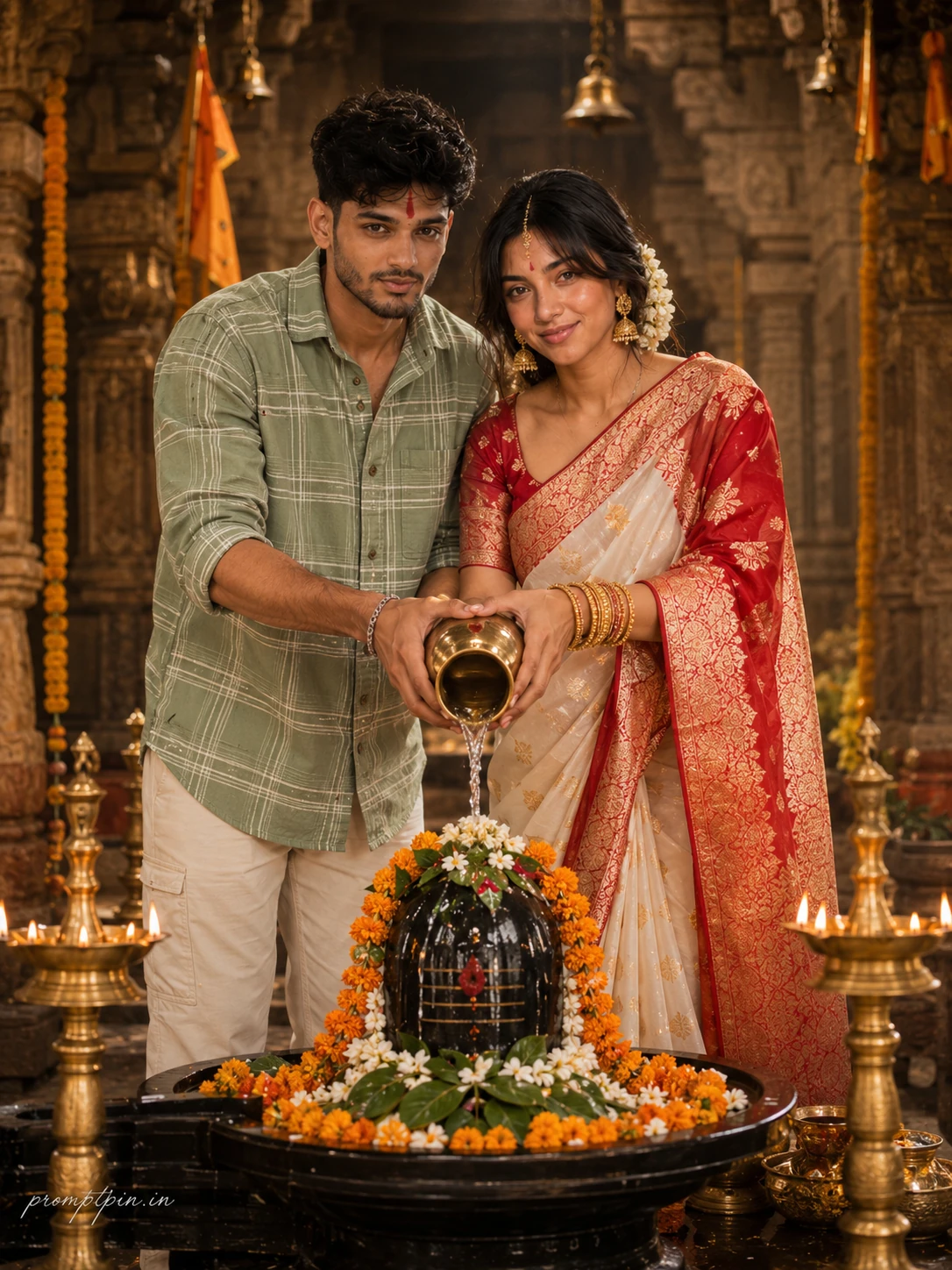
Divine Shiv Puja Couple AI Photo Editing Prompt
The story behind this one: this is the couple’s version of the same ritual — both hands on the same kalash, pouring together rather than one person performing it alone. The styling does real work here: her red-and-gold banarasi saree next to his simple cotton shirt is a deliberate contrast, formal versus casual, which is closer to how couples actually dress for a temple visit than matching outfits would be. It suits couples who want to mark an anniversary or a puja together rather than a solo devotional shot.
Copy this portrait prompt below and paste it into ChatGPT with your own photo.
Facial identity for both subjects locked completely to their reference images, same bone structure, same eyes, same brows, same lip shape, same complexion on each face, nothing altered for either person. Both are looking directly and naturally into the camera with calm, peaceful, devotional expressions and soft genuine smiles. A beautiful young Indian couple stands together at a beautifully decorated black Shivling inside an ancient Hindu temple, both leaning slightly forward in shared Jal Abhishek, four hands wrapped together around a single polished brass kalash as a thin arc of holy water pours steadily over the sacred stone. The woman wears a premium red and white Banarasi saree in heavy georgette with intricate golden thread embroidery across the pallu and border, a matching silk blouse, traditional gold jhumka earrings, fine gold bangles stacked on both wrists, a delicate maang tikka, and a small red bindi. Her hair is styled in a soft low bun with fresh white jasmine flowers pinned along the side. The man wears an oversized light green shirt with white tartan checks, soft brushed cotton fabric, sleeves casually rolled up to the forearms, paired with clean pressed cream trousers. His hair is neatly styled, a subtle red tilak on his forehead, light beard, warm natural expression. The Shivling is richly decorated with cascading fresh orange marigold garlands, sacred green bilva leaves, scattered white jasmine petals, a red tilak at the crown, and two small brass diyas glowing on either side with warm amber flame. Ancient carved stone temple pillars, hanging brass bells, and deep saffron temple flags blur into warm painterly bokeh in the background. Natural soft daylight filters through the temple arches, creating gentle warm shadows across both faces and the offering space. Canon EOS R5 at 85mm f/1.8, ISO 320, warm amber and ivory color grading, ultra-realistic natural skin texture for both subjects, photorealistic RAW DSLR quality, 8K resolution, vertical 3:4 composition. Premium magazine aesthetic from head to toe, platform-safe and elegant, natural skin finish, cinematic light wrapping the entire frame beautifully. Add “promptpin.in” as a small watermark at the bottom-left corner, Petit Formal Script font, thin elegant cursive strokes, soft white color rgba(FFFFFF), 1px letter-spacing, subtle premium handwritten signature style, slight transparency, minimal and refined, no background on text, blends naturally into the image.
Best with: ChatGPT
This portrait prompt turns an ordinary photo into a polished portrait image in a single generation. You get the same look you see above — no editing skills needed. It leans on moody low light and a cinematic finish.
What this prompt creates
The instruction lights them with moody low light, finishes with a cinematic finish and and frames it as a vertical 9:16 frame. At roughly 380 words it is a detailed prompt, so expect the model to follow it closely — either way, the result stays recognisably you because the source photo drives the likeness.
How to use this portrait prompt
- Tap Copy prompt above to copy the full text.
- Open ChatGPT and start a new chat.
- Upload the photo you want to transform.
- Paste the prompt and send it.
- If the first result is not quite right, regenerate once or twice — small changes in wording shift the style a lot.
Tips for a better result
- Match the light. This prompt asks for moody low light, so a source photo shot in similar conditions needs far less correction.
- Shoot for the crop. The output is a vertical 9:16 frame, so leave headroom in your original rather than filling the frame.
- Say what you don’t want. Adding “no text, no watermark” at the end removes most stray artefacts.
- Keep the face unchanged. Add “keep my face exactly the same” if the likeness drifts.
- Change one thing at a time. Edit the colour, outfit, or background separately rather than all at once.
Who this portrait prompt suits
This one works especially well for Couple. It suits Instagram posts, profile pictures, and WhatsApp display photos, and it holds up on both phone and desktop screens.
More prompts like this
Browse every portrait prompt in this collection, or head back to the PromptPin homepage for the newest AI photo prompts. All of them are free to copy and use.
What makes this portrait style work
Three things do most of the heavy lifting here. The lighting is described precisely rather than left to chance. The framing and camera angle are stated up front, which keeps the subject in proportion. And the finish — grain, contrast, and colour grade — is spelled out at the end, which is what separates a snapshot from something that looks deliberately shot.
You can reuse this structure for your own ideas. Keep the sentence order — subject, setting, lighting, camera, finish — and swap the descriptive words. Prompts written this way behave far more predictably than one long sentence.
More prompts like this
- Steel & Silk Contrast Portrait AI Photo Prompt for Girls
- Midnight Royalty Portrait AI Photo Prompt for Girls
- Black & White Portrait AI Photo Prompt for Boys
- Ivory Calm Portrait AI Photo Prompt for Girls
- Silver Fox Stroll Portrait AI Photo Prompt for Girls
- Queen’s Gambit Portrait AI Photo Prompt for Girls
- Trending Black Devil Photo Editing Prompt