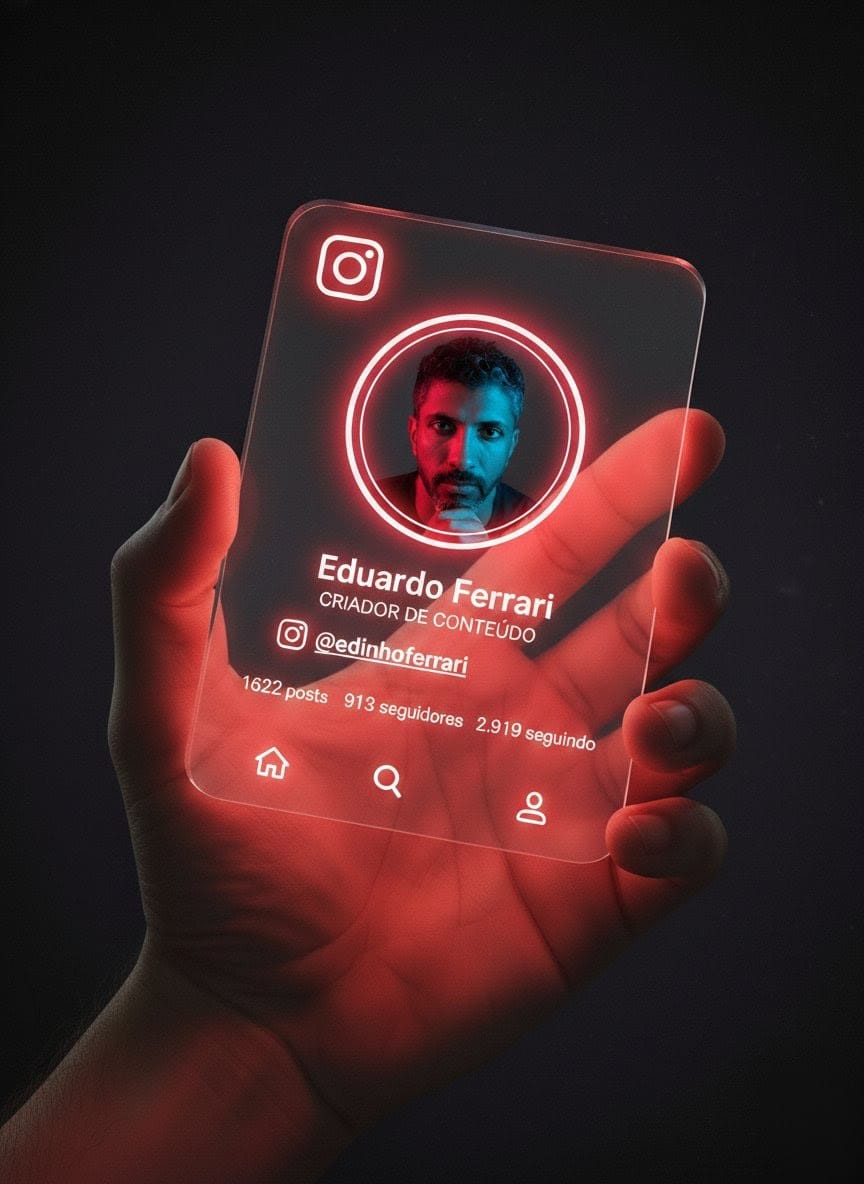
The story behind this one: written in Portuguese, this builds an entire fictional Instagram profile card, complete with a specific follower count (2,919 following, 913 followers, 1,622 posts) and a specific handle, rather than leaving those numbers vague or generic, giving the glowing glass card the texture of a real, lived-in account rather than a mockup. Neon-red borders that visibly reflect onto the fingers and skin of the hand holding the card is a lighting detail that ties a purely graphic element back into the physical, photographed hand holding it.
इस तस्वीर के पीछे की कहानी: पुर्तगाली में लिखा, यह एक पूरा काल्पनिक इंस्टाग्राम प्रोफाइल कार्ड बनाता है, एक खास फॉलोअर काउंट (2,919 फॉलोइंग, 913 फॉलोअर्स, 1,622 पोस्ट) और एक खास हैंडल के साथ, इन आंकड़ों को अस्पष्ट या आम छोड़ने के बजाय, चमकते ग्लास कार्ड को किसी मॉकअप के बजाय एक असली, इस्तेमाल किए गए अकाउंट जैसा टेक्सचर देते हुए। नियॉन-रेड बॉर्डर जो कार्ड पकड़े हाथ की उंगलियों और त्वचा पर साफ दिखते हैं, एक लाइटिंग डिटेल है जो एक पूरी तरह ग्राफिक एलिमेंट को उसे पकड़े असली, खींची गई हाथ से वापस जोड़ती है।
આ ફોટા પાછળની વાત: પોર્ટુગીઝમાં લખાયેલું, આ એક પૂરું કાલ્પનિક ઇન્સ્ટાગ્રામ પ્રોફાઇલ કાર્ડ બનાવે છે, એક ખાસ ફોલોઅર કાઉન્ટ (2,919 ફોલોઇંગ, 913 ફોલોઅર્સ, 1,622 પોસ્ટ) અને એક ખાસ હેન્ડલ સાથે, આ આંકડાઓને અસ્પષ્ટ કે સામાન્ય છોડવાને બદલે, ચમકતા ગ્લાસ કાર્ડને કોઈ મોકઅપને બદલે એક સાચા, વપરાયેલા એકાઉન્ટ જેવું ટેક્સચર આપતાં. નિયોન-રેડ બોર્ડર જે કાર્ડ પકડેલા હાથની આંગળીઓ અને ત્વચા પર સાફ દેખાય છે, એક લાઇટિંગ વિગત છે જે એક સંપૂર્ણ ગ્રાફિક એલિમેન્ટને તેને પકડેલા સાચા, ખેંચાયેલા હાથ સાથે પાછું જોડે છે.
Copy this collage ai photo prompt below and paste it into ChatGPT with your own photo.
नीचे दिया गया collage ai photo prompt कॉपी करें और अपनी फ़ोटो के साथ ChatGPT में पेस्ट करें।
નીચે આપેલ collage ai photo prompt કૉપિ કરો અને તમારા ફોટા સાથે ChatGPT માં પેસ્ટ કરો.
Prompt
Crie uma renderização digital 3D em alta
resolução e ultra-realista de um cartão de perfil
futurista do Instagram seguindo como base referência da imagem, sendo segurado entre a mão. O
cartão deve ser feito de vidro transparente
brilhante, com bordas de neon em tom vermelho
escuro que emitem uma luz intensa e radiante,
refletindo vividamente nos dedos e na pele da
mão. O fundo deve ser bem escuro (quase
preto), com texturas ou gradientes sutis para
destacar o brilho neon. No canto superior
esquerdo do cartão, inclua o ícone do Instagram  em estilo neon. No centro do cartão: uma foto de
perfil circular da pessoa mostrada na imagem
enviada, com aparência profissional, confiante e
olhar firme. Na parte inferior do cartão: • Nome
completo em uma fonte moderna e limpa • Título
profissional: Criador de Conteúdo em cor
vermelho neon • Nome de usuário do Instagram
com ícone: @edinhoferrari • Estatísticas
horizontais: 1622 posts, 913 seguidores, 2.919
seguindo também em cor neon vermelho.
Adicione também em brilho neon o ícone da
casa, da lupa e de seguidor.
Best with:ChatGPT
सबसे अच्छा चलता है:ChatGPT
સૌથી સારું ચાલે છે:ChatGPT
This collage ai photo prompt turns an ordinary photo into a polished collage image in a single generation. You get the same look you see above — no editing skills needed. It leans on neon lighting.
How to use this collage ai photo prompt
Tap Copy prompt above to copy the full text.
Open ChatGPT and start a new chat.
Upload the photo you want to transform.
Paste the prompt and send it.
If the first result is not quite right, regenerate once or twice — small changes in wording shift the style a lot.
Tips for a better result
Match the light. This prompt asks for neon lighting, so a source photo shot in similar conditions needs far less correction.
Keep the face unchanged. Add “keep my face exactly the same” if the likeness drifts.
Change one thing at a time. Edit the colour, outfit, or background separately rather than all at once.
Try it twice. Image models are random — a second run often looks noticeably better.
Who this collage prompt suits
This one works especially well for Boys. It suits Instagram posts, profile pictures, and WhatsApp display photos, and it holds up on both phone and desktop screens.
More prompts like this
Browse every collage prompt in this collection, or head back to the PromptPin homepage for the newest AI photo prompts. All of them are free to copy and use.
Three things do most of the heavy lifting here. The lighting is described precisely rather than left to chance. The framing and camera angle are stated up front, which keeps the subject in proportion. And the finish — grain, contrast, and colour grade — is spelled out at the end, which is what separates a snapshot from something that looks deliberately shot.
You can reuse this structure for your own ideas. Keep the sentence order — subject, setting, lighting, camera, finish — and swap the descriptive words. Prompts written this way behave far more predictably than one long sentence.
यह collage ai photo prompt एक साधारण फ़ोटो को एक ही बार में शानदार collage इमेज में बदल देता है। आपको ऊपर दिखने वाला वैसा ही लुक मिलेगा — किसी एडिटिंग स्किल की ज़रूरत नहीं। It leans on neon lighting.
इस प्रॉम्प्ट का उपयोग कैसे करें
ऊपर Copy prompt पर टैप करके पूरा टेक्स्ट कॉपी करें।
ChatGPT खोलें और नई चैट शुरू करें।
जिस फ़ोटो को बदलना है उसे अपलोड करें।
प्रॉम्प्ट पेस्ट करें और भेज दें।
अगर पहला रिज़ल्ट सही न लगे तो एक-दो बार दोबारा जनरेट करें — शब्दों में छोटा बदलाव भी स्टाइल काफ़ी बदल देता है।
बेहतर रिज़ल्ट के लिए टिप्स
रोशनी मिलाएँ। यह प्रॉम्प्ट neon lighting माँगता है, इसलिए वैसी ही रोशनी में ली गई फ़ोटो में बहुत कम सुधार करना पड़ता है।
चेहरा वैसा ही रखें। अगर चेहरा बदलने लगे तो “keep my face exactly the same” जोड़ दें।
एक बार में एक ही चीज़ बदलें। रंग, कपड़े या बैकग्राउंड — सब एक साथ बदलने के बजाय अलग-अलग बदलें।
दो बार आज़माएँ। इमेज मॉडल हर बार अलग रिज़ल्ट देते हैं — दूसरी बार अक्सर बेहतर आता है।
यह प्रॉम्प्ट किसके लिए सही है
यह ख़ास तौर पर Boys के लिए अच्छा है। यह इंस्टाग्राम पोस्ट, प्रोफ़ाइल फ़ोटो और व्हाट्सऐप डीपी के लिए सही रहता है, और फ़ोन व कंप्यूटर दोनों पर अच्छा दिखता है।
इसमें तीन चीज़ें सबसे ज़्यादा काम करती हैं। रोशनी को अंदाज़े पर नहीं छोड़ा गया, साफ़-साफ़ बताया गया है। फ़्रेमिंग और कैमरा एंगल पहले ही तय है, जिससे चेहरा सही अनुपात में रहता है। और आख़िर में फ़िनिश — ग्रेन, कंट्रास्ट और कलर ग्रेड — बताया गया है, यही आम फ़ोटो और प्रोफ़ेशनल दिखने वाली फ़ोटो का फ़र्क़ है।
आप इसी ढाँचे को अपने आइडिया के लिए भी इस्तेमाल कर सकते हैं। क्रम वही रखें — सब्जेक्ट, जगह, रोशनी, कैमरा, फ़िनिश — और सिर्फ़ शब्द बदलें। इस तरह लिखे प्रॉम्प्ट एक लंबे वाक्य से कहीं बेहतर काम करते हैं।
આ collage ai photo prompt સામાન્ય ફોટાને એક જ વારમાં સુંદર collage ઇમેજમાં ફેરવે છે. તમને ઉપર દેખાય છે તેવો જ લુક મળશે — કોઈ એડિટિંગ સ્કિલની જરૂર નથી. It leans on neon lighting.
આ પ્રોમ્પ્ટનો ઉપયોગ કેવી રીતે કરવો
ઉપર Copy prompt પર ટૅપ કરીને આખો ટેક્સ્ટ કૉપિ કરો.
ChatGPT ખોલો અને નવી ચેટ શરૂ કરો.
જે ફોટો બદલવો છે તે અપલોડ કરો.
પ્રોમ્પ્ટ પેસ્ટ કરો અને મોકલો.
જો પહેલું પરિણામ બરાબર ન લાગે તો એક-બે વાર ફરી જનરેટ કરો — શબ્દોમાં નાનો ફેરફાર પણ સ્ટાઇલ ઘણી બદલે છે.
વધુ સારા પરિણામ માટે ટિપ્સ
પ્રકાશ મેળવો. આ પ્રોમ્પ્ટ neon lighting માંગે છે, તેથી તેવી જ રોશનીમાં લીધેલા ફોટામાં ઘણું ઓછું સુધારવું પડે છે.
ચહેરો એવો જ રાખો. જો ચહેરો બદલાવા લાગે તો “keep my face exactly the same” ઉમેરો.
એક વખતે એક જ વસ્તુ બદલો. રંગ, કપડાં કે બૅકગ્રાઉન્ડ — બધું એકસાથે બદલવાને બદલે અલગ અલગ બદલો.
બે વાર અજમાવો. ઇમેજ મૉડલ દર વખતે અલગ પરિણામ આપે છે — બીજી વાર ઘણી વાર વધુ સારું આવે છે.
આ પ્રોમ્પ્ટ કોના માટે યોગ્ય છે
આ ખાસ કરીને Boys માટે સારું છે. તે ઇન્સ્ટાગ્રામ પોસ્ટ, પ્રોફાઇલ ફોટો અને વૉટ્સઍપ ડીપી માટે યોગ્ય છે, અને ફોન તથા કમ્પ્યુટર બંને પર સારું દેખાય છે.
આમાં ત્રણ વસ્તુઓ સૌથી વધુ કામ કરે છે. પ્રકાશ અંદાજ પર છોડ્યો નથી, સ્પષ્ટ રીતે જણાવ્યો છે. ફ્રેમિંગ અને કૅમેરા ઍન્ગલ પહેલેથી નક્કી છે, જેથી ચહેરો યોગ્ય પ્રમાણમાં રહે. અને અંતે ફિનિશ — ગ્રેન, કૉન્ટ્રાસ્ટ અને કલર ગ્રેડ — જણાવ્યું છે, એ જ સામાન્ય ફોટા અને પ્રોફેશનલ દેખાતા ફોટા વચ્ચેનો ફરક છે.
તમે આ જ ઢાંચો તમારા આઇડિયા માટે પણ વાપરી શકો છો. ક્રમ એ જ રાખો — સબ્જેક્ટ, જગ્યા, પ્રકાશ, કૅમેરા, ફિનિશ — અને ફક્ત શબ્દો બદલો. આ રીતે લખેલા પ્રોમ્પ્ટ એક લાંબા વાક્ય કરતાં ઘણું સારું કામ કરે છે.