Innovation & Growth Workshop 2025 Collage AI Photo Prompt for Girls
The story behind this one: this is a full poster-design brief rather than a portrait prompt, built around invented placeholder people, ‘Alex Moreno’ and ‘Sophie Carter,’ with a complete fake event, date, agenda, and even icon choices specified. It’s clearly meant as a template someone could reuse for a real event by swapping in real speaker photos and real event details, since the whole structure is built around replaceable dummy data.
Copy this collage ai photo prompt below and paste it into ChatGPT with your own photo.
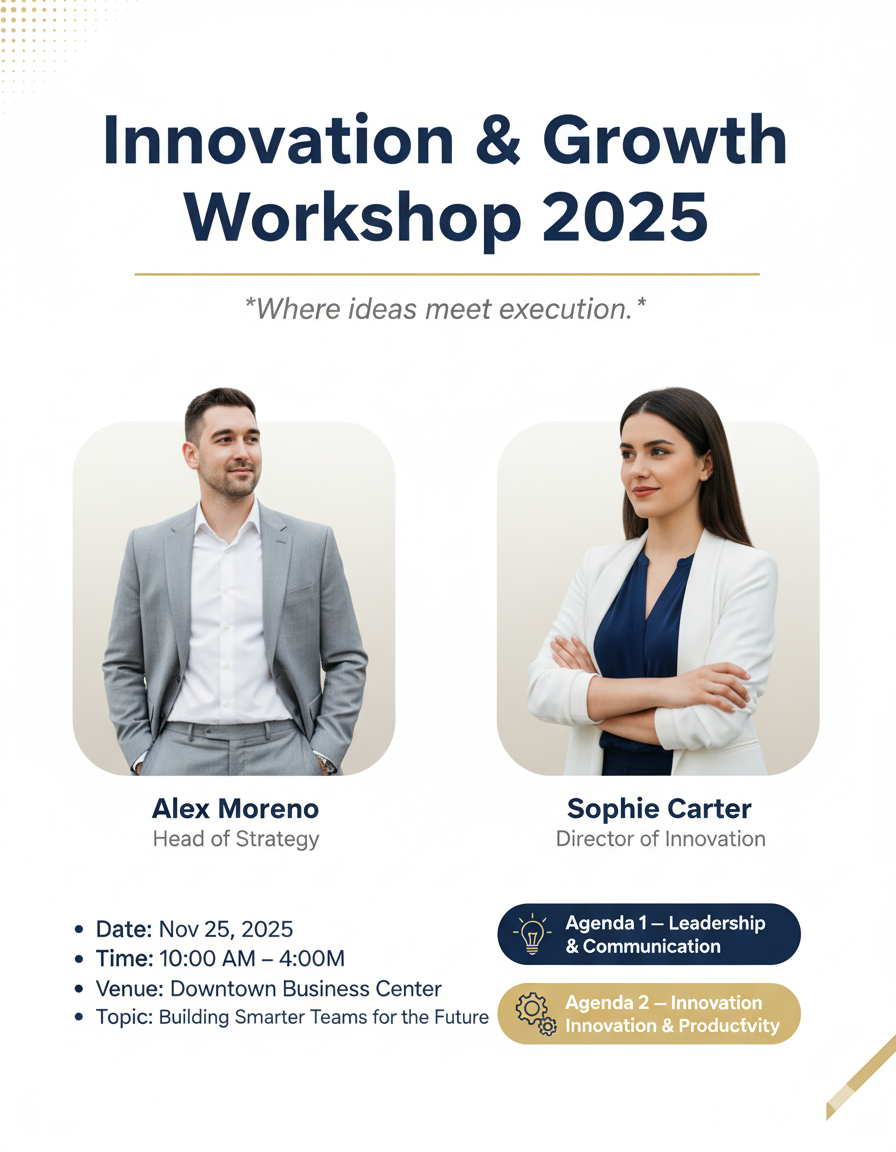
Edit this image into a clean, minimalist corporate poster titled Innovation & Growth Workshop 2025. Feature both speakers equally (no microphones) using the following dummy data and creative but subtle details:

Speakers & position — chest-to-mid-thigh crop, centered horizontally, slight inward angle so they face each other a little (conveys rapport), equal spacing and visual weight:

Left (Man): Alex Moreno — Head of Strategy. Light grey suit, white shirt, no tie, relaxed posture with right hand lightly in pocket and left arm relaxed at his side, small confident smile.

Right (Woman): Sophie Carter — Director of Innovation. White blazer, navy blouse, arms gently crossed (one thumb visible), warm confident expression, slightly angled toward Alex.

Background & panels — pure white canvas with two very light rounded rectangles behind each speaker (soft warm-grey tints) to separate them subtly. Add a single thin light-gold horizontal rule under the title. A faint, tasteful dotted texture in the top-left corner only (very low opacity) for visual interest.

Creative but minimalist accents — small monochrome icons next to agenda lines (simple line icons: a lightbulb for Innovation, a speech bubble for Leadership), subtle soft vignette to gently focus on faces, and a narrow diagonal cut (very subtle) at the bottom-right corner in light-gold to break strict boxiness without adding clutter.

Typography & color — clean sans-serif (e.g., Inter or Helvetica Neue): large navy-blue bold title, medium-weight grey for names/titles, small navy for event details. Accent chips for agendas in navy (Agenda 1) and light gold (Agenda 2) with rounded corners.

Lighting & finish — natural soft lighting, minimal shadow beneath figures for depth, no dramatic effects or heavy gradients. Keep high legibility and a calm, refined tone.

Layout & copy (replace content with below dummy details):

Header: Innovation & Growth Workshop 2025

Subline (italic/light): “Where ideas meet execution.”

Row under header: centered speaker panels (Alex Moreno | Sophie Carter) with names and titles beneath each panel in subtle grey.

Event details block (centered, compact):
• Date: Nov 25, 2025
• Time: 10:00 AM – 4:00 PM
• Venue: Downtown Business Center
• Topic: Building Smarter Teams for the Future

Agenda chips (stacked vertically, small icons):
• Agenda 1 — Leadership & Communication (navy chip + lightbulb icon)
• Agenda 2 — Innovation & Productivity (light-gold chip + gear icon)

Deliverable notes — balanced white space, export-ready crop for social (square 1080×1080) and poster (A4) variants; ensure all text is editable layers.
Best with: ChatGPT
This collage ai photo prompt turns an ordinary photo into a polished collage image in a single generation. You get the same look you see above — no editing skills needed. It leans on soft studio lighting, an urban backdrop and a black-and-white treatment.
What this prompt creates
The instruction places the subject in an urban backdrop, lights them with soft studio lighting, finishes with a black-and-white treatment and and frames it as a vertical 9:16 frame. At roughly 369 words it is a detailed prompt, so expect the model to follow it closely — either way, the result stays recognisably you because the source photo drives the likeness.
How to use this collage ai photo prompt
- Tap Copy prompt above to copy the full text.
- Open ChatGPT and start a new chat.
- Upload the photo you want to transform.
- Paste the prompt and send it.
- If the first result is not quite right, regenerate once or twice — small changes in wording shift the style a lot.
Tips for a better result
- Match the light. This prompt asks for soft studio lighting, so a source photo shot in similar conditions needs far less correction.
- Mind the background. It replaces your backdrop with an urban backdrop — a source photo with a plain or blurred background swaps over most cleanly.
- Shoot for the crop. The output is a vertical 9:16 frame, so leave headroom in your original rather than filling the frame.
- Keep the face unchanged. Add “keep my face exactly the same” if the likeness drifts.
- Change one thing at a time. Edit the colour, outfit, or background separately rather than all at once.
Who this collage prompt suits
This one works especially well for Girls. It suits Instagram posts, profile pictures, and WhatsApp display photos, and it holds up on both phone and desktop screens.
More prompts like this
Browse every collage prompt in this collection, or head back to the PromptPin homepage for the newest AI photo prompts. All of them are free to copy and use.
What makes this collage style work
Three things do most of the heavy lifting here. The lighting is described precisely rather than left to chance. The framing and camera angle are stated up front, which keeps the subject in proportion. And the finish — grain, contrast, and colour grade — is spelled out at the end, which is what separates a snapshot from something that looks deliberately shot.
You can reuse this structure for your own ideas. Keep the sentence order — subject, setting, lighting, camera, finish — and swap the descriptive words. Prompts written this way behave far more predictably than one long sentence.
More prompts like this
- Romantic image Collage AI Photo Prompt for Couple
- Romantic Collage AI Photo Prompt for Couple
- Aesthetic 4 Frames Photo Prompts Collage AI Photo Prompt for Boys
- Picnic Love Story Edit Collage AI Photo Prompt for Couple
- Viral Three Layer Photo Editing ChatGPT Prompts
- Trending Aesthetic College Prompt Collage AI Photo Prompt for Girls
- Trending Black Devil Photo Editing Prompt