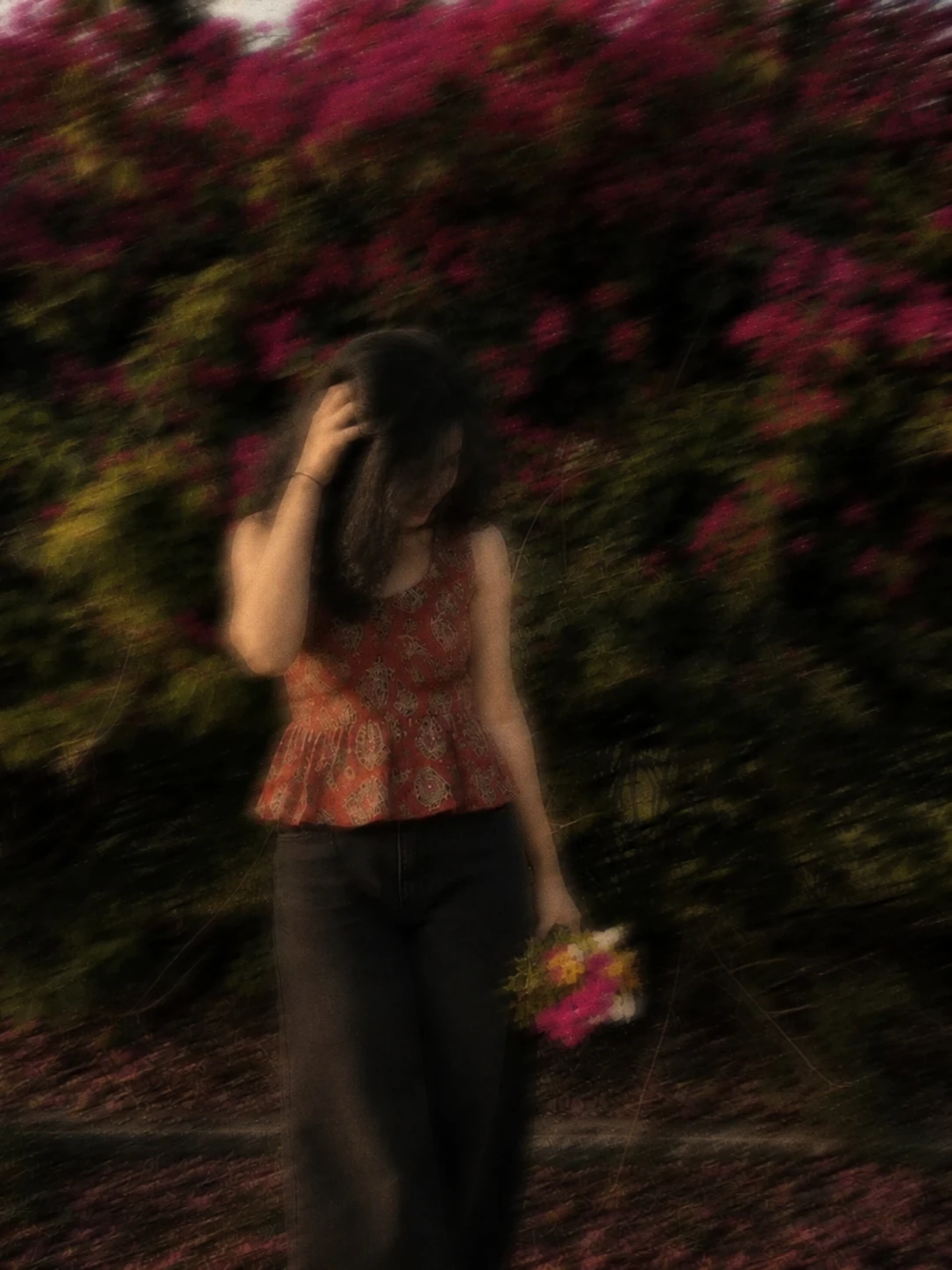
The story behind this one: it is one of the shortest prompts on the site, and almost all of its weight sits on four words — “as if captured while moving”. Ask an AI for motion blur directly and you get a uniform smudge laid over the picture, which reads as a mistake rather than a style. Naming the cause instead of the effect makes the model fake a real long exposure: the streaks follow the direction of travel, the bougainvillea behind drags sideways, and the grain stays where a film frame would keep it. “Unchanged facial features” is the counterweight — without it the model treats the blur as permission to redraw the face, since it is going to be soft anyway.
इस तस्वीर के पीछे की कहानी: यह साइट के सबसे छोटे प्रॉम्प्ट में से एक है, और इसका लगभग पूरा भार चार शब्दों पर टिका है — “as if captured while moving”। एआई से सीधे मोशन ब्लर माँगिए तो वह तस्वीर के ऊपर एक जैसा धब्बा फेर देता है, जो स्टाइल कम और ग़लती ज़्यादा लगता है। असर की जगह उसकी वजह बता देने से मॉडल असली लॉन्ग एक्सपोज़र की नक़ल करता है: लकीरें उसी दिशा में खिंचती हैं जिधर हरकत है, पीछे का बोगनवेलिया बगल की ओर घिसटता है, और ग्रेन वहीं रहता है जहाँ फ़िल्म के फ़्रेम में होता है। “Unchanged facial features” इसका संतुलन है — यह न लिखा हो तो मॉडल ब्लर को चेहरा दोबारा बनाने की छूट मान लेता है, क्योंकि वह वैसे भी धुँधला ही रहने वाला है।
આ ફોટા પાછળની વાત: આ સાઇટના સૌથી ટૂંકા પ્રોમ્પ્ટમાંનો એક છે, અને તેનું લગભગ આખું વજન ચાર શબ્દો પર ટકે છે — “as if captured while moving”. એઆઈ પાસે સીધું મોશન બ્લર માગો તો તે ફોટા ઉપર એકસરખો ડાઘ ફેરવી દે છે, જે સ્ટાઇલ ઓછી અને ભૂલ વધારે લાગે છે. અસરની જગ્યાએ તેનું કારણ કહી દેવાથી મોડલ સાચા લોંગ એક્સપોઝરની નકલ કરે છે: લીટીઓ એ જ દિશામાં ખેંચાય છે જ્યાં હલનચલન છે, પાછળનું બોગનવેલિયા બાજુમાં ઘસડાય છે, અને ગ્રેન ત્યાં જ રહે છે જ્યાં ફિલ્મના ફ્રેમમાં હોય. “Unchanged facial features” તેનું સંતુલન છે — એ ન લખ્યું હોય તો મોડલ બ્લરને ચહેરો ફરીથી બનાવવાની છૂટ માની લે છે, કારણ કે તે તો કોઈ પણ રીતે ધૂંધળો જ રહેવાનો છે.
Copy this aesthetic prompt below and paste it into ChatGPT with your own photo.
नीचे दिया गया aesthetic prompt कॉपी करें और अपनी फ़ोटो के साथ ChatGPT में पेस्ट करें।
નીચે આપેલ aesthetic prompt કૉપિ કરો અને તમારા ફોટા સાથે ChatGPT માં પેસ્ટ કરો.
Prompt
Add strong realistic long-exposure across the entire subject as if captured while moving, vintage film aesthetic, natural lighting, and unchanged facial features.
Best with:ChatGPT
सबसे अच्छा चलता है:ChatGPT
સૌથી સારું ચાલે છે:ChatGPT
This aesthetic prompt turns an ordinary photo into a polished aesthetic image in a single generation. You get the same look you see above — no editing skills needed. It leans on natural daylight.
How to use this aesthetic prompt
Tap Copy prompt above to copy the full text.
Open ChatGPT and start a new chat.
Upload the photo you want to transform.
Paste the prompt and send it.
If the first result is not quite right, regenerate once or twice — small changes in wording shift the style a lot.
Tips for a better result
Match the light. This prompt asks for natural daylight, so a source photo shot in similar conditions needs far less correction.
Start from the highest-resolution copy you have. Detail the model can see is detail it can keep.
Crop before you generate. Removing clutter from the edges usually beats asking the model to remove it.
Say what you don’t want. Adding “no text, no watermark” at the end removes most stray artefacts.
Who this aesthetic prompt suits
This one works especially well for Girls. It suits Instagram posts, profile pictures, and WhatsApp display photos, and it holds up on both phone and desktop screens.
More prompts like this
Browse every aesthetic prompt in this collection, or head back to the PromptPin homepage for the newest AI photo prompts. All of them are free to copy and use.
Three things do most of the heavy lifting here. The lighting is described precisely rather than left to chance. The framing and camera angle are stated up front, which keeps the subject in proportion. And the finish — grain, contrast, and colour grade — is spelled out at the end, which is what separates a snapshot from something that looks deliberately shot.
You can reuse this structure for your own ideas. Keep the sentence order — subject, setting, lighting, camera, finish — and swap the descriptive words. Prompts written this way behave far more predictably than one long sentence.
यह aesthetic prompt एक साधारण फ़ोटो को एक ही बार में शानदार aesthetic इमेज में बदल देता है। आपको ऊपर दिखने वाला वैसा ही लुक मिलेगा — किसी एडिटिंग स्किल की ज़रूरत नहीं। It leans on natural daylight.
इस प्रॉम्प्ट का उपयोग कैसे करें
ऊपर Copy prompt पर टैप करके पूरा टेक्स्ट कॉपी करें।
ChatGPT खोलें और नई चैट शुरू करें।
जिस फ़ोटो को बदलना है उसे अपलोड करें।
प्रॉम्प्ट पेस्ट करें और भेज दें।
अगर पहला रिज़ल्ट सही न लगे तो एक-दो बार दोबारा जनरेट करें — शब्दों में छोटा बदलाव भी स्टाइल काफ़ी बदल देता है।
बेहतर रिज़ल्ट के लिए टिप्स
रोशनी मिलाएँ। यह प्रॉम्प्ट natural daylight माँगता है, इसलिए वैसी ही रोशनी में ली गई फ़ोटो में बहुत कम सुधार करना पड़ता है।
सबसे अच्छी क्वालिटी वाली फ़ोटो से शुरू करें। मॉडल जो डिटेल देख पाएगा, वही बचा भी पाएगा।
जनरेट करने से पहले क्रॉप करें। किनारों की गंदगी खुद हटाना, मॉडल से हटवाने की तुलना में बेहतर रहता है।
जो नहीं चाहिए वह भी बताएँ। अंत में “no text, no watermark” जोड़ने से ज़्यादातर फालतू चीज़ें हट जाती हैं।
यह प्रॉम्प्ट किसके लिए सही है
यह ख़ास तौर पर Girls के लिए अच्छा है। यह इंस्टाग्राम पोस्ट, प्रोफ़ाइल फ़ोटो और व्हाट्सऐप डीपी के लिए सही रहता है, और फ़ोन व कंप्यूटर दोनों पर अच्छा दिखता है।
इसमें तीन चीज़ें सबसे ज़्यादा काम करती हैं। रोशनी को अंदाज़े पर नहीं छोड़ा गया, साफ़-साफ़ बताया गया है। फ़्रेमिंग और कैमरा एंगल पहले ही तय है, जिससे चेहरा सही अनुपात में रहता है। और आख़िर में फ़िनिश — ग्रेन, कंट्रास्ट और कलर ग्रेड — बताया गया है, यही आम फ़ोटो और प्रोफ़ेशनल दिखने वाली फ़ोटो का फ़र्क़ है।
आप इसी ढाँचे को अपने आइडिया के लिए भी इस्तेमाल कर सकते हैं। क्रम वही रखें — सब्जेक्ट, जगह, रोशनी, कैमरा, फ़िनिश — और सिर्फ़ शब्द बदलें। इस तरह लिखे प्रॉम्प्ट एक लंबे वाक्य से कहीं बेहतर काम करते हैं।
આ aesthetic prompt સામાન્ય ફોટાને એક જ વારમાં સુંદર aesthetic ઇમેજમાં ફેરવે છે. તમને ઉપર દેખાય છે તેવો જ લુક મળશે — કોઈ એડિટિંગ સ્કિલની જરૂર નથી. It leans on natural daylight.
આ પ્રોમ્પ્ટનો ઉપયોગ કેવી રીતે કરવો
ઉપર Copy prompt પર ટૅપ કરીને આખો ટેક્સ્ટ કૉપિ કરો.
ChatGPT ખોલો અને નવી ચેટ શરૂ કરો.
જે ફોટો બદલવો છે તે અપલોડ કરો.
પ્રોમ્પ્ટ પેસ્ટ કરો અને મોકલો.
જો પહેલું પરિણામ બરાબર ન લાગે તો એક-બે વાર ફરી જનરેટ કરો — શબ્દોમાં નાનો ફેરફાર પણ સ્ટાઇલ ઘણી બદલે છે.
વધુ સારા પરિણામ માટે ટિપ્સ
પ્રકાશ મેળવો. આ પ્રોમ્પ્ટ natural daylight માંગે છે, તેથી તેવી જ રોશનીમાં લીધેલા ફોટામાં ઘણું ઓછું સુધારવું પડે છે.
સૌથી સારી ક્વૉલિટીવાળા ફોટાથી શરૂ કરો. મૉડલ જે ડિટેલ જોઈ શકે, તે જ જાળવી પણ શકે.
જનરેટ કરતાં પહેલાં ક્રૉપ કરો. કિનારીની ગડબડ જાતે હટાવવી, મૉડલ પાસે હટાવડાવવા કરતાં સારું રહે છે.
જે નથી જોઈતું તે પણ કહો. અંતે “no text, no watermark” ઉમેરવાથી મોટા ભાગની બિનજરૂરી વસ્તુઓ હટી જાય છે.
આ પ્રોમ્પ્ટ કોના માટે યોગ્ય છે
આ ખાસ કરીને Girls માટે સારું છે. તે ઇન્સ્ટાગ્રામ પોસ્ટ, પ્રોફાઇલ ફોટો અને વૉટ્સઍપ ડીપી માટે યોગ્ય છે, અને ફોન તથા કમ્પ્યુટર બંને પર સારું દેખાય છે.
આમાં ત્રણ વસ્તુઓ સૌથી વધુ કામ કરે છે. પ્રકાશ અંદાજ પર છોડ્યો નથી, સ્પષ્ટ રીતે જણાવ્યો છે. ફ્રેમિંગ અને કૅમેરા ઍન્ગલ પહેલેથી નક્કી છે, જેથી ચહેરો યોગ્ય પ્રમાણમાં રહે. અને અંતે ફિનિશ — ગ્રેન, કૉન્ટ્રાસ્ટ અને કલર ગ્રેડ — જણાવ્યું છે, એ જ સામાન્ય ફોટા અને પ્રોફેશનલ દેખાતા ફોટા વચ્ચેનો ફરક છે.
તમે આ જ ઢાંચો તમારા આઇડિયા માટે પણ વાપરી શકો છો. ક્રમ એ જ રાખો — સબ્જેક્ટ, જગ્યા, પ્રકાશ, કૅમેરા, ફિનિશ — અને ફક્ત શબ્દો બદલો. આ રીતે લખેલા પ્રોમ્પ્ટ એક લાંબા વાક્ય કરતાં ઘણું સારું કામ કરે છે.