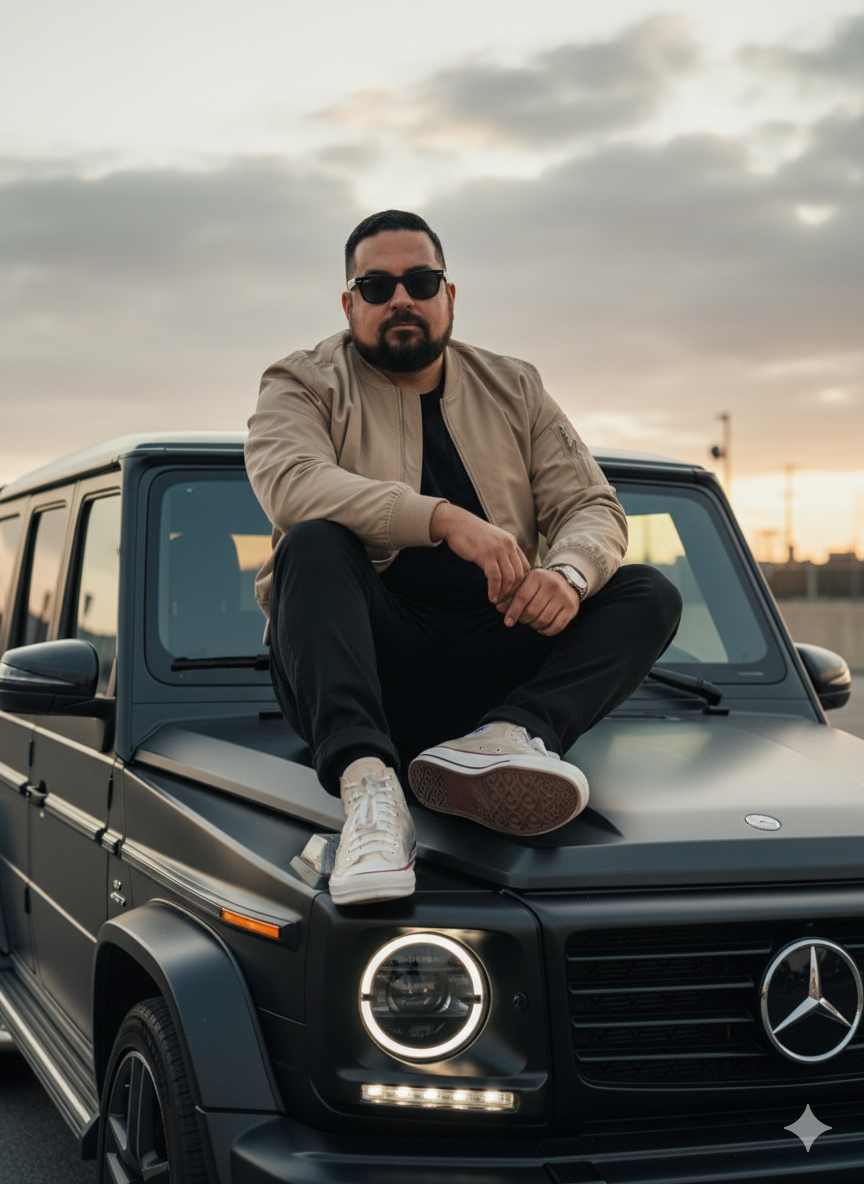
The story behind this one: written in Spanish with explicit ‘–preserve_identity=100%’ and ‘–no_stylization’ flags at the very top, this prompt treats likeness-locking as a technical parameter to set before anything else, rather than a request buried in the description. Naming the exact sneaker collaboration, ‘CONVERSE x OFF-WHITE Chuck Taylor Vulcanized Hi Clear,’ alongside Ray-Ban Wayfarers is the kind of specific product pairing usually seen in real fashion editorials, not generic ‘stylish shoes and sunglasses.’
इस तस्वीर के पीछे की कहानी: स्पेनिश में लिखा, बिल्कुल ऊपर साफ ‘–preserve_identity=100%’ और ‘–no_stylization’ फ्लैग के साथ, यह प्रॉम्प्ट पहचान बनाए रखने को विवरण में दबे अनुरोध के बजाय सबसे पहले तय की जाने वाली एक तकनीकी सेटिंग की तरह लेता है। सटीक स्नीकर कोलैबोरेशन, ‘CONVERSE x OFF-WHITE Chuck Taylor Vulcanized Hi Clear,’ का नाम Ray-Ban Wayfarer के साथ लेना उस तरह की खास प्रोडक्ट जोड़ी है जो आमतौर पर असली फैशन एडिटोरियल में दिखती है, आम ‘स्टाइलिश जूते और धूप के चश्मे’ नहीं।
આ ફોટા પાછળની વાત: સ્પેનિશમાં લખાયેલું, બરાબર ઉપર સ્પષ્ટ ‘–preserve_identity=100%’ અને ‘–no_stylization’ ફ્લેગ સાથે, આ પ્રોમ્પ્ટ ઓળખ જાળવવાને વર્ણનમાં દબાયેલી વિનંતીને બદલે સૌથી પહેલાં નક્કી કરવાની એક ટેકનિકલ સેટિંગની જેમ લે છે. ચોક્કસ સ્નીકર કોલાબોરેશન, ‘CONVERSE x OFF-WHITE Chuck Taylor Vulcanized Hi Clear,’નું નામ Ray-Ban Wayfarer સાથે લેવું એ પ્રકારની ખાસ પ્રોડક્ટ જોડી છે જે સામાન્ય રીતે સાચા ફેશન એડિટોરિયલમાં દેખાય છે, સામાન્ય ‘સ્ટાઇલિશ જૂતાં અને સનગ્લાસ’ નહીં.
Copy this aesthetic ai photo prompt below and paste it into ChatGPT with your own photo.
नीचे दिया गया aesthetic ai photo prompt कॉपी करें और अपनी फ़ोटो के साथ ChatGPT में पेस्ट करें।
નીચે આપેલ aesthetic ai photo prompt કૉપિ કરો અને તમારા ફોટા સાથે ChatGPT માં પેસ્ટ કરો.
Prompt
--preserve_identity=100% --no_stylization --no_feature_blending. Sujeto basado en la imagen de referencia. Rasgos faciales exactos; Estilo editorial hiperrealista en 8K, con atmósfera cinematográfica de atardecer; Hombre sentado de lado sobre el techo de un Mercedes-AMG G63 negro, pierna doblada y pie apoyado en el capó, cabeza ligeramente girada mirando a cámara con presencia impactante; vestimenta: chaqueta bomber beige con cremallera frontal, pantalones negros de corte moderno, zapatillas CONVERSE x OFF-WHITE Chuck Taylor Vulcanized Hi “Clear”, gafas de sol Ray-Ban Wayfarer, estilo casual, sofisticado, urbano y moderno con toque editorial; Zona Urbana, fondo con cielo nublado gris; Luz cálida difusa del atardecer, faros del coche encendidos iluminando suavemente y creando profundidad dramática; retrato en 8K hiperrealista, lente 24 mm f/1.2, profundidad de campo reducida, fondo suavemente desenfocado, enfoque absoluto en texturas de piel, cabello, ropa y materiales del automóvil, iluminación natural combinada con faros, tonos cálidos y contraste suave. -- ar 9:16 vertical, 8K RAW, lente 35-85mm f/1.2-f/2.8, ISO 100-400, enfoque nítido en rostro/ojos, profundidad de campo reducida, bokeh suave, HDR, iluminación cinematográfica, gradación cálida/natural, grano de película sutil, texturas hiperrealistas de piel, ropa y accesorios, fondo suavemente desenfocado, nitidez editorial, estilo editorial/alta moda. -- sin CGI, 3D, render, caricatura, anime; sin piel de plástico, borroso, artefactos, distorsiones, poses rígidas; evitar saturación o colores irreales, sobreexposición, reflejos falsos; no alterar rostro, expresión, cuerpo ni identidad; mantener realismo y estilo cinematográfico/editorial.
Best with:ChatGPT
सबसे अच्छा चलता है:ChatGPT
સૌથી સારું ચાલે છે:ChatGPT
This aesthetic ai photo prompt turns an ordinary photo into a polished aesthetic image in a single generation. You get the same look you see above — no editing skills needed. It leans on an urban backdrop and a high-fashion editorial feel.
What this prompt creates
The instruction places the subject in an urban backdrop, finishes with a high-fashion editorial feel and and frames it as a vertical 9:16 frame. At roughly 255 words it is a detailed prompt, so expect the model to follow it closely — either way, the result stays recognisably you because the source photo drives the likeness.
How to use this aesthetic ai photo prompt
Tap Copy prompt above to copy the full text.
Open ChatGPT and start a new chat.
Upload the photo you want to transform.
Paste the prompt and send it.
If the first result is not quite right, regenerate once or twice — small changes in wording shift the style a lot.
Tips for a better result
Mind the background. It replaces your backdrop with an urban backdrop — a source photo with a plain or blurred background swaps over most cleanly.
Shoot for the crop. The output is a vertical 9:16 frame, so leave headroom in your original rather than filling the frame.
Start from the highest-resolution copy you have. Detail the model can see is detail it can keep.
Crop before you generate. Removing clutter from the edges usually beats asking the model to remove it.
Say what you don’t want. Adding “no text, no watermark” at the end removes most stray artefacts.
Who this aesthetic prompt suits
This one works especially well for Boys. It suits Instagram posts, profile pictures, and WhatsApp display photos, and it holds up on both phone and desktop screens.
More prompts like this
Browse every aesthetic prompt in this collection, or head back to the PromptPin homepage for the newest AI photo prompts. All of them are free to copy and use.
Three things do most of the heavy lifting here. The lighting is described precisely rather than left to chance. The framing and camera angle are stated up front, which keeps the subject in proportion. And the finish — grain, contrast, and colour grade — is spelled out at the end, which is what separates a snapshot from something that looks deliberately shot.
You can reuse this structure for your own ideas. Keep the sentence order — subject, setting, lighting, camera, finish — and swap the descriptive words. Prompts written this way behave far more predictably than one long sentence.
यह aesthetic ai photo prompt एक साधारण फ़ोटो को एक ही बार में शानदार aesthetic इमेज में बदल देता है। आपको ऊपर दिखने वाला वैसा ही लुक मिलेगा — किसी एडिटिंग स्किल की ज़रूरत नहीं। It leans on an urban backdrop and a high-fashion editorial feel.
यह प्रॉम्प्ट क्या बनाता है
The instruction places the subject in an urban backdrop, finishes with a high-fashion editorial feel and and frames it as a vertical 9:16 frame. At roughly 255 words it is a detailed prompt, so expect the model to follow it closely — either way, the result stays recognisably you because the source photo drives the likeness.
इस प्रॉम्प्ट का उपयोग कैसे करें
ऊपर Copy prompt पर टैप करके पूरा टेक्स्ट कॉपी करें।
ChatGPT खोलें और नई चैट शुरू करें।
जिस फ़ोटो को बदलना है उसे अपलोड करें।
प्रॉम्प्ट पेस्ट करें और भेज दें।
अगर पहला रिज़ल्ट सही न लगे तो एक-दो बार दोबारा जनरेट करें — शब्दों में छोटा बदलाव भी स्टाइल काफ़ी बदल देता है।
बेहतर रिज़ल्ट के लिए टिप्स
बैकग्राउंड का ध्यान रखें। यह आपके बैकग्राउंड को an urban backdrop से बदल देता है — सादा या धुंधला बैकग्राउंड वाली फ़ोटो सबसे साफ़ बदलती है।
क्रॉप का ध्यान रखें। आउटपुट a vertical 9:16 frame होता है, इसलिए फ़्रेम पूरा भरने के बजाय ऊपर थोड़ी जगह छोड़ें।
सबसे अच्छी क्वालिटी वाली फ़ोटो से शुरू करें। मॉडल जो डिटेल देख पाएगा, वही बचा भी पाएगा।
जनरेट करने से पहले क्रॉप करें। किनारों की गंदगी खुद हटाना, मॉडल से हटवाने की तुलना में बेहतर रहता है।
जो नहीं चाहिए वह भी बताएँ। अंत में “no text, no watermark” जोड़ने से ज़्यादातर फालतू चीज़ें हट जाती हैं।
यह प्रॉम्प्ट किसके लिए सही है
यह ख़ास तौर पर Boys के लिए अच्छा है। यह इंस्टाग्राम पोस्ट, प्रोफ़ाइल फ़ोटो और व्हाट्सऐप डीपी के लिए सही रहता है, और फ़ोन व कंप्यूटर दोनों पर अच्छा दिखता है।
इसमें तीन चीज़ें सबसे ज़्यादा काम करती हैं। रोशनी को अंदाज़े पर नहीं छोड़ा गया, साफ़-साफ़ बताया गया है। फ़्रेमिंग और कैमरा एंगल पहले ही तय है, जिससे चेहरा सही अनुपात में रहता है। और आख़िर में फ़िनिश — ग्रेन, कंट्रास्ट और कलर ग्रेड — बताया गया है, यही आम फ़ोटो और प्रोफ़ेशनल दिखने वाली फ़ोटो का फ़र्क़ है।
आप इसी ढाँचे को अपने आइडिया के लिए भी इस्तेमाल कर सकते हैं। क्रम वही रखें — सब्जेक्ट, जगह, रोशनी, कैमरा, फ़िनिश — और सिर्फ़ शब्द बदलें। इस तरह लिखे प्रॉम्प्ट एक लंबे वाक्य से कहीं बेहतर काम करते हैं।
આ aesthetic ai photo prompt સામાન્ય ફોટાને એક જ વારમાં સુંદર aesthetic ઇમેજમાં ફેરવે છે. તમને ઉપર દેખાય છે તેવો જ લુક મળશે — કોઈ એડિટિંગ સ્કિલની જરૂર નથી. It leans on an urban backdrop and a high-fashion editorial feel.
આ પ્રોમ્પ્ટ શું બનાવે છે
The instruction places the subject in an urban backdrop, finishes with a high-fashion editorial feel and and frames it as a vertical 9:16 frame. At roughly 255 words it is a detailed prompt, so expect the model to follow it closely — either way, the result stays recognisably you because the source photo drives the likeness.
આ પ્રોમ્પ્ટનો ઉપયોગ કેવી રીતે કરવો
ઉપર Copy prompt પર ટૅપ કરીને આખો ટેક્સ્ટ કૉપિ કરો.
ChatGPT ખોલો અને નવી ચેટ શરૂ કરો.
જે ફોટો બદલવો છે તે અપલોડ કરો.
પ્રોમ્પ્ટ પેસ્ટ કરો અને મોકલો.
જો પહેલું પરિણામ બરાબર ન લાગે તો એક-બે વાર ફરી જનરેટ કરો — શબ્દોમાં નાનો ફેરફાર પણ સ્ટાઇલ ઘણી બદલે છે.
વધુ સારા પરિણામ માટે ટિપ્સ
બૅકગ્રાઉન્ડનું ધ્યાન રાખો. તે તમારા બૅકગ્રાઉન્ડને an urban backdrop થી બદલે છે — સાદા કે ધૂંધળા બૅકગ્રાઉન્ડવાળો ફોટો સૌથી સાફ બદલાય છે.
ક્રૉપનું ધ્યાન રાખો. આઉટપુટ a vertical 9:16 frame હોય છે, તેથી ફ્રેમ આખી ભરવાને બદલે ઉપર થોડી જગ્યા છોડો.
સૌથી સારી ક્વૉલિટીવાળા ફોટાથી શરૂ કરો. મૉડલ જે ડિટેલ જોઈ શકે, તે જ જાળવી પણ શકે.
જનરેટ કરતાં પહેલાં ક્રૉપ કરો. કિનારીની ગડબડ જાતે હટાવવી, મૉડલ પાસે હટાવડાવવા કરતાં સારું રહે છે.
જે નથી જોઈતું તે પણ કહો. અંતે “no text, no watermark” ઉમેરવાથી મોટા ભાગની બિનજરૂરી વસ્તુઓ હટી જાય છે.
આ પ્રોમ્પ્ટ કોના માટે યોગ્ય છે
આ ખાસ કરીને Boys માટે સારું છે. તે ઇન્સ્ટાગ્રામ પોસ્ટ, પ્રોફાઇલ ફોટો અને વૉટ્સઍપ ડીપી માટે યોગ્ય છે, અને ફોન તથા કમ્પ્યુટર બંને પર સારું દેખાય છે.
આમાં ત્રણ વસ્તુઓ સૌથી વધુ કામ કરે છે. પ્રકાશ અંદાજ પર છોડ્યો નથી, સ્પષ્ટ રીતે જણાવ્યો છે. ફ્રેમિંગ અને કૅમેરા ઍન્ગલ પહેલેથી નક્કી છે, જેથી ચહેરો યોગ્ય પ્રમાણમાં રહે. અને અંતે ફિનિશ — ગ્રેન, કૉન્ટ્રાસ્ટ અને કલર ગ્રેડ — જણાવ્યું છે, એ જ સામાન્ય ફોટા અને પ્રોફેશનલ દેખાતા ફોટા વચ્ચેનો ફરક છે.
તમે આ જ ઢાંચો તમારા આઇડિયા માટે પણ વાપરી શકો છો. ક્રમ એ જ રાખો — સબ્જેક્ટ, જગ્યા, પ્રકાશ, કૅમેરા, ફિનિશ — અને ફક્ત શબ્દો બદલો. આ રીતે લખેલા પ્રોમ્પ્ટ એક લાંબા વાક્ય કરતાં ઘણું સારું કામ કરે છે.