
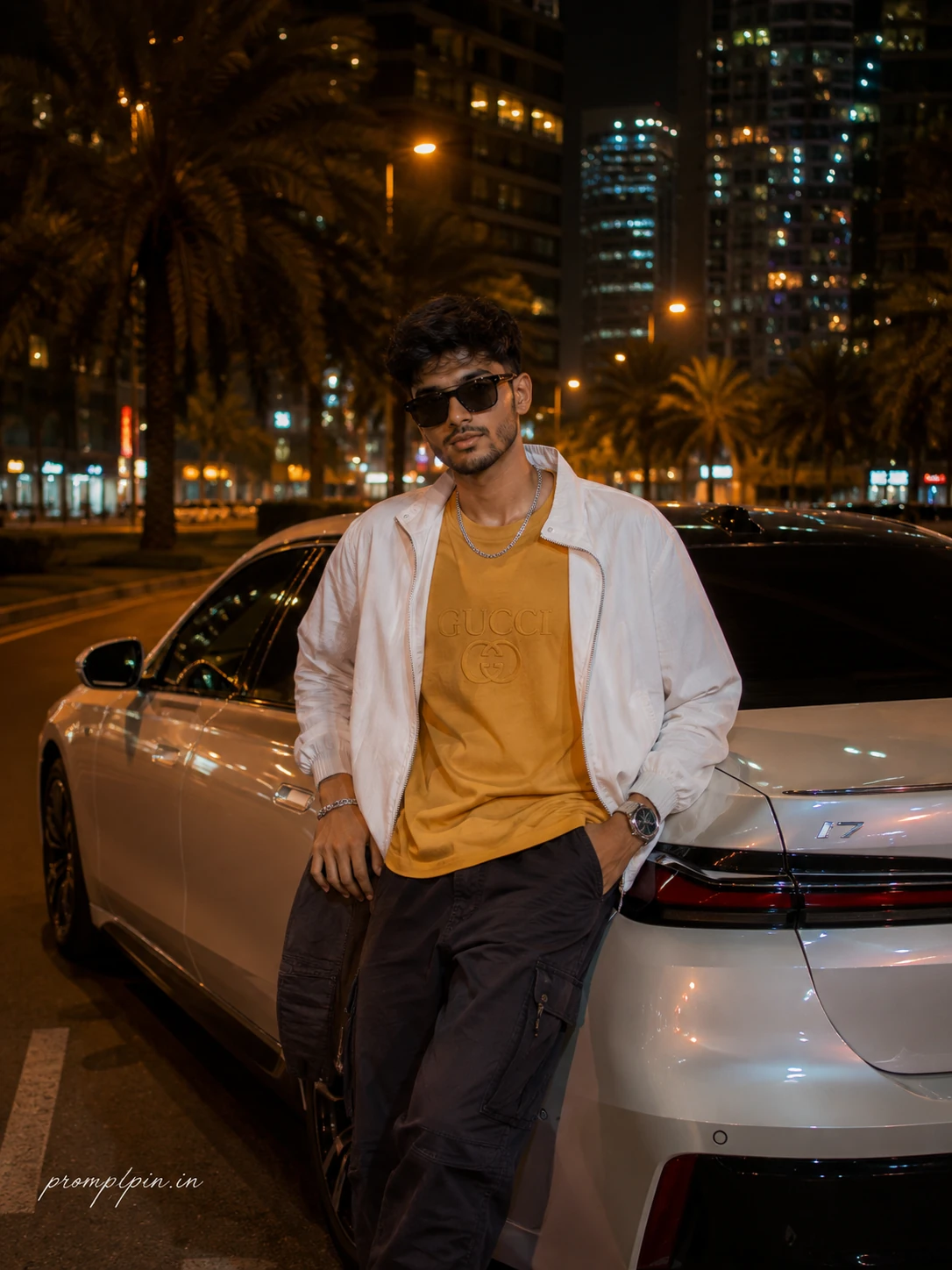
Luxury Car Night City Portrait Prompt for Boys
The story behind this one: the BMW’s white paintwork picking up the amber city lighting and the ghosted skyline reflections in the glass is the detail doing the heavy lifting — it’s what separates this from ‘person standing near a car’ into an actual night-city editorial shot. The streetwear mix here (graphic tee, ripstop half-zip, cargo pants, chain) is deliberately more casual than the luxury car around him, which is closer to how the car-and-fit combination actually gets worn than an all-formal outfit would be.
Copy this portrait prompt below and paste it into ChatGPT with your own photo.
A warm amber city night is already glowing across the wide London-style road when a confident young Indian man steps into frame, his face staying 100% true to the uploaded photo with his jawline, skin tone, beard style, eye shape, and natural expression remaining exactly identical. He stands leaning casually against the passenger door of a sleek white BMW i7 parked on a wide modern city street lined with tall dark palm trees and glass skyscrapers rising behind him in soft bokeh. One hand rests easy on the car’s glossy door panel, the other tucked into his cargo pocket, posture relaxed and completely confident, gaze aimed direct into camera with a calm expression that reads effortlessly cool. He is wearing a mustard yellow oversized graphic tee with a tonal Gucci chest print, layered under a white half-zip cargo jacket in matte ripstop fabric, dark charcoal cargo pants with zip pockets, silver chain, metal bracelet on the left wrist, a clean stainless steel wristwatch, and black rectangular sunglasses. The BMW’s white paintwork catches the city amber and neon reflections perfectly, glass panels showing ghost images of the skyline. His hair is clean and tapered, minimal beard, RAW natural skin texture visible under the warm nighttime bokeh glow. Captured on a Sony A7IV at 50mm f/1.8, ISO 800, 1/100s shutter, warm amber and deep navy color grading, cinematic night photography quality with hyper realistic portrait-level skin detail. Shot in 3:4 vertical aspect ratio. Shot with premium editorial sensibility, clean and classy, platform-safe from every angle, natural skin, cinematic light quality throughout. Add “promptpin.in” as a small watermark at the bottom-left corner, Petit Formal Script font, thin elegant cursive strokes, soft white color rgba(FFFFFF), 1px letter-spacing, subtle premium handwritten signature style, slight transparency, minimal and refined, no background on text, blends naturally into the image.
Best with: ChatGPT
This portrait prompt turns an ordinary photo into a polished portrait image in a single generation. You get the same look you see above — no editing skills needed. It leans on neon lighting, an outdoor setting and a cinematic finish.
What this prompt creates
The instruction places the subject in an outdoor setting, lights them with neon lighting, finishes with a cinematic finish and and frames it as a vertical 9:16 frame. At roughly 304 words it is a detailed prompt, so expect the model to follow it closely — either way, the result stays recognisably you because the source photo drives the likeness.
How to use this portrait prompt
- Tap Copy prompt above to copy the full text.
- Open ChatGPT and start a new chat.
- Upload the photo you want to transform.
- Paste the prompt and send it.
- If the first result is not quite right, regenerate once or twice — small changes in wording shift the style a lot.
Tips for a better result
- Match the light. This prompt asks for neon lighting, so a source photo shot in similar conditions needs far less correction.
- Mind the background. It replaces your backdrop with an outdoor setting — a source photo with a plain or blurred background swaps over most cleanly.
- Shoot for the crop. The output is a vertical 9:16 frame, so leave headroom in your original rather than filling the frame.
- Crop before you generate. Removing clutter from the edges usually beats asking the model to remove it.
- Say what you don’t want. Adding “no text, no watermark” at the end removes most stray artefacts.
Who this portrait prompt suits
This one works especially well for Boys. It suits Instagram posts, profile pictures, and WhatsApp display photos, and it holds up on both phone and desktop screens.
More prompts like this
Browse every portrait prompt in this collection, or head back to the PromptPin homepage for the newest AI photo prompts. All of them are free to copy and use.
What makes this portrait style work
Three things do most of the heavy lifting here. The lighting is described precisely rather than left to chance. The framing and camera angle are stated up front, which keeps the subject in proportion. And the finish — grain, contrast, and colour grade — is spelled out at the end, which is what separates a snapshot from something that looks deliberately shot.
You can reuse this structure for your own ideas. Keep the sentence order — subject, setting, lighting, camera, finish — and swap the descriptive words. Prompts written this way behave far more predictably than one long sentence.
More prompts like this
- Scarlet Confidence Portrait AI Photo Prompt for Girls
- Radiant Autumn Romance Portrait AI Photo Prompt for Girls
- Steel & Silk Contrast Portrait AI Photo Prompt for Girls
- Midnight Royalty Portrait AI Photo Prompt for Girls
- Black & White Portrait AI Photo Prompt for Boys
- Ivory Calm Portrait AI Photo Prompt for Girls
- Trending Black Devil Photo Editing Prompt
