
4 Latest Beach Edit Promot Aesthetic AI Photo Prompt for Boys
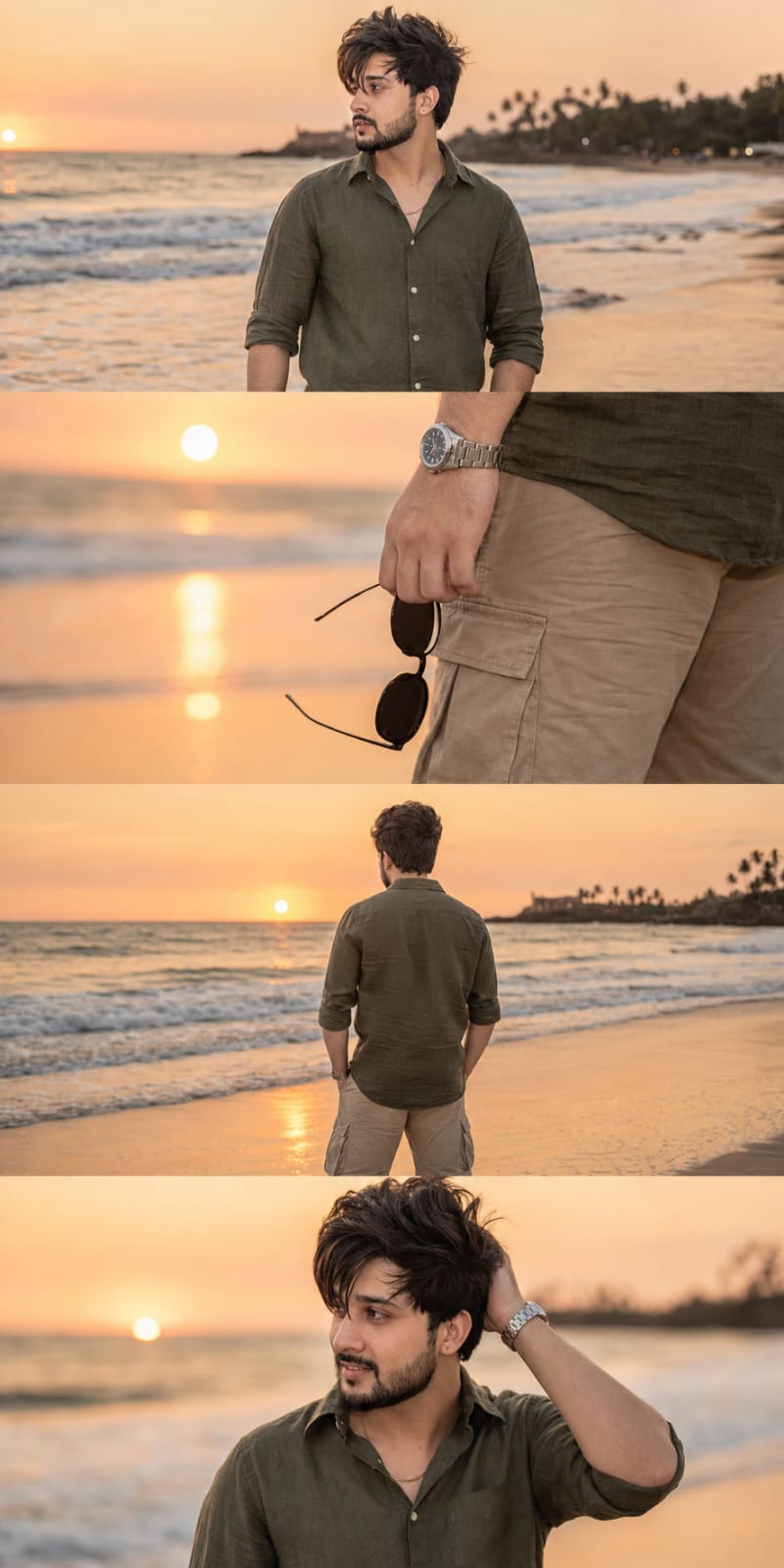
The story behind this one: each of the four photos captures a different small habit rather than four versions of the same standing pose — a side-profile look at the horizon, a close detail of the hand holding sunglasses, a back view at the shoreline, hair being touched while smiling. That range of small moments is what makes it read as a real beach evening someone lived through rather than four takes of one photo shoot.
Copy this aesthetic ai photo prompt below and paste it into ChatGPT with your own photo.
Ultra-realistic DSLR cinematic beach photoshoot collage featuring the SAME person from the uploaded reference image. Preserve face identity 100% exactly — same facial structure, hairstyle, beard shape, jawline, skin texture, expression style, body proportions, and natural appearance. Do NOT modify or beautify the face. Maintain original realistic Indian male look with authentic features.

Create an Instagram portrait size 4-photo vertical collage (1080x1350) exactly like a trendy cinematic reel cover. Keep the SAME collage layout and framing style as the reference image.

Scene: golden sunset beach with pastel orange-pink sky, soft ocean waves, wet reflective sand, dreamy tropical atmosphere, warm cinematic sunlight, shallow depth of field, realistic DSLR photography, highly detailed skin texture, soft natural color grading.

Outfit: olive green linen shirt with rolled sleeves, beige cargo shorts, silver wrist watch, holding black round sunglasses.

Photo 1: medium side-profile portrait looking towards the horizon, calm expression, ocean waves behind.
Photo 2: close-up shot of hand holding black sunglasses near shorts pocket, cinematic focus blur background.
Photo 3: back pose standing near shoreline facing ocean during sunset, relaxed posture.
Photo 4: candid pose touching hair while smiling slightly, warm sunlight on face, soft breeze effect.

Composition: exact same vertical stacked collage layout with thin borders between photos, aesthetic Instagram reel-cover style, smooth warm tones, balanced spacing, realistic shadows and lighting.

Camera settings: DSLR quality, 85mm lens, f/1.8 aperture, ultra realistic, HDR, natural skin texture, cinematic travel photography style, 4K details.

Negative prompt: blurry face, extra fingers, distorted body, cartoon look, over-editing, unrealistic skin, AI face changes, low quality, duplicate person, bad anatomy, overexposed lighting, watermark, text.
Best with: ChatGPT
This aesthetic ai photo prompt turns an ordinary photo into a polished aesthetic image in a single generation. You get the same look you see above — no editing skills needed. It leans on golden-hour light, an outdoor setting and a cinematic finish.
What this prompt creates
The instruction places the subject in an outdoor setting, lights them with golden-hour light, finishes with a cinematic finish and and frames it as a vertical 9:16 frame. At roughly 258 words it is a detailed prompt, so expect the model to follow it closely — either way, the result stays recognisably you because the source photo drives the likeness.
How to use this aesthetic ai photo prompt
- Tap Copy prompt above to copy the full text.
- Open ChatGPT and start a new chat.
- Upload the photo you want to transform.
- Paste the prompt and send it.
- If the first result is not quite right, regenerate once or twice — small changes in wording shift the style a lot.
Tips for a better result
- Match the light. This prompt asks for golden-hour light, so a source photo shot in similar conditions needs far less correction.
- Mind the background. It replaces your backdrop with an outdoor setting — a source photo with a plain or blurred background swaps over most cleanly.
- Shoot for the crop. The output is a vertical 9:16 frame, so leave headroom in your original rather than filling the frame.
- Keep the face unchanged. Add “keep my face exactly the same” if the likeness drifts.
- Change one thing at a time. Edit the colour, outfit, or background separately rather than all at once.
Who this aesthetic prompt suits
This one works especially well for Boys. It suits Instagram posts, profile pictures, and WhatsApp display photos, and it holds up on both phone and desktop screens.
More prompts like this
Browse every aesthetic prompt in this collection, or head back to the PromptPin homepage for the newest AI photo prompts. All of them are free to copy and use.
What makes this aesthetic style work
Three things do most of the heavy lifting here. The lighting is described precisely rather than left to chance. The framing and camera angle are stated up front, which keeps the subject in proportion. And the finish — grain, contrast, and colour grade — is spelled out at the end, which is what separates a snapshot from something that looks deliberately shot.
You can reuse this structure for your own ideas. Keep the sentence order — subject, setting, lighting, camera, finish — and swap the descriptive words. Prompts written this way behave far more predictably than one long sentence.
More prompts like this
- Photo With Horse Royal Vibe
- Lakeside Couple Love Edit Aesthetic AI Photo Prompt
- Viral Flower Field AI Photo Collage Prompt
- Modern minimalism Aesthetic AI Photo Prompt for Girls
- Golden Petal Reverie Aesthetic AI Photo Prompt for Girls
- Violet Velocity Aesthetic AI Photo Prompt for Girls
- Trending Black Devil Photo Editing Prompt
