
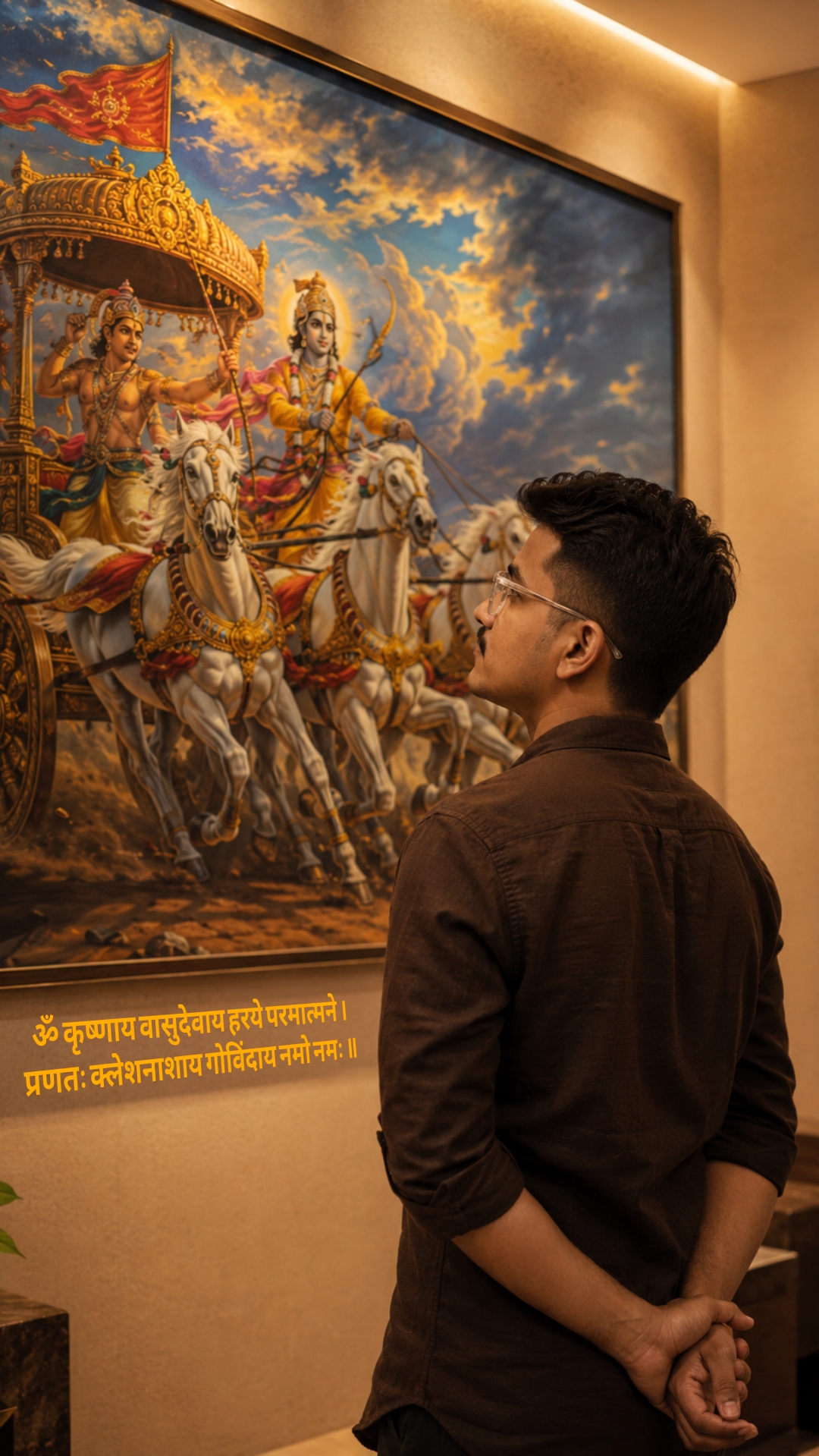
The story behind this one: the deliberate off-centre camera angle, shot from slightly left-back rather than straight on, is what keeps this from looking like a person posing in front of a poster — it reads as someone caught mid-thought, genuinely absorbed in the painting rather than performing for the camera. Hands folded behind the back and head tilted slightly up are a specific posture choice meant to suggest quiet reflection rather than a devotional pose aimed at the viewer.
Copy this festival ai photo prompt below and paste it into ChatGPT with your own photo.
Transform the uploaded reference person into an ultra-realistic cinematic Bhagavad Gita inspired scene while preserving ONLY the exact facial identity, hairstyle, beard details, skin tone, and natural human realism from the uploaded reference image.

IMPORTANT CAMERA ANGLE: the

image should feel naturally clicked slightly from the left-back side perspective, not perfectly centered. The camera must capture both the person and the Mahabharata painting clearly in the frame exactly like a casual cinematic candid photo.

The person should stand calmly facing the painting with both hands folded behind the back, giving a mature, leadership, wiseemotionally powerful, and self-controlled aura. The head should be slightly raised upward as if deeply thinking and absorbing the wisdom of Bhagavad Gita.

Only a subtle portion of the side jawline and hairstyle should be visible naturally from the left-back angle - not a full side face

Outfit should be a realistic premium dark earthy-brown cotton shirt with soft rolled sleeves, natural wrinkles, realistic texture, and masculine minimal Indian aesthetic exactly like a stylish everyday luxury look.

Environment should look like a realistic modern Indian luxury room or elegant home interior with soft cream/beige walls and warm cinematic indoor lighting.

The Mahabharata painting should be colorful, rich, vibrant, and highly detailed - Lord Krishna driving the divine chariot with Arjuna, white horses in motion, dramatic clouds, spiritual battlefield atmosphere, golden-orange tones, rich blue sky, premium mythological

realism.

The painting should remain fully visible while the person occupies the lower-right or center-right foreground naturally, creating balanced cinematic composition.

Lighting style: realistic warm room lighting with subtle top glow above the artwork, natural indoor shadows, soft highlights on hair and shoulders, realistic depth and cinematic warmth.

The overall image must look like real DSLR or iPhone portrait photograph captured naturally inside a luxury modern home - absolutely NO anime look, NO Al-art appearance, NO illustration style.

Ultra-photorealistic cinematic photography, authentic skin texture, realistic brown shirt fabric, natural hair details, cinematic color grading, subtle depth of field, premium Instagram aesthetic, emotionally powerful masculine leadership vibe.

No text, no captions, no watermark, no Ul elements.

Vertical 9:16 composition
Best with: ChatGPT
This festival ai photo prompt turns an ordinary photo into a polished festival image in a single generation. You get the same look you see above — no editing skills needed. It leans on moody low light, an outdoor setting and a cinematic finish.
What this prompt creates
The instruction places the subject in an outdoor setting, lights them with moody low light, finishes with a cinematic finish and and frames it as a vertical 9:16 frame. At roughly 347 words it is a detailed prompt, so expect the model to follow it closely — either way, the result stays recognisably you because the source photo drives the likeness.
How to use this festival ai photo prompt
- Tap Copy prompt above to copy the full text.
- Open ChatGPT and start a new chat.
- Upload the photo you want to transform.
- Paste the prompt and send it.
- If the first result is not quite right, regenerate once or twice — small changes in wording shift the style a lot.
Tips for a better result
- Match the light. This prompt asks for moody low light, so a source photo shot in similar conditions needs far less correction.
- Mind the background. It replaces your backdrop with an outdoor setting — a source photo with a plain or blurred background swaps over most cleanly.
- Shoot for the crop. The output is a vertical 9:16 frame, so leave headroom in your original rather than filling the frame.
- Start from the highest-resolution copy you have. Detail the model can see is detail it can keep.
- Crop before you generate. Removing clutter from the edges usually beats asking the model to remove it.
Who this festival prompt suits
This one works especially well for Boys. It suits Instagram posts, profile pictures, and WhatsApp display photos, and it holds up on both phone and desktop screens.
More prompts like this
Browse every festival prompt in this collection, or head back to the PromptPin homepage for the newest AI photo prompts. All of them are free to copy and use.
What makes this festival style work
Three things do most of the heavy lifting here. The lighting is described precisely rather than left to chance. The framing and camera angle are stated up front, which keeps the subject in proportion. And the finish — grain, contrast, and colour grade — is spelled out at the end, which is what separates a snapshot from something that looks deliberately shot.
You can reuse this structure for your own ideas. Keep the sentence order — subject, setting, lighting, camera, finish — and swap the descriptive words. Prompts written this way behave far more predictably than one long sentence.
More prompts like this
- Shree Krishna Prompt Festival AI Photo Prompt for Girls
- Rainy Season Couple Photo Prompts
- Sawan 2026 Shiv Abhishek AI Photo Prompt
- Kedarnath Temple Photo Prompts Festival AI Photo Prompt for Boys
- Kedarnath Prompt For Girls Festival AI Photo Prompt
- Kedarnath Photo Prompt For Girls
- Trending Black Devil Photo Editing Prompt