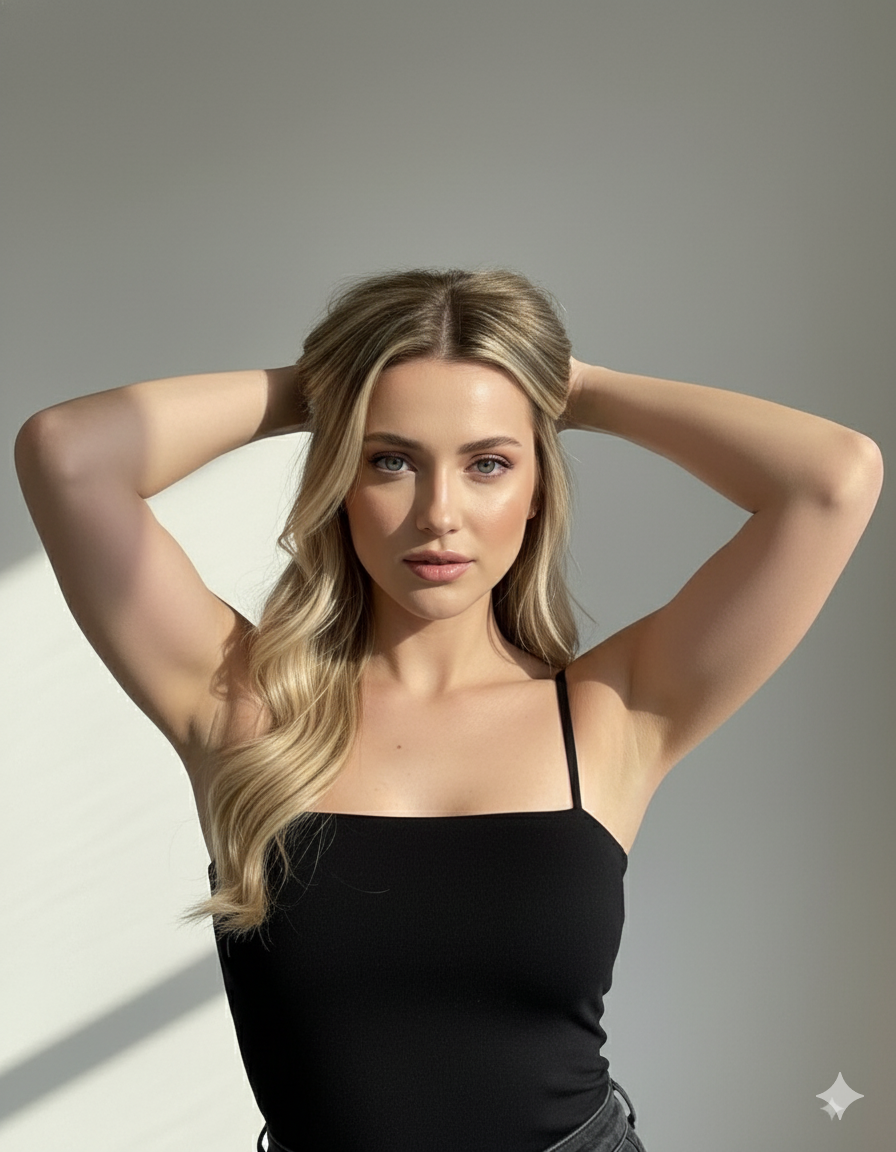
The story behind this one: written in Portuguese, this prompt repeats its core instruction twice in different words, ‘don’t change any of my physical features’ stated once at the start and again at the end, an unusually emphatic, doubled-up likeness requirement compared to most prompts on the site. Light entering specifically through a window, rather than a studio softbox, is what creates the described ‘faixas de luz e sombra’ (stripes of light and shadow) across the face and body, a striped effect a flat studio light couldn’t produce.
इस तस्वीर के पीछे की कहानी: पुर्तगाली में लिखा यह प्रॉम्प्ट अपना मुख्य निर्देश दो बार अलग शब्दों में दोहराता है, ‘मेरी किसी भी शारीरिक विशेषता को मत बदलो’ एक बार शुरुआत में और फिर आखिर में, साइट के ज्यादातर प्रॉम्प्ट के मुकाबले असामान्य रूप से ज़ोर देती, दोहराई गई समानता की मांग। स्टूडियो सॉफ्टबॉक्स के बजाय खासतौर पर एक खिड़की से आती रोशनी ही चेहरे और शरीर पर बताई गई ‘faixas de luz e sombra’ (रोशनी और छाया की धारियां) बनाती है, एक धारीदार इफ़ेक्ट जो एक सपाट स्टूडियो लाइट नहीं बना सकती थी।
આ ફોટા પાછળની વાત: પોર્ટુગીઝમાં લખાયેલું આ પ્રોમ્પ્ટ પોતાની મુખ્ય સૂચના બે વાર અલગ શબ્દોમાં દોહરાવે છે, ‘મારી કોઈ પણ શારીરિક ખાસિયત ન બદલો’ એક વાર શરૂઆતમાં અને ફરી અંતે, સાઇટના મોટા ભાગના પ્રોમ્પ્ટની સરખામણીમાં અસામાન્ય રીતે ભાર દેતી, દોહરાવેલી સામ્યતાની માંગ. સ્ટુડિયો સોફ્ટબોક્સને બદલે ખાસ કરીને એક બારીમાંથી આવતી રોશની જ ચહેરા અને શરીર પર કહેલી ‘faixas de luz e sombra’ (રોશની અને છાયાની પટ્ટીઓ) બનાવે છે, એક પટ્ટીવાળો ઇફેક્ટ જે એક સપાટ સ્ટુડિયો લાઇટ બનાવી ન શકે.
Copy this portrait ai photo prompt below and paste it into ChatGPT with your own photo.
नीचे दिया गया portrait ai photo prompt कॉपी करें और अपनी फ़ोटो के साथ ChatGPT में पेस्ट करें।
નીચે આપેલ portrait ai photo prompt કૉપિ કરો અને તમારા ફોટા સાથે ChatGPT માં પેસ્ટ કરો.
Prompt
Crie uma imagem realista com o MEU ROSTO e a MINHA APARÊNCIA exatamente como na foto que enviei — não mude absolutamente nenhuma das minhas características físicas (rosto, traços, formato dos olhos, nariz, boca, pele, cabelo, corpo etc). Apenas replique o estilo e a composição da imagem abaixo com fidelidade.

A pessoa deve estar com os braços erguidos atrás da cabeça, em uma pose confiante e sensual. A iluminação deve vir de uma janela, projetando faixas de luz e sombra no rosto e no corpo, criando um contraste dramático e artístico. A luz deve destacar principalmente os olhos e o brilho natural da pele.

O fundo deve ser simples e neutro, em tom claro, para manter o foco no rosto. O clima geral da imagem precisa ser intimista, elegante e cinematográfico, com um toque de mistério e intensidade no olhar.

A maquiagem deve ser natural e iluminada, com pele glow e lábios com leve brilho. Os cabelos devem estar soltos, com aparência natural e volume suave. A roupa deve ser uma blusa preta com alças, deixando os ombros à mostra.

Importante: mantenha 100% das minhas características reais — não altere o formato do rosto, olhos, nariz, boca, cor da pele, cabelo ou qualquer traço físico meu. Apenas insira minha aparência nessa mesma pose, iluminação e estilo descritos
Best with:ChatGPT
सबसे अच्छा चलता है:ChatGPT
સૌથી સારું ચાલે છે:ChatGPT
This portrait ai photo prompt turns an ordinary photo into a polished portrait image in a single generation. You get the same look you see above — no editing skills needed. It describes the scene in enough detail that the model has little left to guess at.
How to use this portrait ai photo prompt
Tap Copy prompt above to copy the full text.
Open ChatGPT and start a new chat.
Upload the photo you want to transform.
Paste the prompt and send it.
If the first result is not quite right, regenerate once or twice — small changes in wording shift the style a lot.
Tips for a better result
Crop before you generate. Removing clutter from the edges usually beats asking the model to remove it.
Say what you don’t want. Adding “no text, no watermark” at the end removes most stray artefacts.
Keep the face unchanged. Add “keep my face exactly the same” if the likeness drifts.
Who this portrait prompt suits
This one works especially well for Girls. It suits Instagram posts, profile pictures, and WhatsApp display photos, and it holds up on both phone and desktop screens.
More prompts like this
Browse every portrait prompt in this collection, or head back to the PromptPin homepage for the newest AI photo prompts. All of them are free to copy and use.
Three things do most of the heavy lifting here. The lighting is described precisely rather than left to chance. The framing and camera angle are stated up front, which keeps the subject in proportion. And the finish — grain, contrast, and colour grade — is spelled out at the end, which is what separates a snapshot from something that looks deliberately shot.
You can reuse this structure for your own ideas. Keep the sentence order — subject, setting, lighting, camera, finish — and swap the descriptive words. Prompts written this way behave far more predictably than one long sentence.
यह portrait ai photo prompt एक साधारण फ़ोटो को एक ही बार में शानदार portrait इमेज में बदल देता है। आपको ऊपर दिखने वाला वैसा ही लुक मिलेगा — किसी एडिटिंग स्किल की ज़रूरत नहीं। It describes the scene in enough detail that the model has little left to guess at.
इस प्रॉम्प्ट का उपयोग कैसे करें
ऊपर Copy prompt पर टैप करके पूरा टेक्स्ट कॉपी करें।
ChatGPT खोलें और नई चैट शुरू करें।
जिस फ़ोटो को बदलना है उसे अपलोड करें।
प्रॉम्प्ट पेस्ट करें और भेज दें।
अगर पहला रिज़ल्ट सही न लगे तो एक-दो बार दोबारा जनरेट करें — शब्दों में छोटा बदलाव भी स्टाइल काफ़ी बदल देता है।
बेहतर रिज़ल्ट के लिए टिप्स
जनरेट करने से पहले क्रॉप करें। किनारों की गंदगी खुद हटाना, मॉडल से हटवाने की तुलना में बेहतर रहता है।
जो नहीं चाहिए वह भी बताएँ। अंत में “no text, no watermark” जोड़ने से ज़्यादातर फालतू चीज़ें हट जाती हैं।
चेहरा वैसा ही रखें। अगर चेहरा बदलने लगे तो “keep my face exactly the same” जोड़ दें।
यह प्रॉम्प्ट किसके लिए सही है
यह ख़ास तौर पर Girls के लिए अच्छा है। यह इंस्टाग्राम पोस्ट, प्रोफ़ाइल फ़ोटो और व्हाट्सऐप डीपी के लिए सही रहता है, और फ़ोन व कंप्यूटर दोनों पर अच्छा दिखता है।
इसमें तीन चीज़ें सबसे ज़्यादा काम करती हैं। रोशनी को अंदाज़े पर नहीं छोड़ा गया, साफ़-साफ़ बताया गया है। फ़्रेमिंग और कैमरा एंगल पहले ही तय है, जिससे चेहरा सही अनुपात में रहता है। और आख़िर में फ़िनिश — ग्रेन, कंट्रास्ट और कलर ग्रेड — बताया गया है, यही आम फ़ोटो और प्रोफ़ेशनल दिखने वाली फ़ोटो का फ़र्क़ है।
आप इसी ढाँचे को अपने आइडिया के लिए भी इस्तेमाल कर सकते हैं। क्रम वही रखें — सब्जेक्ट, जगह, रोशनी, कैमरा, फ़िनिश — और सिर्फ़ शब्द बदलें। इस तरह लिखे प्रॉम्प्ट एक लंबे वाक्य से कहीं बेहतर काम करते हैं।
આ portrait ai photo prompt સામાન્ય ફોટાને એક જ વારમાં સુંદર portrait ઇમેજમાં ફેરવે છે. તમને ઉપર દેખાય છે તેવો જ લુક મળશે — કોઈ એડિટિંગ સ્કિલની જરૂર નથી. It describes the scene in enough detail that the model has little left to guess at.
આ પ્રોમ્પ્ટનો ઉપયોગ કેવી રીતે કરવો
ઉપર Copy prompt પર ટૅપ કરીને આખો ટેક્સ્ટ કૉપિ કરો.
ChatGPT ખોલો અને નવી ચેટ શરૂ કરો.
જે ફોટો બદલવો છે તે અપલોડ કરો.
પ્રોમ્પ્ટ પેસ્ટ કરો અને મોકલો.
જો પહેલું પરિણામ બરાબર ન લાગે તો એક-બે વાર ફરી જનરેટ કરો — શબ્દોમાં નાનો ફેરફાર પણ સ્ટાઇલ ઘણી બદલે છે.
વધુ સારા પરિણામ માટે ટિપ્સ
જનરેટ કરતાં પહેલાં ક્રૉપ કરો. કિનારીની ગડબડ જાતે હટાવવી, મૉડલ પાસે હટાવડાવવા કરતાં સારું રહે છે.
જે નથી જોઈતું તે પણ કહો. અંતે “no text, no watermark” ઉમેરવાથી મોટા ભાગની બિનજરૂરી વસ્તુઓ હટી જાય છે.
ચહેરો એવો જ રાખો. જો ચહેરો બદલાવા લાગે તો “keep my face exactly the same” ઉમેરો.
આ પ્રોમ્પ્ટ કોના માટે યોગ્ય છે
આ ખાસ કરીને Girls માટે સારું છે. તે ઇન્સ્ટાગ્રામ પોસ્ટ, પ્રોફાઇલ ફોટો અને વૉટ્સઍપ ડીપી માટે યોગ્ય છે, અને ફોન તથા કમ્પ્યુટર બંને પર સારું દેખાય છે.
આમાં ત્રણ વસ્તુઓ સૌથી વધુ કામ કરે છે. પ્રકાશ અંદાજ પર છોડ્યો નથી, સ્પષ્ટ રીતે જણાવ્યો છે. ફ્રેમિંગ અને કૅમેરા ઍન્ગલ પહેલેથી નક્કી છે, જેથી ચહેરો યોગ્ય પ્રમાણમાં રહે. અને અંતે ફિનિશ — ગ્રેન, કૉન્ટ્રાસ્ટ અને કલર ગ્રેડ — જણાવ્યું છે, એ જ સામાન્ય ફોટા અને પ્રોફેશનલ દેખાતા ફોટા વચ્ચેનો ફરક છે.
તમે આ જ ઢાંચો તમારા આઇડિયા માટે પણ વાપરી શકો છો. ક્રમ એ જ રાખો — સબ્જેક્ટ, જગ્યા, પ્રકાશ, કૅમેરા, ફિનિશ — અને ફક્ત શબ્દો બદલો. આ રીતે લખેલા પ્રોમ્પ્ટ એક લાંબા વાક્ય કરતાં ઘણું સારું કામ કરે છે.