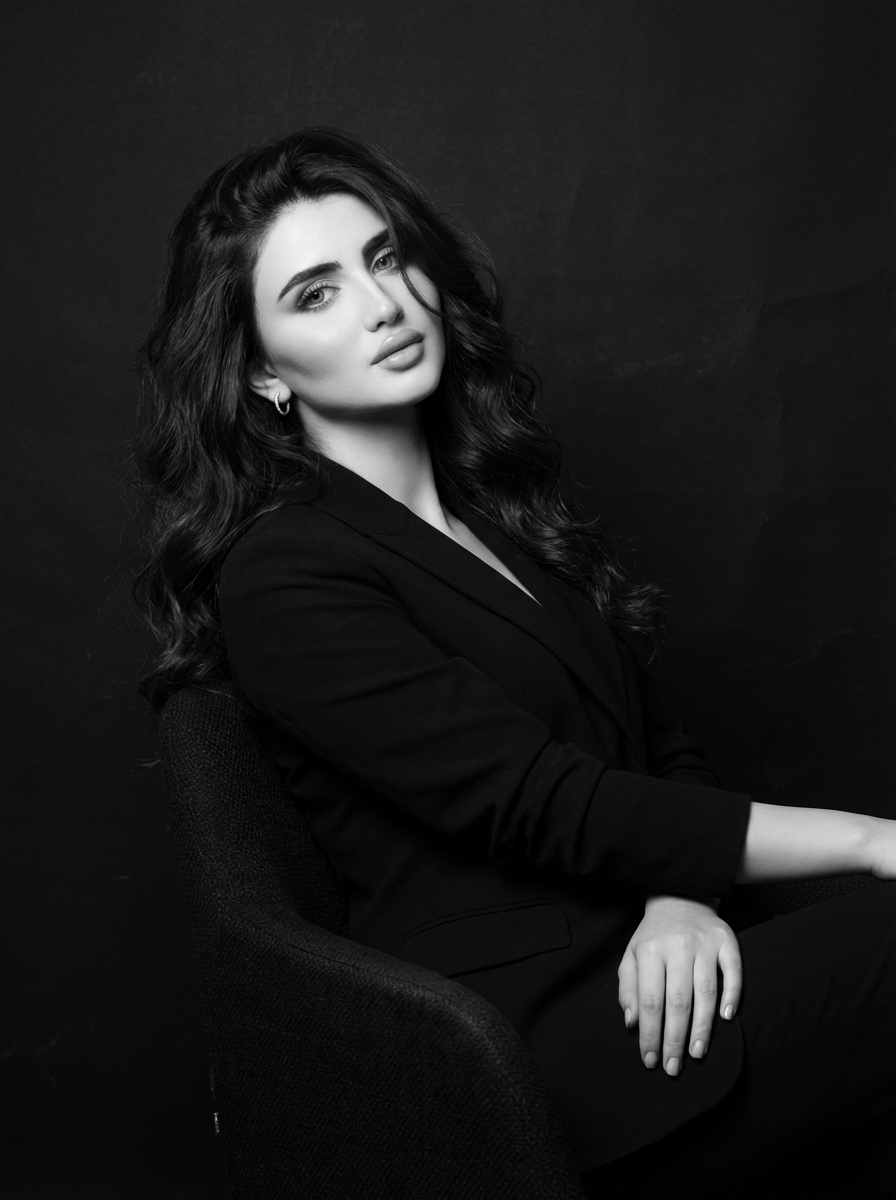
The story behind this one: ‘one arm rests along the chair, wrist subtly turned’ while the other ‘frames her posture with quiet authority’ is a prompt describing two hands doing two different jobs at once, one relaxed, one composed, rather than a single symmetrical pose. A single ‘loose strand crossing her face’ is a deliberately small imperfection dropped into an otherwise very controlled, tailored look, keeping it human rather than mannequin-still.
इस तस्वीर के पीछे की कहानी: ‘एक हाथ कुर्सी के साथ टिका है, कलाई हल्के से मुड़ी हुई’ जबकि दूसरा ‘उसकी मुद्रा को शांत अथॉरिटी के साथ फ्रेम करता है’ एक ऐसा प्रॉम्प्ट है जो एक सममित पोज़ के बजाय दो हाथों को एक साथ दो अलग काम करते हुए बताता है, एक रिलैक्स्ड, एक संयत। एक अकेली ‘उसके चेहरे पर आती ढीली लट’ एक जानबूझकर डाली गई छोटी खामी है, बाकी बहुत नियंत्रित, बनी-ठनी लुक में, इसे मैनिक्विन जैसे स्थिर होने से बचाते हुए।
આ ફોટા પાછળની વાત: ‘એક હાથ ખુરશી સાથે ટેકવેલો છે, કાંડું હળવેથી વળેલું’ જ્યારે બીજો ‘તેની મુદ્રાને શાંત ઓથોરિટી સાથે ફ્રેમ કરે છે’ એક એવો પ્રોમ્પ્ટ છે જે એક સપ્રમાણ પોઝને બદલે બે હાથોને એકસાથે બે અલગ કામ કરતાં બતાવે છે, એક રિલેક્સ્ડ, એક સંયત. એક એકલી ‘તેના ચહેરા પર આવતી ઢીલી લટ’ એક ઈરાદાપૂર્વક નાખેલી નાની ખામી છે, બાકીના ખૂબ નિયંત્રિત, બની-ઠનેલી લુકમાં, તેને પૂતળા જેવી સ્થિર થવાથી બચાવતાં.
Copy this portrait ai photo prompt below and paste it into ChatGPT with your own photo.
नीचे दिया गया portrait ai photo prompt कॉपी करें और अपनी फ़ोटो के साथ ChatGPT में पेस्ट करें।
નીચે આપેલ portrait ai photo prompt કૉપિ કરો અને તમારા ફોટા સાથે ChatGPT માં પેસ્ટ કરો.
Prompt
A sophisticated woman sits slightly angled, shoulders relaxed yet composed. One arm rests along the chair, wrist subtly turned, while the other frames her posture with quiet authority. Her head tilts gently toward the camera, eyes calm and self-assured.
She wears a tailored dark blazer with clean lines, rendered in rich monochrome tones. Her voluminous, wavy dark hair flows over one shoulder, a loose strand crossing her face for a natural, intimate feel. Small hoop earrings catch a soft highlight.
Directional studio lighting creates elegant shadows along her cheekbones and jawline, with luminous highlights that give her skin a porcelain glow. The background remains minimal and textured, allowing contrast and expression to dominate.
Best with:ChatGPT
सबसे अच्छा चलता है:ChatGPT
સૌથી સારું ચાલે છે:ChatGPT
This portrait ai photo prompt turns an ordinary photo into a polished portrait image in a single generation. You get the same look you see above — no editing skills needed. It leans on soft studio lighting, a studio backdrop and a black-and-white treatment.
What this prompt creates
The instruction places the subject in a studio backdrop, lights them with soft studio lighting and finishes with a black-and-white treatment. At roughly 113 words it is a compact prompt, which leaves the model room to interpret — either way, the result stays recognisably you because the source photo drives the likeness.
How to use this portrait ai photo prompt
Tap Copy prompt above to copy the full text.
Open ChatGPT and start a new chat.
Upload the photo you want to transform.
Paste the prompt and send it.
If the first result is not quite right, regenerate once or twice — small changes in wording shift the style a lot.
Tips for a better result
Match the light. This prompt asks for soft studio lighting, so a source photo shot in similar conditions needs far less correction.
Mind the background. It replaces your backdrop with a studio backdrop — a source photo with a plain or blurred background swaps over most cleanly.
Change one thing at a time. Edit the colour, outfit, or background separately rather than all at once.
Try it twice. Image models are random — a second run often looks noticeably better.
Start from the highest-resolution copy you have. Detail the model can see is detail it can keep.
Who this portrait prompt suits
This one works especially well for Girls. It suits Instagram posts, profile pictures, and WhatsApp display photos, and it holds up on both phone and desktop screens.
More prompts like this
Browse every portrait prompt in this collection, or head back to the PromptPin homepage for the newest AI photo prompts. All of them are free to copy and use.
Three things do most of the heavy lifting here. The lighting is described precisely rather than left to chance. The framing and camera angle are stated up front, which keeps the subject in proportion. And the finish — grain, contrast, and colour grade — is spelled out at the end, which is what separates a snapshot from something that looks deliberately shot.
You can reuse this structure for your own ideas. Keep the sentence order — subject, setting, lighting, camera, finish — and swap the descriptive words. Prompts written this way behave far more predictably than one long sentence.
यह portrait ai photo prompt एक साधारण फ़ोटो को एक ही बार में शानदार portrait इमेज में बदल देता है। आपको ऊपर दिखने वाला वैसा ही लुक मिलेगा — किसी एडिटिंग स्किल की ज़रूरत नहीं। It leans on soft studio lighting, a studio backdrop and a black-and-white treatment.
यह प्रॉम्प्ट क्या बनाता है
The instruction places the subject in a studio backdrop, lights them with soft studio lighting and finishes with a black-and-white treatment. At roughly 113 words it is a compact prompt, which leaves the model room to interpret — either way, the result stays recognisably you because the source photo drives the likeness.
इस प्रॉम्प्ट का उपयोग कैसे करें
ऊपर Copy prompt पर टैप करके पूरा टेक्स्ट कॉपी करें।
ChatGPT खोलें और नई चैट शुरू करें।
जिस फ़ोटो को बदलना है उसे अपलोड करें।
प्रॉम्प्ट पेस्ट करें और भेज दें।
अगर पहला रिज़ल्ट सही न लगे तो एक-दो बार दोबारा जनरेट करें — शब्दों में छोटा बदलाव भी स्टाइल काफ़ी बदल देता है।
बेहतर रिज़ल्ट के लिए टिप्स
रोशनी मिलाएँ। यह प्रॉम्प्ट soft studio lighting माँगता है, इसलिए वैसी ही रोशनी में ली गई फ़ोटो में बहुत कम सुधार करना पड़ता है।
बैकग्राउंड का ध्यान रखें। यह आपके बैकग्राउंड को a studio backdrop से बदल देता है — सादा या धुंधला बैकग्राउंड वाली फ़ोटो सबसे साफ़ बदलती है।
एक बार में एक ही चीज़ बदलें। रंग, कपड़े या बैकग्राउंड — सब एक साथ बदलने के बजाय अलग-अलग बदलें।
दो बार आज़माएँ। इमेज मॉडल हर बार अलग रिज़ल्ट देते हैं — दूसरी बार अक्सर बेहतर आता है।
सबसे अच्छी क्वालिटी वाली फ़ोटो से शुरू करें। मॉडल जो डिटेल देख पाएगा, वही बचा भी पाएगा।
यह प्रॉम्प्ट किसके लिए सही है
यह ख़ास तौर पर Girls के लिए अच्छा है। यह इंस्टाग्राम पोस्ट, प्रोफ़ाइल फ़ोटो और व्हाट्सऐप डीपी के लिए सही रहता है, और फ़ोन व कंप्यूटर दोनों पर अच्छा दिखता है।
इसमें तीन चीज़ें सबसे ज़्यादा काम करती हैं। रोशनी को अंदाज़े पर नहीं छोड़ा गया, साफ़-साफ़ बताया गया है। फ़्रेमिंग और कैमरा एंगल पहले ही तय है, जिससे चेहरा सही अनुपात में रहता है। और आख़िर में फ़िनिश — ग्रेन, कंट्रास्ट और कलर ग्रेड — बताया गया है, यही आम फ़ोटो और प्रोफ़ेशनल दिखने वाली फ़ोटो का फ़र्क़ है।
आप इसी ढाँचे को अपने आइडिया के लिए भी इस्तेमाल कर सकते हैं। क्रम वही रखें — सब्जेक्ट, जगह, रोशनी, कैमरा, फ़िनिश — और सिर्फ़ शब्द बदलें। इस तरह लिखे प्रॉम्प्ट एक लंबे वाक्य से कहीं बेहतर काम करते हैं।
આ portrait ai photo prompt સામાન્ય ફોટાને એક જ વારમાં સુંદર portrait ઇમેજમાં ફેરવે છે. તમને ઉપર દેખાય છે તેવો જ લુક મળશે — કોઈ એડિટિંગ સ્કિલની જરૂર નથી. It leans on soft studio lighting, a studio backdrop and a black-and-white treatment.
આ પ્રોમ્પ્ટ શું બનાવે છે
The instruction places the subject in a studio backdrop, lights them with soft studio lighting and finishes with a black-and-white treatment. At roughly 113 words it is a compact prompt, which leaves the model room to interpret — either way, the result stays recognisably you because the source photo drives the likeness.
આ પ્રોમ્પ્ટનો ઉપયોગ કેવી રીતે કરવો
ઉપર Copy prompt પર ટૅપ કરીને આખો ટેક્સ્ટ કૉપિ કરો.
ChatGPT ખોલો અને નવી ચેટ શરૂ કરો.
જે ફોટો બદલવો છે તે અપલોડ કરો.
પ્રોમ્પ્ટ પેસ્ટ કરો અને મોકલો.
જો પહેલું પરિણામ બરાબર ન લાગે તો એક-બે વાર ફરી જનરેટ કરો — શબ્દોમાં નાનો ફેરફાર પણ સ્ટાઇલ ઘણી બદલે છે.
વધુ સારા પરિણામ માટે ટિપ્સ
પ્રકાશ મેળવો. આ પ્રોમ્પ્ટ soft studio lighting માંગે છે, તેથી તેવી જ રોશનીમાં લીધેલા ફોટામાં ઘણું ઓછું સુધારવું પડે છે.
બૅકગ્રાઉન્ડનું ધ્યાન રાખો. તે તમારા બૅકગ્રાઉન્ડને a studio backdrop થી બદલે છે — સાદા કે ધૂંધળા બૅકગ્રાઉન્ડવાળો ફોટો સૌથી સાફ બદલાય છે.
એક વખતે એક જ વસ્તુ બદલો. રંગ, કપડાં કે બૅકગ્રાઉન્ડ — બધું એકસાથે બદલવાને બદલે અલગ અલગ બદલો.
બે વાર અજમાવો. ઇમેજ મૉડલ દર વખતે અલગ પરિણામ આપે છે — બીજી વાર ઘણી વાર વધુ સારું આવે છે.
સૌથી સારી ક્વૉલિટીવાળા ફોટાથી શરૂ કરો. મૉડલ જે ડિટેલ જોઈ શકે, તે જ જાળવી પણ શકે.
આ પ્રોમ્પ્ટ કોના માટે યોગ્ય છે
આ ખાસ કરીને Girls માટે સારું છે. તે ઇન્સ્ટાગ્રામ પોસ્ટ, પ્રોફાઇલ ફોટો અને વૉટ્સઍપ ડીપી માટે યોગ્ય છે, અને ફોન તથા કમ્પ્યુટર બંને પર સારું દેખાય છે.
આમાં ત્રણ વસ્તુઓ સૌથી વધુ કામ કરે છે. પ્રકાશ અંદાજ પર છોડ્યો નથી, સ્પષ્ટ રીતે જણાવ્યો છે. ફ્રેમિંગ અને કૅમેરા ઍન્ગલ પહેલેથી નક્કી છે, જેથી ચહેરો યોગ્ય પ્રમાણમાં રહે. અને અંતે ફિનિશ — ગ્રેન, કૉન્ટ્રાસ્ટ અને કલર ગ્રેડ — જણાવ્યું છે, એ જ સામાન્ય ફોટા અને પ્રોફેશનલ દેખાતા ફોટા વચ્ચેનો ફરક છે.
તમે આ જ ઢાંચો તમારા આઇડિયા માટે પણ વાપરી શકો છો. ક્રમ એ જ રાખો — સબ્જેક્ટ, જગ્યા, પ્રકાશ, કૅમેરા, ફિનિશ — અને ફક્ત શબ્દો બદલો. આ રીતે લખેલા પ્રોમ્પ્ટ એક લાંબા વાક્ય કરતાં ઘણું સારું કામ કરે છે.