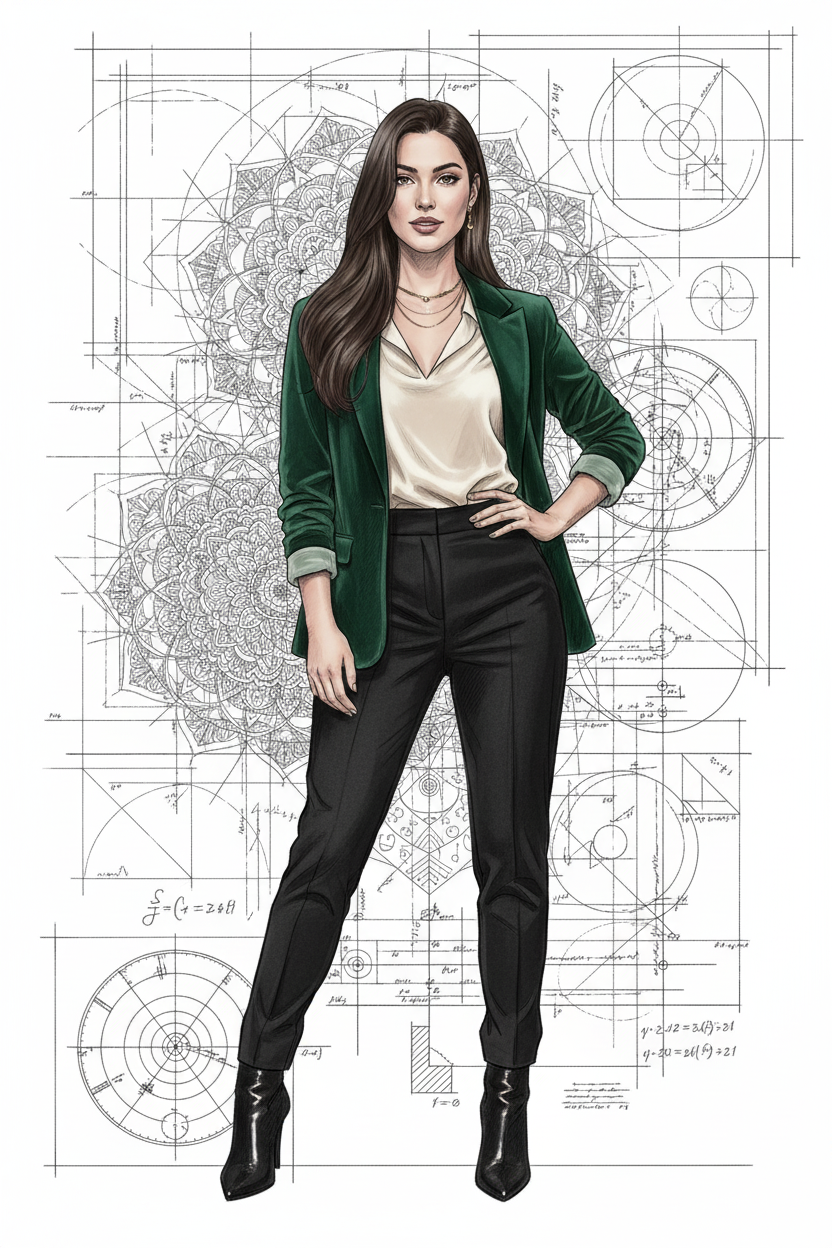
The story behind this one: surrounding her with technical blueprints, mandala patterns, and golden-ratio spirals is what the title’s ‘algorithm’ actually refers to, mathematical and geometric design elements layered around a fashion portrait rather than a generic decorative background. Rendering only her emerald blazer and gold jewelry in full colour while the technical overlay stays as ink-sketch linework is what keeps her the clear focal point despite how detailed and busy the surrounding diagrams are.
इस तस्वीर के पीछे की कहानी: उसे तकनीकी ब्लूप्रिंट, मंडाला पैटर्न और गोल्डन रेशियो स्पाइरल से घेरना ही असल में शीर्षक का ‘एल्गोरिदम’ है, एक फैशन पोर्ट्रेट के इर्द-गिर्द परत दर परत गणितीय और ज्यामितीय डिज़ाइन एलिमेंट, किसी आम सजावटी बैकग्राउंड के बजाय। सिर्फ उसके पन्ना हरे ब्लेज़र और सोने के गहनों को पूरे रंग में रखना जबकि तकनीकी ओवरले इंक-स्केच लाइनवर्क बना रहता है, यही उसे आस-पास के इतने विस्तृत और व्यस्त डायग्राम के बावजूद साफ फोकल पॉइंट बनाए रखता है।
આ ફોટા પાછળની વાત: તેને ટેકનિકલ બ્લુપ્રિન્ટ, મંડાલા પેટર્ન અને ગોલ્ડન રેશિયો સ્પાયરલથી ઘેરવો જ ખરેખર શીર્ષકનું ‘એલ્ગોરિધમ’ છે, એક ફેશન પોર્ટ્રેટની આસપાસ સ્તર દર સ્તર ગાણિતિક અને ભૌમિતિક ડિઝાઇન એલિમેન્ટ, કોઈ સામાન્ય સજાવટી બેકગ્રાઉન્ડને બદલે. ફક્ત તેના પન્ના લીલા બ્લેઝર અને સોનાના ઘરેણાંને પૂરા રંગમાં રાખવો જ્યારે ટેકનિકલ ઓવરલે ઇન્ક-સ્કેચ લાઇનવર્ક રહે છે, આ જ તેને આસપાસના આટલા વિગતવાર અને વ્યસ્ત ડાયાગ્રામ છતાં સ્પષ્ટ ફોકલ પોઇન્ટ રાખે છે.
Copy this cartoon ai photo prompt below and paste it into ChatGPT with your own photo.
नीचे दिया गया cartoon ai photo prompt कॉपी करें और अपनी फ़ोटो के साथ ChatGPT में पेस्ट करें।
નીચે આપેલ cartoon ai photo prompt કૉપિ કરો અને તમારા ફોટા સાથે ChatGPT માં પેસ્ટ કરો.
Prompt
Edit this image to show a woman standing in an elegant asymmetrical pose with one hip slightly shifted and one hand on her hip, captured from eye level. She has sleek, long straight hair flowing past her shoulders with subtle waves at the ends, with a poised expression featuring strong eye contact and a subtle confident smile. She wears a deep emerald green velvet blazer over a cream silk blouse tucked into high-waisted black tailored trousers, paired with pointed-toe heeled ankle boots. Add delicate gold jewelry (thin necklace and small earrings). Her stance is refined and powerful. Surround her with intricate technical blueprints featuring geometric mandala patterns, astronomical charts, golden ratio spirals, elegant calligraphy-style equations, and art deco-inspired measurement lines overlaid throughout the composition. Use a realistic ink sketch art style with selective color highlighting (emerald blazer and gold accents as focal points), soft shadowing techniques, and delicate line work for the technical elements. The overall aesthetic should blend scientific precision with refined sophistication, maintaining photorealistic details while incorporating the technical diagram elements as an artistic framework around her.
Best with:ChatGPT
सबसे अच्छा चलता है:ChatGPT
સૌથી સારું ચાલે છે:ChatGPT
This cartoon ai photo prompt turns an ordinary photo into a polished cartoon image in a single generation. You get the same look you see above — no editing skills needed. It leans on moody low light.
How to use this cartoon ai photo prompt
Tap Copy prompt above to copy the full text.
Open ChatGPT and start a new chat.
Upload the photo you want to transform.
Paste the prompt and send it.
If the first result is not quite right, regenerate once or twice — small changes in wording shift the style a lot.
Tips for a better result
Match the light. This prompt asks for moody low light, so a source photo shot in similar conditions needs far less correction.
Say what you don’t want. Adding “no text, no watermark” at the end removes most stray artefacts.
Keep the face unchanged. Add “keep my face exactly the same” if the likeness drifts.
Change one thing at a time. Edit the colour, outfit, or background separately rather than all at once.
Who this cartoon prompt suits
This one works especially well for Girls. It suits Instagram posts, profile pictures, and WhatsApp display photos, and it holds up on both phone and desktop screens.
More prompts like this
Browse every cartoon prompt in this collection, or head back to the PromptPin homepage for the newest AI photo prompts. All of them are free to copy and use.
Three things do most of the heavy lifting here. The lighting is described precisely rather than left to chance. The framing and camera angle are stated up front, which keeps the subject in proportion. And the finish — grain, contrast, and colour grade — is spelled out at the end, which is what separates a snapshot from something that looks deliberately shot.
You can reuse this structure for your own ideas. Keep the sentence order — subject, setting, lighting, camera, finish — and swap the descriptive words. Prompts written this way behave far more predictably than one long sentence.
यह cartoon ai photo prompt एक साधारण फ़ोटो को एक ही बार में शानदार cartoon इमेज में बदल देता है। आपको ऊपर दिखने वाला वैसा ही लुक मिलेगा — किसी एडिटिंग स्किल की ज़रूरत नहीं। It leans on moody low light.
इस प्रॉम्प्ट का उपयोग कैसे करें
ऊपर Copy prompt पर टैप करके पूरा टेक्स्ट कॉपी करें।
ChatGPT खोलें और नई चैट शुरू करें।
जिस फ़ोटो को बदलना है उसे अपलोड करें।
प्रॉम्प्ट पेस्ट करें और भेज दें।
अगर पहला रिज़ल्ट सही न लगे तो एक-दो बार दोबारा जनरेट करें — शब्दों में छोटा बदलाव भी स्टाइल काफ़ी बदल देता है।
बेहतर रिज़ल्ट के लिए टिप्स
रोशनी मिलाएँ। यह प्रॉम्प्ट moody low light माँगता है, इसलिए वैसी ही रोशनी में ली गई फ़ोटो में बहुत कम सुधार करना पड़ता है।
जो नहीं चाहिए वह भी बताएँ। अंत में “no text, no watermark” जोड़ने से ज़्यादातर फालतू चीज़ें हट जाती हैं।
चेहरा वैसा ही रखें। अगर चेहरा बदलने लगे तो “keep my face exactly the same” जोड़ दें।
एक बार में एक ही चीज़ बदलें। रंग, कपड़े या बैकग्राउंड — सब एक साथ बदलने के बजाय अलग-अलग बदलें।
यह प्रॉम्प्ट किसके लिए सही है
यह ख़ास तौर पर Girls के लिए अच्छा है। यह इंस्टाग्राम पोस्ट, प्रोफ़ाइल फ़ोटो और व्हाट्सऐप डीपी के लिए सही रहता है, और फ़ोन व कंप्यूटर दोनों पर अच्छा दिखता है।
इसमें तीन चीज़ें सबसे ज़्यादा काम करती हैं। रोशनी को अंदाज़े पर नहीं छोड़ा गया, साफ़-साफ़ बताया गया है। फ़्रेमिंग और कैमरा एंगल पहले ही तय है, जिससे चेहरा सही अनुपात में रहता है। और आख़िर में फ़िनिश — ग्रेन, कंट्रास्ट और कलर ग्रेड — बताया गया है, यही आम फ़ोटो और प्रोफ़ेशनल दिखने वाली फ़ोटो का फ़र्क़ है।
आप इसी ढाँचे को अपने आइडिया के लिए भी इस्तेमाल कर सकते हैं। क्रम वही रखें — सब्जेक्ट, जगह, रोशनी, कैमरा, फ़िनिश — और सिर्फ़ शब्द बदलें। इस तरह लिखे प्रॉम्प्ट एक लंबे वाक्य से कहीं बेहतर काम करते हैं।
આ cartoon ai photo prompt સામાન્ય ફોટાને એક જ વારમાં સુંદર cartoon ઇમેજમાં ફેરવે છે. તમને ઉપર દેખાય છે તેવો જ લુક મળશે — કોઈ એડિટિંગ સ્કિલની જરૂર નથી. It leans on moody low light.
આ પ્રોમ્પ્ટનો ઉપયોગ કેવી રીતે કરવો
ઉપર Copy prompt પર ટૅપ કરીને આખો ટેક્સ્ટ કૉપિ કરો.
ChatGPT ખોલો અને નવી ચેટ શરૂ કરો.
જે ફોટો બદલવો છે તે અપલોડ કરો.
પ્રોમ્પ્ટ પેસ્ટ કરો અને મોકલો.
જો પહેલું પરિણામ બરાબર ન લાગે તો એક-બે વાર ફરી જનરેટ કરો — શબ્દોમાં નાનો ફેરફાર પણ સ્ટાઇલ ઘણી બદલે છે.
વધુ સારા પરિણામ માટે ટિપ્સ
પ્રકાશ મેળવો. આ પ્રોમ્પ્ટ moody low light માંગે છે, તેથી તેવી જ રોશનીમાં લીધેલા ફોટામાં ઘણું ઓછું સુધારવું પડે છે.
જે નથી જોઈતું તે પણ કહો. અંતે “no text, no watermark” ઉમેરવાથી મોટા ભાગની બિનજરૂરી વસ્તુઓ હટી જાય છે.
ચહેરો એવો જ રાખો. જો ચહેરો બદલાવા લાગે તો “keep my face exactly the same” ઉમેરો.
એક વખતે એક જ વસ્તુ બદલો. રંગ, કપડાં કે બૅકગ્રાઉન્ડ — બધું એકસાથે બદલવાને બદલે અલગ અલગ બદલો.
આ પ્રોમ્પ્ટ કોના માટે યોગ્ય છે
આ ખાસ કરીને Girls માટે સારું છે. તે ઇન્સ્ટાગ્રામ પોસ્ટ, પ્રોફાઇલ ફોટો અને વૉટ્સઍપ ડીપી માટે યોગ્ય છે, અને ફોન તથા કમ્પ્યુટર બંને પર સારું દેખાય છે.
આમાં ત્રણ વસ્તુઓ સૌથી વધુ કામ કરે છે. પ્રકાશ અંદાજ પર છોડ્યો નથી, સ્પષ્ટ રીતે જણાવ્યો છે. ફ્રેમિંગ અને કૅમેરા ઍન્ગલ પહેલેથી નક્કી છે, જેથી ચહેરો યોગ્ય પ્રમાણમાં રહે. અને અંતે ફિનિશ — ગ્રેન, કૉન્ટ્રાસ્ટ અને કલર ગ્રેડ — જણાવ્યું છે, એ જ સામાન્ય ફોટા અને પ્રોફેશનલ દેખાતા ફોટા વચ્ચેનો ફરક છે.
તમે આ જ ઢાંચો તમારા આઇડિયા માટે પણ વાપરી શકો છો. ક્રમ એ જ રાખો — સબ્જેક્ટ, જગ્યા, પ્રકાશ, કૅમેરા, ફિનિશ — અને ફક્ત શબ્દો બદલો. આ રીતે લખેલા પ્રોમ્પ્ટ એક લાંબા વાક્ય કરતાં ઘણું સારું કામ કરે છે.