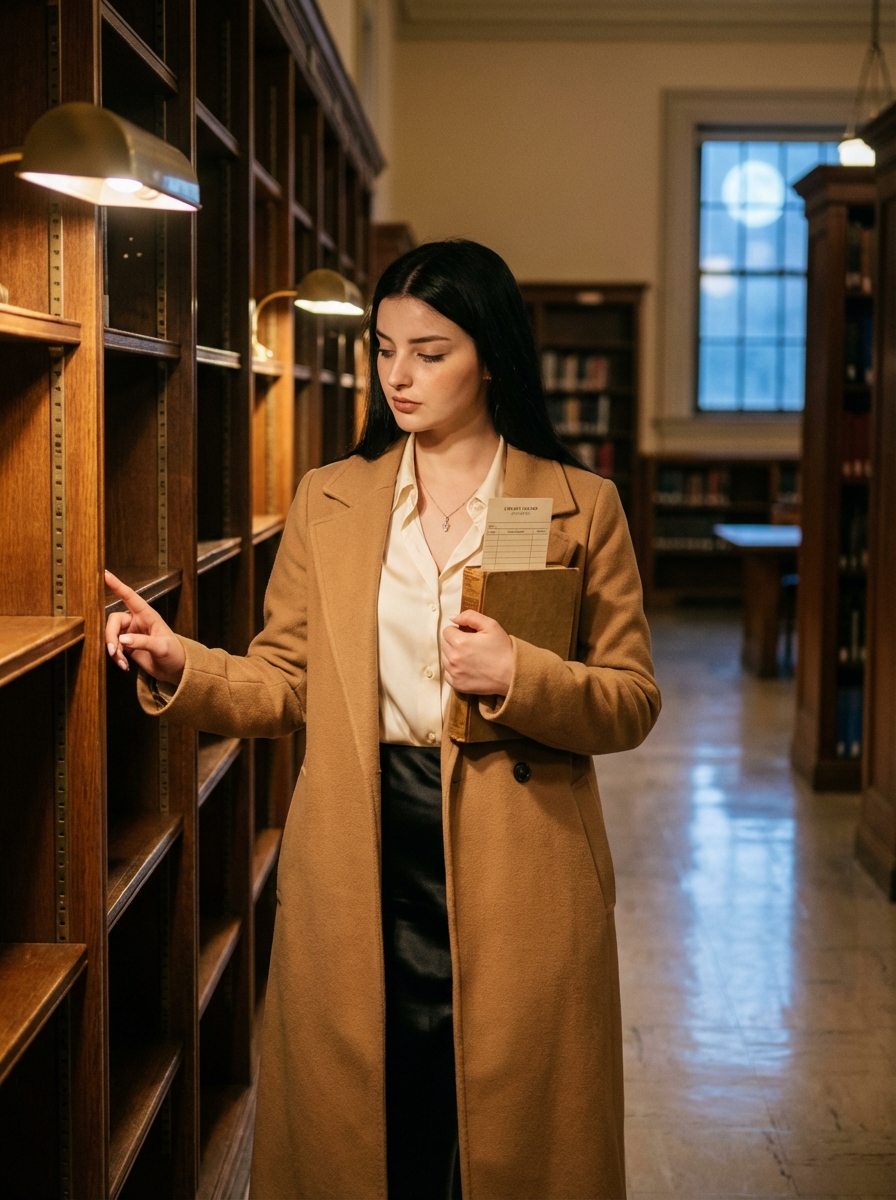
The story behind this one: a blank library checkout card peeking out of the book she’s holding is a small, specific prop detail that implies a whole history for that object — other readers, other dates — without any of it needing to be legible. Pausing between the shelves rather than walking through them is what gives this its ‘quiet’ mood, it’s a moment of hesitation rather than a purposeful stride.
इस तस्वीर के पीछे की कहानी: उसकी पकड़ी किताब से झांकता खाली लाइब्रेरी चेकआउट कार्ड एक छोटी, खास प्रॉप डिटेल है जो उस चीज़ के लिए एक पूरा इतिहास जोड़ती है, दूसरे पाठक, दूसरी तारीखें, बिना कुछ भी पढ़ने लायक हुए। किताबों की अलमारियों के बीच से चलने के बजाय वहां रुक जाना ही इसे शीर्षक वाला ‘शांत’ मूड देता है, यह एक तय चाल के बजाय हिचकिचाहट का पल है।
આ ફોટા પાછળની વાત: તેની પકડેલી બુકમાંથી ડોકિયું કરતું ખાલી લાઇબ્રેરી ચેકઆઉટ કાર્ડ એક નાની, ખાસ પ્રોપ વિગત છે જે એ વસ્તુ માટે એક આખો ઇતિહાસ ઉમેરે છે, બીજા વાચકો, બીજી તારીખો, કંઈ પણ વાંચી શકાય તેવું થયા વગર. પુસ્તકોના શેલ્ફ વચ્ચેથી ચાલવાને બદલે ત્યાં અટકી જવું જ તેને શીર્ષકવાળો ‘શાંત’ મૂડ આપે છે, આ એક નક્કી ચાલને બદલે અચકાટની પળ છે.
Copy this aesthetic ai photo prompt below and paste it into ChatGPT with your own photo.
नीचे दिया गया aesthetic ai photo prompt कॉपी करें और अपनी फ़ोटो के साथ ChatGPT में पेस्ट करें।
નીચે આપેલ aesthetic ai photo prompt કૉપિ કરો અને તમારા ફોટા સાથે ChatGPT માં પેસ્ટ કરો.
Prompt
Create an image-edit prompt that transforms the user’s photo into a quiet story-driven editorial inside an empty historic library after closing.

Keep the same woman from the input photo; preserve identity and likeness.

Set the scene in a clean, elegant library aisle: tall wooden shelves, soft brass reading lamps, polished floor, dust motes in the air; no readable book titles.

Dress her in a long camel wool coat over a cream silk blouse and a black satin skirt; add subtle gold hoops and a slim watch.

Pose her paused between shelves: one hand holding an old hardback book to her chest, the other fingertip gently touching the shelf; gaze slightly downward as if deciding whether to leave.

Add one story detail: a vintage library checkout card peeking from the book (blank, no readable text).

Light with warm lamp pools and a cool moonlit window fill from afar; soft shadows, cinematic depth, refined color grade.

Color palette: warm amber, deep wood browns, cream, muted black, faint cool blue.

Camera: 50–85mm look, vertical 4:5, full-body or 3/4, shallow depth with soft bokeh lamps.

Remove all text/logos/watermarks; no extra people.

Negative prompt: readable spines, clutter, harsh HDR, warped shelves, extra fingers, plastic skin, text.
Best with:ChatGPT
सबसे अच्छा चलता है:ChatGPT
સૌથી સારું ચાલે છે:ChatGPT
This aesthetic ai photo prompt turns an ordinary photo into a polished aesthetic image in a single generation. You get the same look you see above — no editing skills needed. It leans on moody low light and a cinematic finish.
What this prompt creates
The instruction lights them with moody low light, finishes with a cinematic finish and and frames it as a vertical 9:16 frame. At roughly 202 words it is a detailed prompt, so expect the model to follow it closely — either way, the result stays recognisably you because the source photo drives the likeness.
How to use this aesthetic ai photo prompt
Tap Copy prompt above to copy the full text.
Open ChatGPT and start a new chat.
Upload the photo you want to transform.
Paste the prompt and send it.
If the first result is not quite right, regenerate once or twice — small changes in wording shift the style a lot.
Tips for a better result
Match the light. This prompt asks for moody low light, so a source photo shot in similar conditions needs far less correction.
Shoot for the crop. The output is a vertical 9:16 frame, so leave headroom in your original rather than filling the frame.
Change one thing at a time. Edit the colour, outfit, or background separately rather than all at once.
Try it twice. Image models are random — a second run often looks noticeably better.
Start from the highest-resolution copy you have. Detail the model can see is detail it can keep.
Who this aesthetic prompt suits
This one works especially well for Girls. It suits Instagram posts, profile pictures, and WhatsApp display photos, and it holds up on both phone and desktop screens.
More prompts like this
Browse every aesthetic prompt in this collection, or head back to the PromptPin homepage for the newest AI photo prompts. All of them are free to copy and use.
Three things do most of the heavy lifting here. The lighting is described precisely rather than left to chance. The framing and camera angle are stated up front, which keeps the subject in proportion. And the finish — grain, contrast, and colour grade — is spelled out at the end, which is what separates a snapshot from something that looks deliberately shot.
You can reuse this structure for your own ideas. Keep the sentence order — subject, setting, lighting, camera, finish — and swap the descriptive words. Prompts written this way behave far more predictably than one long sentence.
यह aesthetic ai photo prompt एक साधारण फ़ोटो को एक ही बार में शानदार aesthetic इमेज में बदल देता है। आपको ऊपर दिखने वाला वैसा ही लुक मिलेगा — किसी एडिटिंग स्किल की ज़रूरत नहीं। It leans on moody low light and a cinematic finish.
यह प्रॉम्प्ट क्या बनाता है
The instruction lights them with moody low light, finishes with a cinematic finish and and frames it as a vertical 9:16 frame. At roughly 202 words it is a detailed prompt, so expect the model to follow it closely — either way, the result stays recognisably you because the source photo drives the likeness.
इस प्रॉम्प्ट का उपयोग कैसे करें
ऊपर Copy prompt पर टैप करके पूरा टेक्स्ट कॉपी करें।
ChatGPT खोलें और नई चैट शुरू करें।
जिस फ़ोटो को बदलना है उसे अपलोड करें।
प्रॉम्प्ट पेस्ट करें और भेज दें।
अगर पहला रिज़ल्ट सही न लगे तो एक-दो बार दोबारा जनरेट करें — शब्दों में छोटा बदलाव भी स्टाइल काफ़ी बदल देता है।
बेहतर रिज़ल्ट के लिए टिप्स
रोशनी मिलाएँ। यह प्रॉम्प्ट moody low light माँगता है, इसलिए वैसी ही रोशनी में ली गई फ़ोटो में बहुत कम सुधार करना पड़ता है।
क्रॉप का ध्यान रखें। आउटपुट a vertical 9:16 frame होता है, इसलिए फ़्रेम पूरा भरने के बजाय ऊपर थोड़ी जगह छोड़ें।
एक बार में एक ही चीज़ बदलें। रंग, कपड़े या बैकग्राउंड — सब एक साथ बदलने के बजाय अलग-अलग बदलें।
दो बार आज़माएँ। इमेज मॉडल हर बार अलग रिज़ल्ट देते हैं — दूसरी बार अक्सर बेहतर आता है।
सबसे अच्छी क्वालिटी वाली फ़ोटो से शुरू करें। मॉडल जो डिटेल देख पाएगा, वही बचा भी पाएगा।
यह प्रॉम्प्ट किसके लिए सही है
यह ख़ास तौर पर Girls के लिए अच्छा है। यह इंस्टाग्राम पोस्ट, प्रोफ़ाइल फ़ोटो और व्हाट्सऐप डीपी के लिए सही रहता है, और फ़ोन व कंप्यूटर दोनों पर अच्छा दिखता है।
इसमें तीन चीज़ें सबसे ज़्यादा काम करती हैं। रोशनी को अंदाज़े पर नहीं छोड़ा गया, साफ़-साफ़ बताया गया है। फ़्रेमिंग और कैमरा एंगल पहले ही तय है, जिससे चेहरा सही अनुपात में रहता है। और आख़िर में फ़िनिश — ग्रेन, कंट्रास्ट और कलर ग्रेड — बताया गया है, यही आम फ़ोटो और प्रोफ़ेशनल दिखने वाली फ़ोटो का फ़र्क़ है।
आप इसी ढाँचे को अपने आइडिया के लिए भी इस्तेमाल कर सकते हैं। क्रम वही रखें — सब्जेक्ट, जगह, रोशनी, कैमरा, फ़िनिश — और सिर्फ़ शब्द बदलें। इस तरह लिखे प्रॉम्प्ट एक लंबे वाक्य से कहीं बेहतर काम करते हैं।
આ aesthetic ai photo prompt સામાન્ય ફોટાને એક જ વારમાં સુંદર aesthetic ઇમેજમાં ફેરવે છે. તમને ઉપર દેખાય છે તેવો જ લુક મળશે — કોઈ એડિટિંગ સ્કિલની જરૂર નથી. It leans on moody low light and a cinematic finish.
આ પ્રોમ્પ્ટ શું બનાવે છે
The instruction lights them with moody low light, finishes with a cinematic finish and and frames it as a vertical 9:16 frame. At roughly 202 words it is a detailed prompt, so expect the model to follow it closely — either way, the result stays recognisably you because the source photo drives the likeness.
આ પ્રોમ્પ્ટનો ઉપયોગ કેવી રીતે કરવો
ઉપર Copy prompt પર ટૅપ કરીને આખો ટેક્સ્ટ કૉપિ કરો.
ChatGPT ખોલો અને નવી ચેટ શરૂ કરો.
જે ફોટો બદલવો છે તે અપલોડ કરો.
પ્રોમ્પ્ટ પેસ્ટ કરો અને મોકલો.
જો પહેલું પરિણામ બરાબર ન લાગે તો એક-બે વાર ફરી જનરેટ કરો — શબ્દોમાં નાનો ફેરફાર પણ સ્ટાઇલ ઘણી બદલે છે.
વધુ સારા પરિણામ માટે ટિપ્સ
પ્રકાશ મેળવો. આ પ્રોમ્પ્ટ moody low light માંગે છે, તેથી તેવી જ રોશનીમાં લીધેલા ફોટામાં ઘણું ઓછું સુધારવું પડે છે.
ક્રૉપનું ધ્યાન રાખો. આઉટપુટ a vertical 9:16 frame હોય છે, તેથી ફ્રેમ આખી ભરવાને બદલે ઉપર થોડી જગ્યા છોડો.
એક વખતે એક જ વસ્તુ બદલો. રંગ, કપડાં કે બૅકગ્રાઉન્ડ — બધું એકસાથે બદલવાને બદલે અલગ અલગ બદલો.
બે વાર અજમાવો. ઇમેજ મૉડલ દર વખતે અલગ પરિણામ આપે છે — બીજી વાર ઘણી વાર વધુ સારું આવે છે.
સૌથી સારી ક્વૉલિટીવાળા ફોટાથી શરૂ કરો. મૉડલ જે ડિટેલ જોઈ શકે, તે જ જાળવી પણ શકે.
આ પ્રોમ્પ્ટ કોના માટે યોગ્ય છે
આ ખાસ કરીને Girls માટે સારું છે. તે ઇન્સ્ટાગ્રામ પોસ્ટ, પ્રોફાઇલ ફોટો અને વૉટ્સઍપ ડીપી માટે યોગ્ય છે, અને ફોન તથા કમ્પ્યુટર બંને પર સારું દેખાય છે.
આમાં ત્રણ વસ્તુઓ સૌથી વધુ કામ કરે છે. પ્રકાશ અંદાજ પર છોડ્યો નથી, સ્પષ્ટ રીતે જણાવ્યો છે. ફ્રેમિંગ અને કૅમેરા ઍન્ગલ પહેલેથી નક્કી છે, જેથી ચહેરો યોગ્ય પ્રમાણમાં રહે. અને અંતે ફિનિશ — ગ્રેન, કૉન્ટ્રાસ્ટ અને કલર ગ્રેડ — જણાવ્યું છે, એ જ સામાન્ય ફોટા અને પ્રોફેશનલ દેખાતા ફોટા વચ્ચેનો ફરક છે.
તમે આ જ ઢાંચો તમારા આઇડિયા માટે પણ વાપરી શકો છો. ક્રમ એ જ રાખો — સબ્જેક્ટ, જગ્યા, પ્રકાશ, કૅમેરા, ફિનિશ — અને ફક્ત શબ્દો બદલો. આ રીતે લખેલા પ્રોમ્પ્ટ એક લાંબા વાક્ય કરતાં ઘણું સારું કામ કરે છે.