
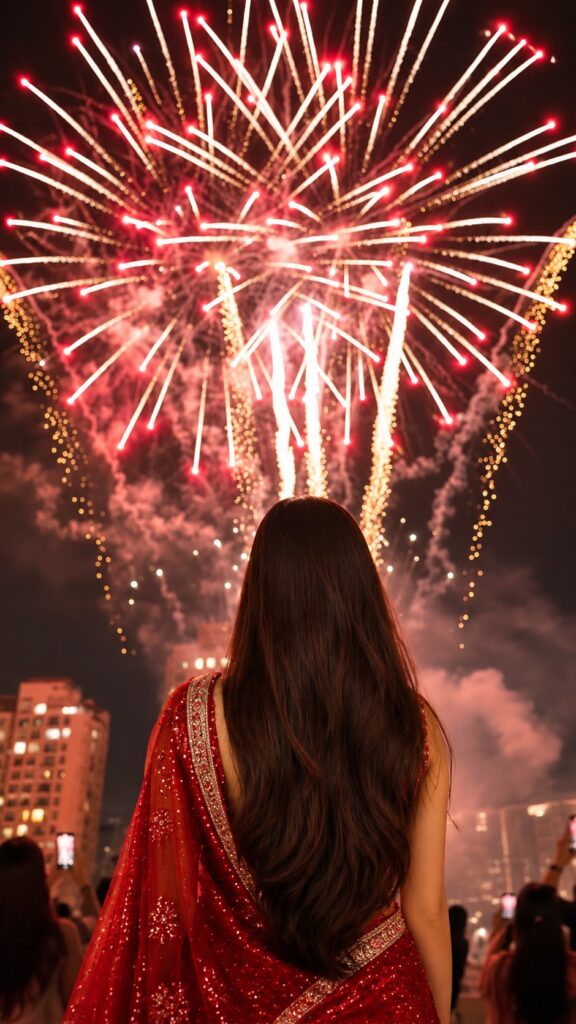
This viral Diwali AI video starts on a calm rooftop at twilight — then one graceful twirl of the dupatta flips the whole scene into a night sky bursting with green, pink and golden fireworks. It is one of the most saved Diwali transition reels of the season, and you can make your own version with Google Flow using the prompt below. Copy it, paste it into Flow and generate — full guide in English, Hindi and Gujarati.
Opens Google Flow · Sign in with your Google account
Template details
| Template name | Diwali Twirl Fireworks Transition |
| AI tool | Google Flow (AI video) |
| Aspect ratio | 9:16 |
| Input | Text prompt — optionally your own photo as the first frame |
| Editing style | Twirl transition from twilight into Diwali fireworks |
| Best for | Instagram Reels, WhatsApp status, YouTube Shorts, Facebook Reels |
| Difficulty | Beginner — copy, paste and generate |
English — Full Guide
What you actually get
A ready-written video prompt that describes the whole reel second by second: the twilight rooftop, the slow spin, the dupatta sweeping across the frame, and the fireworks changing from gold to green to pink as the night takes over. Google Flow turns that description into an AI video — no shooting, no fireworks and no editing app needed.
Use it as text only and Flow creates the girl for you, or start from your own photo so the person in the reel looks like you.
Why this edit is trending
Diwali transition reels — calm look first, fireworks after the spin — are some of the most shared videos of the festival season. Making one for real needs a rooftop, a fireworks show and perfect timing. An AI video prompt gives you the same cinematic moment from your phone in a few minutes.
How to make this video in Google Flow, step by step
-
Open Google Flow
Tap the Open Google Flow button above and sign in with your Google account.
-
Click New project
On the Flow home screen, click New project.
-
Upload your image
Upload a clear, full-length photo of yourself — this is the person who will spin under the fireworks.
-
Paste the prompt
Tap Copy prompt in the box above and paste it into the prompt box in Flow.
-
Choose the video settings
Select the Video tab and 9:16, pick Omni (or any other model you like) and set the length to 8s or 10s.
-
Click Generate
Click Generate and wait a minute or two for your video.
-
Export
Click Export to save the video, then share it as a Reel, Short or WhatsApp status.
Tips for a better reel
- Generate two versions and keep the better one — AI video changes a little every time.
- Change the outfit words (mauve anarkali, white floral bodice) to match your own outfit or a red saree like the poster.
- If the video comes out sideways, delete the sentence about the footage being rotated 90 degrees and generate again.
- AI often misspells on-screen text — add the “Save this for your Diwali transition” caption yourself in Instagram or CapCut.
- Add a trending Diwali song in Instagram before you post, and post while the festival buzz is still on.
Prompt not working?
If nothing generates, check that you still have credits left in Flow and that you are signed in with a personal Google account. If Flow refuses your photo, try a different clear photo or switch to Text to Video. If the result looks different from the poster, generate again — each run gives a new take on the same scene.
Stay safe: only use the official Google Flow website. Never pay unknown sites or apps that promise “free Flow credits”.
हिंदी — पूरी जानकारी
यह Diwali AI वीडियो प्रॉम्प्ट क्या है?
यह एक तैयार वीडियो प्रॉम्प्ट है जो पूरी रील को सेकंड-दर-सेकंड बताता है — शाम का छत वाला सीन, धीमा घूमना, दुपट्टे का लहराना और फिर रात के आसमान में सुनहरे, हरे और गुलाबी पटाखे। Google Flow इसी विवरण से AI वीडियो बना देता है — न शूटिंग, न एडिटिंग।
सिर्फ़ टेक्स्ट से Flow खुद लड़की बना देगा, या अपनी फ़ोटो से शुरू करें ताकि रील में आप दिखें।
यह ट्रेंड इतना पॉपुलर क्यों है?
पहले शांत लुक और घूमते ही पटाखों वाली Diwali ट्रांज़िशन रील्स त्योहार में सबसे ज़्यादा शेयर होती हैं। असली में बनाने के लिए छत, आतिशबाज़ी और सही टाइमिंग चाहिए — AI प्रॉम्प्ट से वही सीन कुछ मिनटों में फ़ोन पर बन जाता है।
Google Flow में वीडियो बनाने का तरीका
-
Google Flow खोलें
ऊपर दिया Open Google Flow बटन दबाएँ और अपने Google अकाउंट से साइन इन करें।
-
New project पर क्लिक करें
Flow की होम स्क्रीन पर New project दबाएँ।
-
अपनी फ़ोटो अपलोड करें
अपनी साफ़ फ़ुल-लेंथ फ़ोटो अपलोड करें — यही व्यक्ति पटाखों के बीच घूमता दिखेगा।
-
प्रॉम्प्ट पेस्ट करें
ऊपर बॉक्स में Copy prompt दबाएँ और Flow के प्रॉम्प्ट बॉक्स में पेस्ट करें।
-
वीडियो सेटिंग्स चुनें
Video टैब और 9:16 चुनें, Omni (या अपनी पसंद का कोई भी मॉडल) चुनें और समय 8s या 10s रखें।
-
Generate दबाएँ
Generate दबाएँ और एक-दो मिनट इंतज़ार करें।
-
Export करें
Export दबाकर वीडियो सेव करें और रील या स्टेटस पर शेयर करें।
प्रॉम्प्ट काम नहीं कर रहा?
कुछ न बने तो देखें कि Flow में क्रेडिट बचे हैं और आप साइन इन हैं। फ़ोटो स्वीकार न हो तो दूसरी साफ़ फ़ोटो लें या Text to Video इस्तेमाल करें। वीडियो टेढ़ा आए तो प्रॉम्प्ट से 90 डिग्री घुमाने वाली लाइन हटा दें।
सावधानी: सिर्फ़ ऑफिशियल Google Flow वेबसाइट इस्तेमाल करें।
ગુજરાતી — સંપૂર્ણ માહિતી
આ Diwali AI વીડિયો પ્રોમ્પ્ટ શું છે?
આ એક તૈયાર વીડિયો પ્રોમ્પ્ટ છે જે આખી રીલ સેકન્ડ-દર-સેકન્ડ વર્ણવે છે — સાંજનું છતનું દૃશ્ય, ધીમું ફરવું, દુપટ્ટાનું લહેરાવું અને પછી રાતના આકાશમાં સોનેરી, લીલા અને ગુલાબી ફટાકડા. Google Flow આ વર્ણનમાંથી AI વીડિયો બનાવી દે છે — ન શૂટિંગ, ન એડિટિંગ.
ફક્ત ટેક્સ્ટથી Flow જાતે છોકરી બનાવશે, અથવા તમારા ફોટાથી શરૂ કરો જેથી રીલમાં તમે દેખાઓ.
Google Flow માં વીડિયો બનાવવાની રીત
-
Google Flow ખોલો
ઉપર આપેલું Open Google Flow બટન દબાવો અને તમારા Google એકાઉન્ટથી સાઇન ઇન કરો.
-
New project પર ક્લિક કરો
Flow ની હોમ સ્ક્રીન પર New project દબાવો.
-
તમારો ફોટો અપલોડ કરો
તમારો સ્પષ્ટ ફુલ-લેન્થ ફોટો અપલોડ કરો — આ જ વ્યક્તિ ફટાકડા વચ્ચે ફરતી દેખાશે.
-
પ્રોમ્પ્ટ પેસ્ટ કરો
ઉપર બૉક્સમાં Copy prompt દબાવો અને Flow ના પ્રોમ્પ્ટ બૉક્સમાં પેસ્ટ કરો.
-
વીડિયો સેટિંગ્સ પસંદ કરો
Video ટેબ અને 9:16 પસંદ કરો, Omni (અથવા તમને ગમતું કોઈ પણ મોડલ) પસંદ કરો અને સમય 8s કે 10s રાખો.
-
Generate દબાવો
Generate દબાવો અને એક-બે મિનિટ રાહ જુઓ.
-
Export કરો
Export દબાવીને વીડિયો સેવ કરો અને રીલ કે સ્ટેટસ પર શેર કરો.
પ્રોમ્પ્ટ કામ નથી કરતો?
કંઈ ન બને તો જુઓ કે Flow માં ક્રેડિટ બાકી છે અને તમે સાઇન ઇન છો. ફોટો સ્વીકાર ન થાય તો બીજો સ્પષ્ટ ફોટો લો અથવા Text to Video વાપરો. વીડિયો આડો આવે તો પ્રોમ્પ્ટમાંથી 90 ડિગ્રી ફેરવવાવાળી લાઇન કાઢી નાખો.
સાવચેતી: ફક્ત ઑફિશિયલ Google Flow વેબસાઇટ વાપરો.
Want Diwali photos too?
Pair your reel with matching festive portraits made from one selfie: