Donne Royale Travel AI Photo Prompt for Girls
The story behind this one: this prompt is written less like a scene description and more like an actual shoot brief — camera angle in degrees, shutter speed, specific lighting setups from both sides, deliverable file sizes at the end. That level of technical detail is unusual for this site and suggests it was written by or for someone thinking about this as a produced photoshoot, not just a single AI-generated image.
Copy this travel ai photo prompt below and paste it into ChatGPT with your own photo.
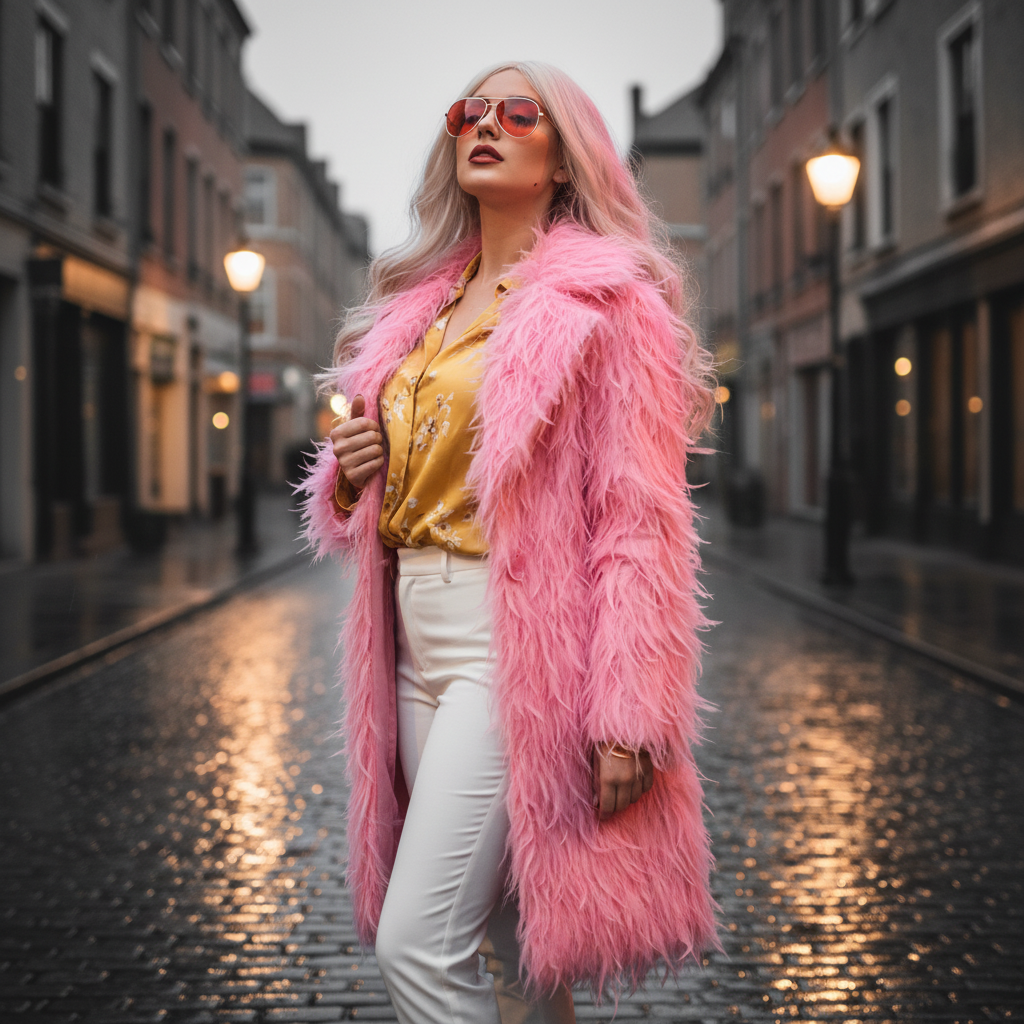
Edit this image into a realistic, fashion-forward female cosplay: a tailored feminine take on Doflamingo — fitted candy-pink feather overcoat with defined waist, silk yellow floral blouse, high-waisted white trousers, thin gold bangle and bold red sunglasses. Place her on a rain-washed cobblestone street at dusk for dramatic reflections.
Camera / lens / framing: 85 mm @ f/2.0, slight low angle (~8°), framed mid-thigh to above head for a three-quarter portrait that emphasizes silhouette and textures. Use a moderately fast shutter (1/200) to keep subtle feather movement.
Lighting: cool dusk key from camera-left (large softbox or diffused LED), warm streetlight fill from camera-right (tungsten gel) to create complementary color aura; add a soft magenta hair rim to intensify feather color. Use a small backlight to pick out feather edges and wet cobble reflections.
Wardrobe & construction notes (realism): coat constructed from layered feather panels on a tailored wool undercoat to hold a feminine silhouette—feather density concentrated on shoulders and hem; blouse silk-blend with delicate floral print, blouse partially tucked; trousers cut slim with natural creasing; shoes: low block heel loafers. Sunglasses: oversized red-tinted aviators. Consider practical fastenings inside coat for movement control.
Hair & makeup: long platinum-blonde wig with soft waves, wind-tousled; makeup high-fashion: matte flawless base, sculpted brows, subtle smoky eye, warm contour, bold matte lip; add a tiny subtle scar/line near jaw for character edge (optional).
Pose & direction: stance confident — one foot forward, coat slightly open with left hand holding lapel, right hand relaxed at side or brushing hair back; gaze direct and cool into lens, slight upward chin to convey challenge. Encourage small movement so feathers catch light naturally.
Set dressing / atmosphere: wet pavement reflections with soft bokeh of distant warm lights; very light mist for atmosphere; minimal props (a single vintage streetlamp or distant car light) to ground scene. Keep background slightly blurred to emphasize subject.
Post-processing: emphasize textile detail (feather barbs), dodge & burn to sculpt body and fabric folds, selective color pop for pinks and yellows while muting other hues, add subtle film grain, clean up stray feathers and stray reflections. Final grade: warm skin, vivid coat, cool shadows. Provide both a color and a desaturated editorial variant (black-and-white with pink coat isolated).
Deliverables: 3000×2000 JPG for web + layered PSD with separate costume, background, and color grading layers; mobile-cropped 1080×1350 for social.
Best with: ChatGPT
This travel ai photo prompt turns an ordinary photo into a polished travel image in a single generation. You get the same look you see above — no editing skills needed. It leans on soft studio lighting, an outdoor setting and a cinematic finish.
What this prompt creates
The instruction places the subject in an outdoor setting, lights them with soft studio lighting and finishes with a cinematic finish. At roughly 378 words it is a detailed prompt, so expect the model to follow it closely — either way, the result stays recognisably you because the source photo drives the likeness.
How to use this travel ai photo prompt
- Tap Copy prompt above to copy the full text.
- Open ChatGPT and start a new chat.
- Upload the photo you want to transform.
- Paste the prompt and send it.
- If the first result is not quite right, regenerate once or twice — small changes in wording shift the style a lot.
Tips for a better result
- Match the light. This prompt asks for soft studio lighting, so a source photo shot in similar conditions needs far less correction.
- Mind the background. It replaces your backdrop with an outdoor setting — a source photo with a plain or blurred background swaps over most cleanly.
- Change one thing at a time. Edit the colour, outfit, or background separately rather than all at once.
- Try it twice. Image models are random — a second run often looks noticeably better.
- Start from the highest-resolution copy you have. Detail the model can see is detail it can keep.
Who this travel prompt suits
This one works especially well for Girls. It suits Instagram posts, profile pictures, and WhatsApp display photos, and it holds up on both phone and desktop screens.
More prompts like this
Browse every travel prompt in this collection, or head back to the PromptPin homepage for the newest AI photo prompts. All of them are free to copy and use.
What makes this travel style work
Three things do most of the heavy lifting here. The lighting is described precisely rather than left to chance. The framing and camera angle are stated up front, which keeps the subject in proportion. And the finish — grain, contrast, and colour grade — is spelled out at the end, which is what separates a snapshot from something that looks deliberately shot.
You can reuse this structure for your own ideas. Keep the sentence order — subject, setting, lighting, camera, finish — and swap the descriptive words. Prompts written this way behave far more predictably than one long sentence.
More prompts like this
- Omar Faruk Jafree Travel AI Photo Prompt for Boys
- Desert Nomad – Sahara’s Whisper Travel AI Photo Prompt for Girls
- Blue Dreams of Morocco 🇲🇦 Travel AI Photo Prompt for Girls
- Arctic Warrior: Cinematic Snowstorm Portrait
- Midnight Dreams in Shibuya Travel AI Photo Prompt for Girls
- Trending Black Devil Photo Editing Prompt