
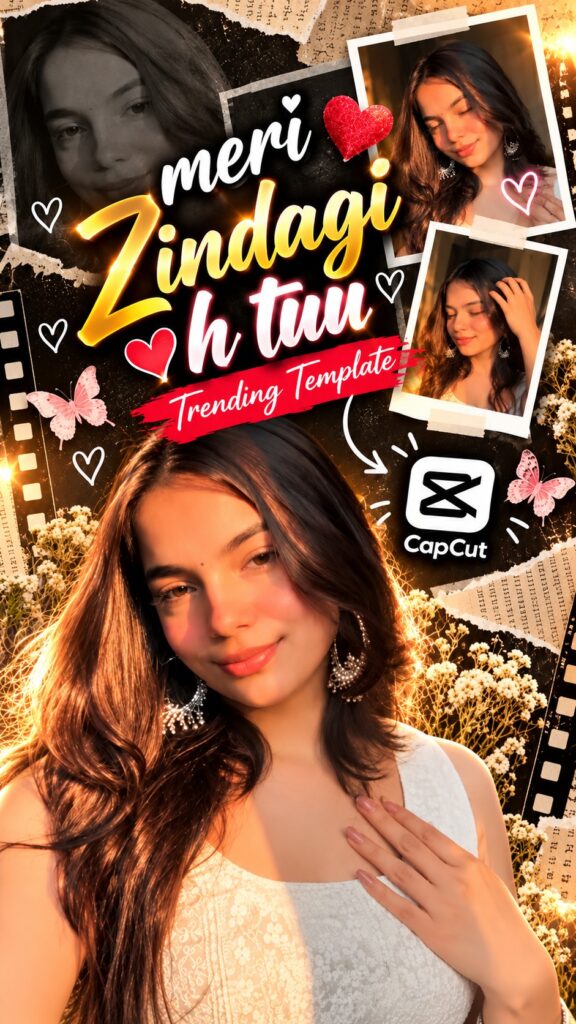
The Meri Zindagi H Tuuu edit has been spreading through Reels all week — a romantic, aesthetic cut built for showcasing your favourite photos and special memories. Watch the preview below, then grab the CapCut template — the timing, transitions and colour work are already done, you only drop in your own photos and export. Full guide in English, Hindi and Gujarati.
Opens in the CapCut app · Free · No login required
Template details
| Template name | Meri Zindagi H Tuuu Reel Edit |
| Aspect ratio | 9:16 |
| Media type | Photos or short video clips |
| Editing style | Romantic, aesthetic collage with warm glowing accents |
| Best for | Instagram Reels, WhatsApp status, YouTube Shorts, Facebook Reels |
| Difficulty | Beginner — no editing skill needed |
English — Full Guide
What you actually get
This is a finished edit with the clip slots left empty. The romantic collage layout, glowing heart and light accents, and warm aesthetic grade are already built and tested — you are placing your own photos and video clips into a sequence someone else already designed.
It suits couple photos, personal selfies, and any memories you want to feel warm, nostalgic and a little dramatic. The template layers photo collage elements with your main clip, so it reads more like a scrapbook page than a plain slideshow.
How to use this template, step by step
-
Open the template link
Tap the Use Template on CapCut button above. CapCut opens straight into a preview screen for this template.
-
Tap “Use template”
If the template is still public and matches your CapCut version, a Use template button appears at the bottom. Tapping it opens the project in CapCut with your gallery ready.
-
Choose your photos or video clips
Pick clear, high-quality photos — portrait shots usually work best for this layout. Fill the slots CapCut asks for; the order you tap is the order they appear.
-
Adjust the framing
Tap any clip on the timeline and pinch or drag until the subject sits well inside the frame, especially where the collage elements overlap the edges.
-
Preview the whole thing
Play it start to finish. The transitions, effects and timing are already applied — you are only checking that each photo sits where you want it.
-
Export and share
Tap export, choose your quality, and the reel saves to your device. From there it goes straight to Instagram Reels, Facebook, YouTube Shorts or WhatsApp status.
Tips for a better reel
- Pick photos with warm lighting — the template’s glow and colour grade already lean golden-hour.
- Close-up portrait shots read best; the collage frames crop in tighter than a full-body shot.
- Keep faces centred so the overlaid decorative elements do not sit across them.
- Post while the sound is still trending — timing matters as much as editing.
Template not working?
A template link can fail for a few reasons: the creator may have removed it, the link may have expired, it may not be available in your region, or your CapCut app may be out of date. Update CapCut and open the link again. If it still does not load, the template has most likely been taken down — that does not mean anything is wrong with your phone.
Stay safe: only open official capcut.com links. Never download templates or modified CapCut APK files from unknown websites.
हिंदी — पूरी जानकारी
इसमें आपको क्या मिलता है
यह एक पूरी तरह तैयार एडिट है जिसमें सिर्फ़ क्लिप की जगहें ख़ाली रखी गई हैं। रोमांटिक कोलाज लेआउट, चमकता हुआ दिल और लाइट इफ़ेक्ट, और गर्म एस्थेटिक ग्रेड पहले से बना और टेस्ट किया हुआ है — आप बस अपनी फ़ोटो और क्लिप एक बनी-बनाई सीक्वेंस में रख रहे हैं।
यह कपल फ़ोटो, पर्सनल सेल्फ़ी और उन यादों पर अच्छा लगता है जिन्हें आप गर्म, नॉस्टैल्जिक और थोड़ा ड्रामेटिक दिखाना चाहते हैं।
टेम्पलेट इस्तेमाल करने का तरीका
-
टेम्पलेट लिंक खोलें
ऊपर दिया Use Template on CapCut बटन दबाएँ। CapCut सीधे इस टेम्पलेट की प्रीव्यू स्क्रीन पर खुलेगा।
-
“Use template” दबाएँ
अगर टेम्पलेट अब भी पब्लिक है, तो नीचे Use template बटन दिखेगा। दबाते ही प्रोजेक्ट CapCut में खुलेगा।
-
अपनी फ़ोटो या क्लिप चुनें
साफ़, अच्छी क्वालिटी की फ़ोटो चुनें — पोर्ट्रेट शॉट इस लेआउट में सबसे अच्छे लगते हैं।
-
फ़्रेमिंग ठीक करें
टाइमलाइन पर क्लिप दबाकर पिंच या ड्रैग करें ताकि सब्जेक्ट फ़्रेम के अंदर अच्छी तरह बैठे।
-
पूरा प्रीव्यू देखें
शुरू से आख़िर तक चलाकर देखें कि हर फ़ोटो सही जगह है।
-
एक्सपोर्ट करके शेयर करें
एक्सपोर्ट दबाएँ, क्वालिटी चुनें, और रील सेव हो जाएगी।
टेम्पलेट काम नहीं कर रहा?
लिंक कई वजहों से काम नहीं करता: क्रिएटर ने हटा दिया हो, लिंक एक्सपायर हो गया हो, या CapCut ऐप पुराना हो। ऐप अपडेट करके दोबारा खोलें।
सावधानी: सिर्फ़ ऑफिशियल capcut.com लिंक खोलें।
ગુજરાતી — સંપૂર્ણ માહિતી
આમાં તમને શું મળે છે
આ સંપૂર્ણ તૈયાર એડિટ છે જેમાં ફક્ત ક્લિપની જગ્યાઓ ખાલી રાખી છે. રોમેન્ટિક કોલાજ લેઆઉટ, ચમકતું હૃદય અને લાઇટ ઇફેક્ટ, અને હૂંફાળો એસ્થેટિક ગ્રેડ પહેલેથી બનાવેલો અને ચકાસેલો છે.
આ કપલ ફોટા, પર્સનલ સેલ્ફી અને એવી યાદો પર સારું લાગે છે જેને તમે હૂંફાળી અને થોડી ડ્રામેટિક બતાવવા માંગો છો.
ટેમ્પલેટ વાપરવાની રીત
-
ટેમ્પલેટ લિંક ખોલો
ઉપર આપેલું Use Template on CapCut બટન દબાવો.
-
“Use template” દબાવો
ટેમ્પલેટ પબ્લિક હોય તો નીચે Use template બટન દેખાશે.
-
તમારા ફોટા કે ક્લિપ પસંદ કરો
સ્પષ્ટ, સારી ક્વોલિટીના પોર્ટ્રેટ ફોટા આ લેઆઉટમાં સૌથી સારા લાગે છે.
-
ફ્રેમિંગ ગોઠવો
ક્લિપ દબાવીને પિંચ કે ડ્રેગ કરો જેથી સબ્જેક્ટ ફ્રેમની અંદર બરાબર બેસે.
-
આખું પ્રીવ્યૂ જુઓ
શરૂથી અંત સુધી ચલાવીને જુઓ.
-
એક્સપોર્ટ કરીને શેર કરો
એક્સપોર્ટ દબાવો, ક્વોલિટી પસંદ કરો, અને રીલ સેવ થશે.
ટેમ્પલેટ કામ નથી કરતું?
લિંક ઘણાં કારણોસર કામ ન કરે: ક્રિએટરે હટાવી દીધી હોય, લિંક એક્સપાયર થઈ હોય, અથવા CapCut ઍપ જૂની હોય.
સાવચેતી: ફક્ત ઑફિશિયલ capcut.com લિંક ખોલો.
Need photos for this template?
Good source photos make the difference here. If you are short of shots that suit this edit, use these AI photo prompts to create some:
