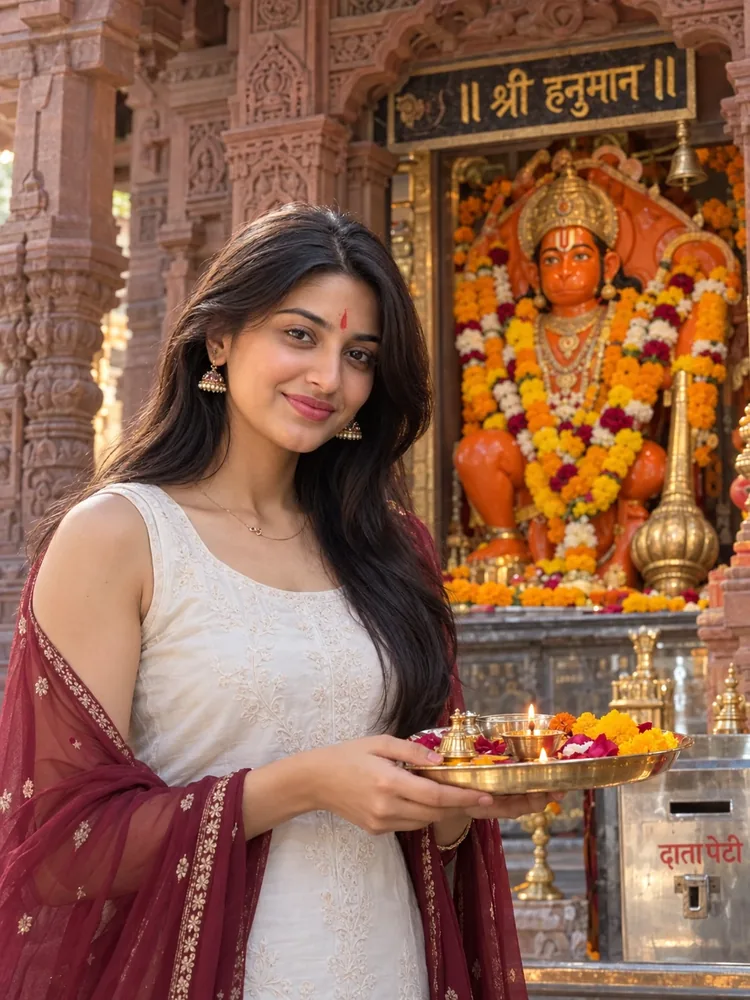
The story behind this one: devotional portraits live or die on restraint, and this prompt is built that way. The shrine does the colour — saffron idol, marigold garlands, gold lettering — so the outfit stays quiet: a white kurti and one deep maroon dupatta that echoes the stone without competing with the flowers. The puja thali gives her hands a reason to be where they are, which is what stops a temple photo looking posed. Naming the small real things, the gada beside the deity, the sign above and the donation box at the side, is what makes the model build a working mandir instead of a generic golden backdrop. Soft natural light and a 35mm shallow depth of field keep her face sharp and let Hanuman ji stay present but gently out of focus.
इस तस्वीर के पीछे की कहानी: भक्ति वाले पोर्ट्रेट संयम से ही बनते हैं, और यह प्रॉम्प्ट उसी तरह लिखा गया है। रंग का काम मंदिर करता है — केसरिया मूर्ति, गेंदे की मालाएँ, सुनहरे अक्षर — इसलिए पहनावा शांत रहता है: सफ़ेद कुर्ती और एक गहरा मैरून दुपट्टा, जो पत्थर से मेल खाता है पर फूलों से होड़ नहीं करता। पूजा की थाली हाथों को वहाँ होने की वजह देती है, और यही मंदिर की फ़ोटो को बनावटी लगने से बचाती है। छोटी असली चीज़ों का नाम लेना — मूर्ति के पास गदा, ऊपर लिखा नाम और किनारे दान पेटी — मॉडल से एक सच्चा मंदिर बनवाता है, कोई आम सुनहरा बैकग्राउंड नहीं। नरम प्राकृतिक रोशनी और 35mm की कम गहराई चेहरे को साफ़ रखती है, और हनुमान जी पीछे हल्के धुँधले होकर भी पूरी तरह मौजूद रहते हैं।
આ ફોટા પાછળની વાત: ભક્તિભર્યા પોર્ટ્રેટ સંયમથી જ બને છે, અને આ પ્રોમ્પ્ટ એ રીતે જ લખાયો છે. રંગનું કામ મંદિર કરે છે — કેસરી મૂર્તિ, ગલગોટાના હાર, સોનેરી અક્ષરો — એટલે પહેરવેશ શાંત રહે છે: સફેદ કુર્તી અને એક ઘેરો મરૂન દુપટ્ટો, જે પથ્થર સાથે મેળ ખાય છે પણ ફૂલો સાથે હરીફાઈ કરતો નથી. પૂજાની થાળી હાથને ત્યાં હોવાનું કારણ આપે છે, અને એ જ મંદિરના ફોટાને બનાવટી લાગતો અટકાવે છે. નાની સાચી વસ્તુઓનાં નામ લેવાથી — મૂર્તિ પાસે ગદા, ઉપર લખેલું નામ અને બાજુમાં દાન પેટી — મૉડલ સાચું મંદિર બનાવે છે, કોઈ સામાન્ય સોનેરી બૅકગ્રાઉન્ડ નહીં. નરમ કુદરતી પ્રકાશ અને 35mmની ઓછી ઊંડાઈ ચહેરાને સ્પષ્ટ રાખે છે, અને હનુમાનજી પાછળ હળવા ધૂંધળા રહીને પણ પૂરેપૂરા હાજર રહે છે.
Copy this photo prompt below and paste it into ChatGPT with your own photo.
नीचे दिया गया photo prompt कॉपी करें और अपनी फ़ोटो के साथ ChatGPT में पेस्ट करें।
નીચે આપેલ photo prompt કૉપિ કરો અને તમારા ફોટા સાથે ChatGPT માં પેસ્ટ કરો.
Prompt
Create a high-resolution, cinematic close-up portrait of a woman (from the reference image) with dark hair, standing slightly in front of an ornate Hindu shrine in the frame. The woman is wearing a white sleeveless kurti with a maroon sheer dupatta. She is standing with her hands holding a puja thali and smiling warmly at the camera. She wears a red tilak on her forehead, soft light makeup and simple jhumkas.
The background features a detailed, reddish-brown stone temple structure with a vibrant orange idol of Lord Hanuman decorated with orange and yellow marigold flower garlands, and a prominent 'Gada' (mace) placed next to the deity.
The inscription '॥ श्री हनुमान ॥' is visible in gold lettering above the idol, and a metal 'दान पेटी' (donation box) is visible on the side.
The lighting is soft and natural, emphasizing a respectful and serene atmosphere, shot with a professional 35mm lens style for a shallow depth of field. 3:4 ratio.
Best with:ChatGPT
सबसे अच्छा चलता है:ChatGPT
સૌથી સારું ચાલે છે:ChatGPT
This photo prompt turns an ordinary photo into a polished festival image in a single generation. You get the same look you see above — no editing skills needed. It leans on soft studio lighting and a cinematic finish.
What this prompt creates
The instruction lights them with soft studio lighting, finishes with a cinematic finish and frames it as a portrait 3:4 frame. At roughly 156 words it is a detailed prompt, so expect the model to follow it closely — either way, the result stays recognisably you because the source photo drives the likeness.
How to use this photo prompt
Tap Copy prompt above to copy the full text.
Open ChatGPT and start a new chat.
Upload the photo you want to transform.
Paste the prompt and send it.
If the first result is not quite right, regenerate once or twice — small changes in wording shift the style a lot.
Tips for a better result
Match the light. This prompt asks for soft studio lighting, so a source photo shot in similar conditions needs far less correction.
Shoot for the crop. The output is a portrait 3:4 frame, so leave headroom in your original rather than filling the frame.
Change one thing at a time. Edit the colour, outfit, or background separately rather than all at once.
Try it twice. Image models are random — a second run often looks noticeably better.
Start from the highest-resolution copy you have. Detail the model can see is detail it can keep.
Who this festival prompt suits
This one works especially well for Girls. It suits Instagram posts, profile pictures, and WhatsApp display photos, and it holds up on both phone and desktop screens.
More prompts like this
Browse every festival prompt in this collection, or head back to the PromptPin homepage for the newest AI photo prompts. All of them are free to copy and use.
Want the theory behind the look? Read up on colour grading.
What makes this festival style work
Three things do most of the heavy lifting here. The lighting is described precisely rather than left to chance. The framing and camera angle are stated up front, which keeps the subject in proportion. And the finish — grain, contrast, and colour grade — is spelled out at the end, which is what separates a snapshot from something that looks deliberately shot.
You can reuse this structure for your own ideas. Keep the sentence order — subject, setting, lighting, camera, finish — and swap the descriptive words. Prompts written this way behave far more predictably than one long sentence.
यह photo prompt एक साधारण फ़ोटो को एक ही बार में शानदार festival इमेज में बदल देता है। आपको ऊपर दिखने वाला वैसा ही लुक मिलेगा — किसी एडिटिंग स्किल की ज़रूरत नहीं। It leans on soft studio lighting and a cinematic finish.
यह प्रॉम्प्ट क्या बनाता है
The instruction lights them with soft studio lighting, finishes with a cinematic finish and frames it as a portrait 3:4 frame. At roughly 156 words it is a detailed prompt, so expect the model to follow it closely — either way, the result stays recognisably you because the source photo drives the likeness.
इस प्रॉम्प्ट का उपयोग कैसे करें
ऊपर Copy prompt पर टैप करके पूरा टेक्स्ट कॉपी करें।
ChatGPT खोलें और नई चैट शुरू करें।
जिस फ़ोटो को बदलना है उसे अपलोड करें।
प्रॉम्प्ट पेस्ट करें और भेज दें।
अगर पहला रिज़ल्ट सही न लगे तो एक-दो बार दोबारा जनरेट करें — शब्दों में छोटा बदलाव भी स्टाइल काफ़ी बदल देता है।
बेहतर रिज़ल्ट के लिए टिप्स
रोशनी मिलाएँ। यह प्रॉम्प्ट soft studio lighting माँगता है, इसलिए वैसी ही रोशनी में ली गई फ़ोटो में बहुत कम सुधार करना पड़ता है।
क्रॉप का ध्यान रखें। आउटपुट a portrait 3:4 frame होता है, इसलिए फ़्रेम पूरा भरने के बजाय ऊपर थोड़ी जगह छोड़ें।
एक बार में एक ही चीज़ बदलें। रंग, कपड़े या बैकग्राउंड — सब एक साथ बदलने के बजाय अलग-अलग बदलें।
दो बार आज़माएँ। इमेज मॉडल हर बार अलग रिज़ल्ट देते हैं — दूसरी बार अक्सर बेहतर आता है।
सबसे अच्छी क्वालिटी वाली फ़ोटो से शुरू करें। मॉडल जो डिटेल देख पाएगा, वही बचा भी पाएगा।
यह प्रॉम्प्ट किसके लिए सही है
यह ख़ास तौर पर Girls के लिए अच्छा है। यह इंस्टाग्राम पोस्ट, प्रोफ़ाइल फ़ोटो और व्हाट्सऐप डीपी के लिए सही रहता है, और फ़ोन व कंप्यूटर दोनों पर अच्छा दिखता है।
इस लुक के पीछे की थ्योरी समझनी है? colour grading के बारे में पढ़ें।
यह स्टाइल क्यों अच्छा काम करता है
इसमें तीन चीज़ें सबसे ज़्यादा काम करती हैं। रोशनी को अंदाज़े पर नहीं छोड़ा गया, साफ़-साफ़ बताया गया है। फ़्रेमिंग और कैमरा एंगल पहले ही तय है, जिससे चेहरा सही अनुपात में रहता है। और आख़िर में फ़िनिश — ग्रेन, कंट्रास्ट और कलर ग्रेड — बताया गया है, यही आम फ़ोटो और प्रोफ़ेशनल दिखने वाली फ़ोटो का फ़र्क़ है।
आप इसी ढाँचे को अपने आइडिया के लिए भी इस्तेमाल कर सकते हैं। क्रम वही रखें — सब्जेक्ट, जगह, रोशनी, कैमरा, फ़िनिश — और सिर्फ़ शब्द बदलें। इस तरह लिखे प्रॉम्प्ट एक लंबे वाक्य से कहीं बेहतर काम करते हैं।
આ photo prompt સામાન્ય ફોટાને એક જ વારમાં સુંદર festival ઇમેજમાં ફેરવે છે. તમને ઉપર દેખાય છે તેવો જ લુક મળશે — કોઈ એડિટિંગ સ્કિલની જરૂર નથી. It leans on soft studio lighting and a cinematic finish.
આ પ્રોમ્પ્ટ શું બનાવે છે
The instruction lights them with soft studio lighting, finishes with a cinematic finish and frames it as a portrait 3:4 frame. At roughly 156 words it is a detailed prompt, so expect the model to follow it closely — either way, the result stays recognisably you because the source photo drives the likeness.
આ પ્રોમ્પ્ટનો ઉપયોગ કેવી રીતે કરવો
ઉપર Copy prompt પર ટૅપ કરીને આખો ટેક્સ્ટ કૉપિ કરો.
ChatGPT ખોલો અને નવી ચેટ શરૂ કરો.
જે ફોટો બદલવો છે તે અપલોડ કરો.
પ્રોમ્પ્ટ પેસ્ટ કરો અને મોકલો.
જો પહેલું પરિણામ બરાબર ન લાગે તો એક-બે વાર ફરી જનરેટ કરો — શબ્દોમાં નાનો ફેરફાર પણ સ્ટાઇલ ઘણી બદલે છે.
વધુ સારા પરિણામ માટે ટિપ્સ
પ્રકાશ મેળવો. આ પ્રોમ્પ્ટ soft studio lighting માંગે છે, તેથી તેવી જ રોશનીમાં લીધેલા ફોટામાં ઘણું ઓછું સુધારવું પડે છે.
ક્રૉપનું ધ્યાન રાખો. આઉટપુટ a portrait 3:4 frame હોય છે, તેથી ફ્રેમ આખી ભરવાને બદલે ઉપર થોડી જગ્યા છોડો.
એક વખતે એક જ વસ્તુ બદલો. રંગ, કપડાં કે બૅકગ્રાઉન્ડ — બધું એકસાથે બદલવાને બદલે અલગ અલગ બદલો.
બે વાર અજમાવો. ઇમેજ મૉડલ દર વખતે અલગ પરિણામ આપે છે — બીજી વાર ઘણી વાર વધુ સારું આવે છે.
સૌથી સારી ક્વૉલિટીવાળા ફોટાથી શરૂ કરો. મૉડલ જે ડિટેલ જોઈ શકે, તે જ જાળવી પણ શકે.
આ પ્રોમ્પ્ટ કોના માટે યોગ્ય છે
આ ખાસ કરીને Girls માટે સારું છે. તે ઇન્સ્ટાગ્રામ પોસ્ટ, પ્રોફાઇલ ફોટો અને વૉટ્સઍપ ડીપી માટે યોગ્ય છે, અને ફોન તથા કમ્પ્યુટર બંને પર સારું દેખાય છે.
આમાં ત્રણ વસ્તુઓ સૌથી વધુ કામ કરે છે. પ્રકાશ અંદાજ પર છોડ્યો નથી, સ્પષ્ટ રીતે જણાવ્યો છે. ફ્રેમિંગ અને કૅમેરા ઍન્ગલ પહેલેથી નક્કી છે, જેથી ચહેરો યોગ્ય પ્રમાણમાં રહે. અને અંતે ફિનિશ — ગ્રેન, કૉન્ટ્રાસ્ટ અને કલર ગ્રેડ — જણાવ્યું છે, એ જ સામાન્ય ફોટા અને પ્રોફેશનલ દેખાતા ફોટા વચ્ચેનો ફરક છે.
તમે આ જ ઢાંચો તમારા આઇડિયા માટે પણ વાપરી શકો છો. ક્રમ એ જ રાખો — સબ્જેક્ટ, જગ્યા, પ્રકાશ, કૅમેરા, ફિનિશ — અને ફક્ત શબ્દો બદલો. આ રીતે લખેલા પ્રોમ્પ્ટ એક લાંબા વાક્ય કરતાં ઘણું સારું કામ કરે છે.