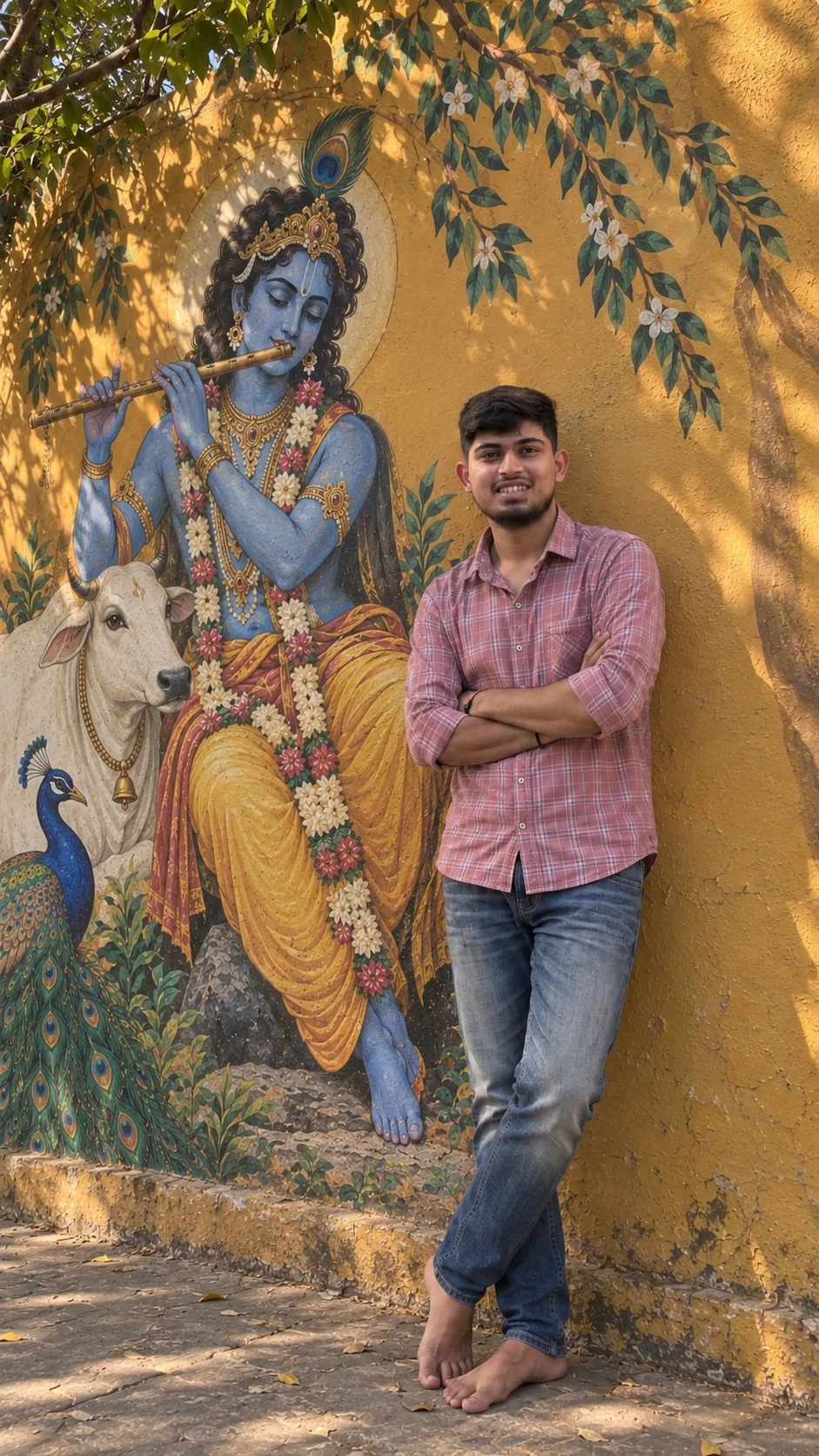
The story behind this Janmashtami AI photo editing prompt for boys: almost all of its length is spent defending your own face. The opening instruction does not ask for a good portrait — it names the uploaded image as the only source of facial identity, lists eleven separate features that must survive untouched, and then closes with four verbs it flatly refuses: beautify, reshape, replace, stylize. That refusal matters more than it sounds. Smoothing an Indian face is the default behaviour of nearly every image model, and a prompt that does not forbid it by name tends to hand back a polished stranger. The second decision worth stealing is how hard it insists the Krishna on the wall is a painting. Krishna, the white cow and the peacock are all “clearly painted as part of the wall mural with authentic brush texture”, and the negative list separately bans real Krishna and real animals. Without those two lines the model puts a living Krishna beside you, which is both wrong and awkward. Third, the light is given a job rather than an adjective: sunlight filters through tree branches and casts leaf-and-branch shadows across the wall. That dappling is what makes the frame read as a photograph instead of a render. Finally, notice which body parts are named twice — hands, fingers, feet — because folded arms and bare feet are exactly where these models fall apart.
इस Janmashtami AI photo editing prompt for boys के पीछे की कहानी: इसकी लगभग पूरी लंबाई आपके अपने चेहरे को बचाने में ख़र्च होती है। पहला ही निर्देश अच्छी तस्वीर नहीं माँगता — वह अपलोड की गई फ़ोटो को चेहरे की पहचान का इकलौता स्रोत बताता है, ग्यारह अलग-अलग चीज़ें गिनाता है जो ज्यों की त्यों रहनी चाहिए, और फिर चार क्रियाओं से साफ़ मना करता है: सुंदर बनाना, आकार बदलना, बदल देना, स्टाइल कर देना। यह मनाही जितनी लगती है, उससे कहीं ज़्यादा मायने रखती है। किसी भारतीय चेहरे को चिकना कर देना लगभग हर इमेज मॉडल का डिफ़ॉल्ट व्यवहार है, और जो प्रॉम्प्ट इसे नाम लेकर मना नहीं करता, उसे बदले में एक चमकाया हुआ अजनबी चेहरा मिलता है। दूसरी नकल करने लायक बात यह है कि दीवार पर बने कृष्ण को बार-बार पेंटिंग ही कहा गया है। कृष्ण, सफ़ेद गाय और मोर — तीनों “दीवार पर बने म्यूरल का हिस्सा, असली ब्रश टेक्सचर के साथ” बताए गए हैं, और negative सूची अलग से असली कृष्ण और असली जानवरों पर रोक लगाती है। इन दो पंक्तियों के बिना मॉडल आपके बगल में जीता-जागता कृष्ण खड़ा कर देता है, जो ग़लत भी है और अटपटा भी। तीसरी बात, रोशनी को विशेषण नहीं, काम दिया गया है: धूप टहनियों से छनकर आती है और दीवार पर पत्तों-टहनियों की परछाइयाँ डालती है। यही छनती हुई परछाई फ़्रेम को रेंडर नहीं, तस्वीर बनाती है। आख़िर में देखिए कि किन अंगों का ज़िक्र दो बार है — हाथ, उंगलियाँ, पैर — क्योंकि बंधी हुई बाँहें और नंगे पैर ठीक वहीं हैं जहाँ ये मॉडल चूकते हैं।
આ Janmashtami AI photo editing prompt for boys પાછળની વાત: તેની લગભગ આખી લંબાઈ તમારા પોતાના ચહેરાને બચાવવામાં વપરાય છે. પહેલી જ સૂચના સારો ફોટો માંગતી નથી — તે અપલોડ કરેલા ફોટાને ચહેરાની ઓળખનો એકમાત્ર સ્રોત ગણાવે છે, અગિયાર અલગ અલગ વસ્તુઓ ગણાવે છે જે જેમની તેમ રહેવી જોઈએ, અને પછી ચાર ક્રિયાઓની સ્પષ્ટ મનાઈ કરે છે: સુંદર બનાવવું, આકાર બદલવો, બદલી નાખવું, સ્ટાઇલ કરી દેવું. આ મનાઈ જેટલી લાગે છે તેના કરતાં ઘણી વધારે મહત્ત્વની છે. ભારતીય ચહેરાને લીસો કરી દેવો એ લગભગ દરેક ઇમેજ મોડેલનું ડિફૉલ્ટ વર્તન છે, અને જે પ્રોમ્પ્ટ નામ લઈને એની મનાઈ નથી કરતો તેને બદલામાં એક ચમકાવેલો અજાણ્યો ચહેરો મળે છે. બીજી નકલ કરવા જેવી વાત એ છે કે દીવાલ પરના કૃષ્ણને વારંવાર પેઇન્ટિંગ જ કહેવાયું છે. કૃષ્ણ, સફેદ ગાય અને મોર — ત્રણેયને “દીવાલ પરના મ્યુરલનો ભાગ, અસલી બ્રશ ટેક્સચર સાથે” કહેવાયા છે, અને negative યાદી અલગથી અસલી કૃષ્ણ અને અસલી પ્રાણીઓ પર રોક મૂકે છે. આ બે લીટી વગર મોડેલ તમારી બાજુમાં જીવતા કૃષ્ણ ઊભા કરી દે છે, જે ખોટું પણ છે અને અજુગતું પણ. ત્રીજી વાત, પ્રકાશને વિશેષણ નહીં, કામ સોંપાયું છે: તડકો ડાળીઓમાંથી ગળાઈને આવે છે અને દીવાલ પર પાંદડાં-ડાળીઓના પડછાયા પાડે છે. આ ગળાયેલો પડછાયો જ ફ્રેમને રેન્ડર નહીં, ફોટો બનાવે છે. છેલ્લે જુઓ કે કયા અંગોનો ઉલ્લેખ બે વાર છે — હાથ, આંગળીઓ, પગ — કારણ કે વાળેલા હાથ અને ઉઘાડા પગ બરાબર ત્યાં જ છે જ્યાં આ મોડેલ ભૂલ કરે છે.
Copy this photo prompt below and paste it into ChatGPT with your own photo.
नीचे दिया गया photo prompt कॉपी करें और अपनी फ़ोटो के साथ ChatGPT में पेस्ट करें।
નીચે આપેલ photo prompt કૉપિ કરો અને તમારા ફોટા સાથે ChatGPT માં પેસ્ટ કરો.
Prompt
Shot: Use the uploaded reference image as the only facial identity reference. Preserve the young Indian man's exact face, facial structure, eyes, eyebrows, nose, lips, jawline, skin tone, natural texture, hairline, proportions, and recognizable identity with zero identity drift. Do not beautify, reshape, replace, stylize, or generate a different face.

Create a 9:16 ultra-photorealistic cinematic full-body portrait of him standing barefoot beside a large Lord Krishna wall mural. He wears a pink checkered shirt with sleeves casually rolled up and faded blue jeans, with his arms comfortably folded across his chest while casually leaning against the warm mustard-yellow wall. Natural confident posture, realistic hands, fingers, body proportions, clothing folds, denim texture, and bare feet.

The mural features serene blue-skinned Krishna with curly dark hair, peacock feather, traditional jewelry, floral garlands, Indian attire, and flute, seated peacefully, accompanied by a white cow and vibrant peacock, all clearly painted as part of the wall mural with authentic brush texture.

Warm golden-hour sunlight filters through tree branches, casting soft organic leaf-and-branch shadows across the wall and mural. Natural skin tones, realistic highlights, subtle shadows, detailed hair strands, visible skin pores, fabric texture, mural brushwork, textured wall, realistic depth of field, professional DSLR photography, natural perspective, subtle film grain, premium cinematic color grading.

The man remains the primary photographic subject, while the Krishna mural is large, detailed, and clearly visible beside him. Peaceful, devotional, spiritual, artistic, culturally elegant, warm cinematic atmosphere. Authentic photograph, not CGI or digital art.

Negative: different person, identity drift, face swap, altered face, beautified face, generic AI face, face reshaping, plastic skin, excessive smoothing, CGI, 3D, cartoon, distorted anatomy, malformed hands, extra fingers, distorted feet, artificial mural, real Krishna, real animals, excessive glow, oversaturation, harsh lighting, excessive HDR, blur, low resolution, cropped body, cropped feet, watermark, logo, text, signature.
Best with:ChatGPT
सबसे अच्छा चलता है:ChatGPT
સૌથી સારું ચાલે છે:ChatGPT
This photo prompt turns an ordinary photo into a polished festive days image in a single generation. You get the same look you see above — no editing skills needed. It leans on golden-hour light and a cinematic finish.
What this prompt creates
The instruction lights them with golden-hour light, finishes with a cinematic finish and frames it as a vertical 9:16 frame. At roughly 298 words it is a detailed prompt, so expect the model to follow it closely — either way, the result stays recognisably you because the source photo drives the likeness.
How to use this photo prompt
Tap Copy prompt above to copy the full text.
Open ChatGPT and start a new chat.
Upload the photo you want to transform.
Paste the prompt and send it.
If the first result is not quite right, regenerate once or twice — small changes in wording shift the style a lot.
Tips for a better result
Match the light. This prompt asks for golden-hour light, so a source photo shot in similar conditions needs far less correction.
Shoot for the crop. The output is a vertical 9:16 frame, so leave headroom in your original rather than filling the frame.
Change one thing at a time. Edit the colour, outfit, or background separately rather than all at once.
Try it twice. Image models are random — a second run often looks noticeably better.
Start from the highest-resolution copy you have. Detail the model can see is detail it can keep.
Who this festive days prompt suits
This one works especially well for Boys. It suits Instagram posts, profile pictures, and WhatsApp display photos, and it holds up on both phone and desktop screens.
More prompts like this
Browse every festive days prompt in this collection, or head back to the PromptPin homepage for the newest AI photo prompts. All of them are free to copy and use.
Want the theory behind the look? Read up on colour grading.
What makes this festive days style work
Three things do most of the heavy lifting here. The lighting is described precisely rather than left to chance. The framing and camera angle are stated up front, which keeps the subject in proportion. And the finish — grain, contrast, and colour grade — is spelled out at the end, which is what separates a snapshot from something that looks deliberately shot.
You can reuse this structure for your own ideas. Keep the sentence order — subject, setting, lighting, camera, finish — and swap the descriptive words. Prompts written this way behave far more predictably than one long sentence.
यह photo prompt एक साधारण फ़ोटो को एक ही बार में शानदार festive days इमेज में बदल देता है। आपको ऊपर दिखने वाला वैसा ही लुक मिलेगा — किसी एडिटिंग स्किल की ज़रूरत नहीं। It leans on golden-hour light and a cinematic finish.
यह प्रॉम्प्ट क्या बनाता है
The instruction lights them with golden-hour light, finishes with a cinematic finish and frames it as a vertical 9:16 frame. At roughly 298 words it is a detailed prompt, so expect the model to follow it closely — either way, the result stays recognisably you because the source photo drives the likeness.
इस प्रॉम्प्ट का उपयोग कैसे करें
ऊपर Copy prompt पर टैप करके पूरा टेक्स्ट कॉपी करें।
ChatGPT खोलें और नई चैट शुरू करें।
जिस फ़ोटो को बदलना है उसे अपलोड करें।
प्रॉम्प्ट पेस्ट करें और भेज दें।
अगर पहला रिज़ल्ट सही न लगे तो एक-दो बार दोबारा जनरेट करें — शब्दों में छोटा बदलाव भी स्टाइल काफ़ी बदल देता है।
बेहतर रिज़ल्ट के लिए टिप्स
रोशनी मिलाएँ। यह प्रॉम्प्ट golden-hour light माँगता है, इसलिए वैसी ही रोशनी में ली गई फ़ोटो में बहुत कम सुधार करना पड़ता है।
क्रॉप का ध्यान रखें। आउटपुट a vertical 9:16 frame होता है, इसलिए फ़्रेम पूरा भरने के बजाय ऊपर थोड़ी जगह छोड़ें।
एक बार में एक ही चीज़ बदलें। रंग, कपड़े या बैकग्राउंड — सब एक साथ बदलने के बजाय अलग-अलग बदलें।
दो बार आज़माएँ। इमेज मॉडल हर बार अलग रिज़ल्ट देते हैं — दूसरी बार अक्सर बेहतर आता है।
सबसे अच्छी क्वालिटी वाली फ़ोटो से शुरू करें। मॉडल जो डिटेल देख पाएगा, वही बचा भी पाएगा।
यह प्रॉम्प्ट किसके लिए सही है
यह ख़ास तौर पर Boys के लिए अच्छा है। यह इंस्टाग्राम पोस्ट, प्रोफ़ाइल फ़ोटो और व्हाट्सऐप डीपी के लिए सही रहता है, और फ़ोन व कंप्यूटर दोनों पर अच्छा दिखता है।
इस लुक के पीछे की थ्योरी समझनी है? colour grading के बारे में पढ़ें।
यह स्टाइल क्यों अच्छा काम करता है
इसमें तीन चीज़ें सबसे ज़्यादा काम करती हैं। रोशनी को अंदाज़े पर नहीं छोड़ा गया, साफ़-साफ़ बताया गया है। फ़्रेमिंग और कैमरा एंगल पहले ही तय है, जिससे चेहरा सही अनुपात में रहता है। और आख़िर में फ़िनिश — ग्रेन, कंट्रास्ट और कलर ग्रेड — बताया गया है, यही आम फ़ोटो और प्रोफ़ेशनल दिखने वाली फ़ोटो का फ़र्क़ है।
आप इसी ढाँचे को अपने आइडिया के लिए भी इस्तेमाल कर सकते हैं। क्रम वही रखें — सब्जेक्ट, जगह, रोशनी, कैमरा, फ़िनिश — और सिर्फ़ शब्द बदलें। इस तरह लिखे प्रॉम्प्ट एक लंबे वाक्य से कहीं बेहतर काम करते हैं।
આ photo prompt સામાન્ય ફોટાને એક જ વારમાં સુંદર festive days ઇમેજમાં ફેરવે છે. તમને ઉપર દેખાય છે તેવો જ લુક મળશે — કોઈ એડિટિંગ સ્કિલની જરૂર નથી. It leans on golden-hour light and a cinematic finish.
આ પ્રોમ્પ્ટ શું બનાવે છે
The instruction lights them with golden-hour light, finishes with a cinematic finish and frames it as a vertical 9:16 frame. At roughly 298 words it is a detailed prompt, so expect the model to follow it closely — either way, the result stays recognisably you because the source photo drives the likeness.
આ પ્રોમ્પ્ટનો ઉપયોગ કેવી રીતે કરવો
ઉપર Copy prompt પર ટૅપ કરીને આખો ટેક્સ્ટ કૉપિ કરો.
ChatGPT ખોલો અને નવી ચેટ શરૂ કરો.
જે ફોટો બદલવો છે તે અપલોડ કરો.
પ્રોમ્પ્ટ પેસ્ટ કરો અને મોકલો.
જો પહેલું પરિણામ બરાબર ન લાગે તો એક-બે વાર ફરી જનરેટ કરો — શબ્દોમાં નાનો ફેરફાર પણ સ્ટાઇલ ઘણી બદલે છે.
વધુ સારા પરિણામ માટે ટિપ્સ
પ્રકાશ મેળવો. આ પ્રોમ્પ્ટ golden-hour light માંગે છે, તેથી તેવી જ રોશનીમાં લીધેલા ફોટામાં ઘણું ઓછું સુધારવું પડે છે.
ક્રૉપનું ધ્યાન રાખો. આઉટપુટ a vertical 9:16 frame હોય છે, તેથી ફ્રેમ આખી ભરવાને બદલે ઉપર થોડી જગ્યા છોડો.
એક વખતે એક જ વસ્તુ બદલો. રંગ, કપડાં કે બૅકગ્રાઉન્ડ — બધું એકસાથે બદલવાને બદલે અલગ અલગ બદલો.
બે વાર અજમાવો. ઇમેજ મૉડલ દર વખતે અલગ પરિણામ આપે છે — બીજી વાર ઘણી વાર વધુ સારું આવે છે.
સૌથી સારી ક્વૉલિટીવાળા ફોટાથી શરૂ કરો. મૉડલ જે ડિટેલ જોઈ શકે, તે જ જાળવી પણ શકે.
આ પ્રોમ્પ્ટ કોના માટે યોગ્ય છે
આ ખાસ કરીને Boys માટે સારું છે. તે ઇન્સ્ટાગ્રામ પોસ્ટ, પ્રોફાઇલ ફોટો અને વૉટ્સઍપ ડીપી માટે યોગ્ય છે, અને ફોન તથા કમ્પ્યુટર બંને પર સારું દેખાય છે.
આમાં ત્રણ વસ્તુઓ સૌથી વધુ કામ કરે છે. પ્રકાશ અંદાજ પર છોડ્યો નથી, સ્પષ્ટ રીતે જણાવ્યો છે. ફ્રેમિંગ અને કૅમેરા ઍન્ગલ પહેલેથી નક્કી છે, જેથી ચહેરો યોગ્ય પ્રમાણમાં રહે. અને અંતે ફિનિશ — ગ્રેન, કૉન્ટ્રાસ્ટ અને કલર ગ્રેડ — જણાવ્યું છે, એ જ સામાન્ય ફોટા અને પ્રોફેશનલ દેખાતા ફોટા વચ્ચેનો ફરક છે.
તમે આ જ ઢાંચો તમારા આઇડિયા માટે પણ વાપરી શકો છો. ક્રમ એ જ રાખો — સબ્જેક્ટ, જગ્યા, પ્રકાશ, કૅમેરા, ફિનિશ — અને ફક્ત શબ્દો બદલો. આ રીતે લખેલા પ્રોમ્પ્ટ એક લાંબા વાક્ય કરતાં ઘણું સારું કામ કરે છે.