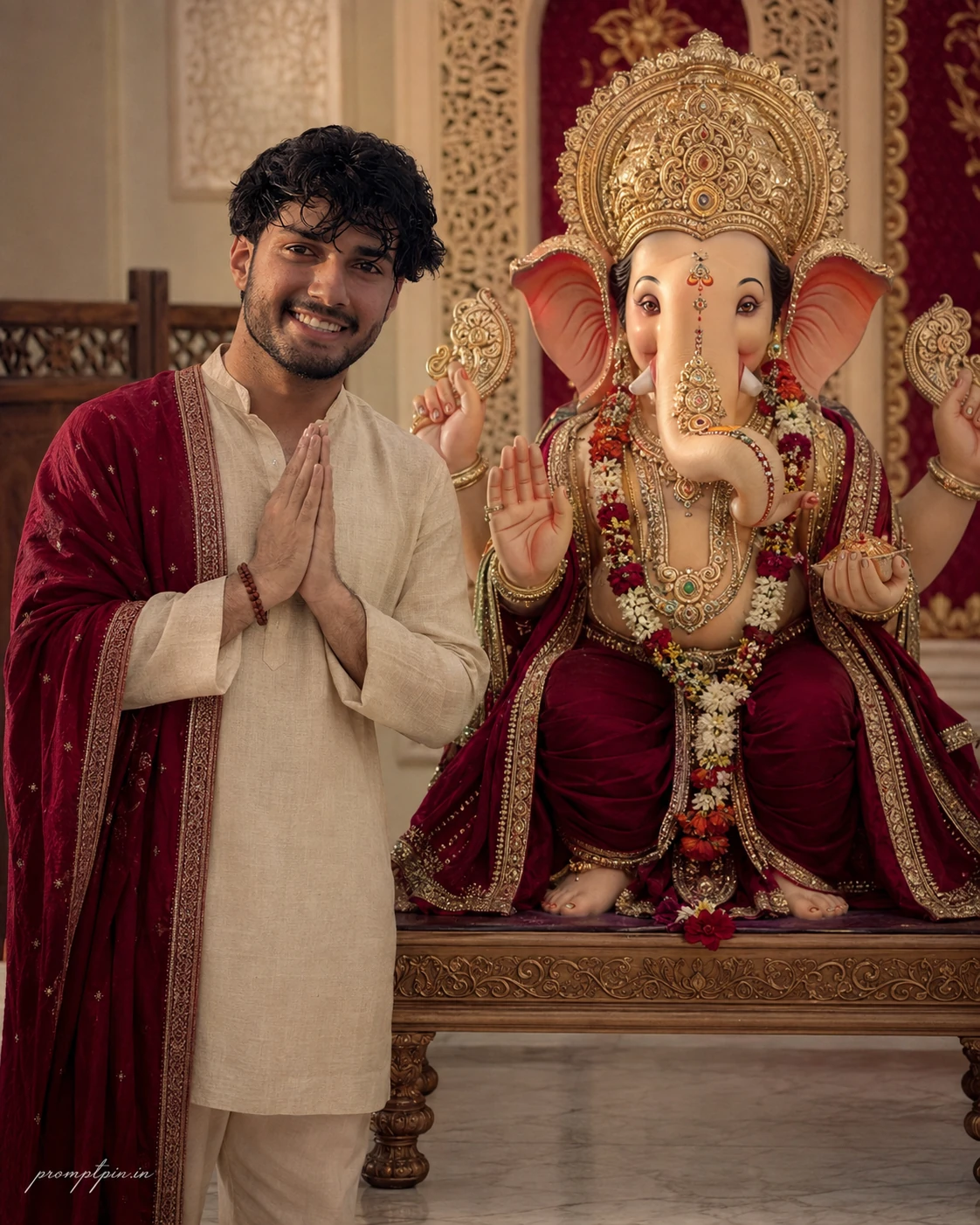
Ultimate Ganesh Chaturthi AI Photo Prompt
Copy this photo prompt below and paste it into ChatGPT with your own photo.
Use the uploaded reference image as the exact identity reference. Preserve the face faithfully with the same facial structure, eyes, eyebrows, nose, lips, jawline, hairstyle, facial hair, skin tone, natural proportions and unique identity. Do not beautify, reshape or redesign the face at any point in the generation process. Create a sophisticated ultra realistic Ganesh Chaturthi AI photo prompt portrait of a young Indian man standing respectfully beside Lord Ganesha inside an elegant community prayer hall.

He wears a soft beige linen kurta with visible natural fibers, tapered ivory trousers and a deep crimson embroidered shawl draped over one shoulder with a finely detailed woven border. Traditional sandals and one simple wooden bead bracelet complete the look without overloading the styling. His torso is upright and relaxed. One hand is raised naturally in a respectful Namaste gesture while the other hand rests beside his body. His shoulders remain comfortable and his face is fully directed toward the camera. He looks directly into the lens with a peaceful devotional smile that feels genuine rather than posed.

Lord Ganesha is positioned beside him on a refined carved wooden platform with an ornate crown, layered jewelry, deep crimson and cream fabric and carefully crafted decorative details that show realistic handmade texture and paint work. The prayer hall contains textured cream walls, carved wooden dividers, soft red textile panels and a polished stone floor. Subtle festive ornamentation is present but never overcrowded. Every surface is clean and carefully maintained throughout the frame. No messy decorations and no distracting background objects appear anywhere.

Skin should remain highly realistic with visible pores, subtle facial hairs, natural tonal variation and realistic texture around the eyes and lips. Preserve the linen fiber structure, embroidery threads, wooden grain of the bracelet, polished stone floor reflections and handcrafted details of the idol surface at a photographically convincing level. This is a devotional AI photo prompt designed to deliver maximum realism when used in both ChatGPT and Gemini photo editing workflows.

Lighting is soft frontal diffused illumination with a gentle side fill from the left. Create balanced facial exposure, natural cheek shadows and subtle fabric highlights. The image must not have artificial glowing skin or overexposed highlights on the face. Use an 80mm medium format inspired portrait look with eye level camera placement, natural perspective and smooth realistic depth separation. Keep the boy and Lord Ganesha extremely sharp while allowing the deepest part of the hall to soften gradually and naturally. Color grading should use restrained beige, cream, crimson and muted gold tones with realistic white balance, subtle grain and natural RAW photography character.

Strict vertical 4:5 composition. Face looking directly into camera. No dirty surroundings, no litter, no excessive decorations, no brass diyas, no crowd clutter, no distorted hands, no extra fingers, no duplicate objects, no artificial skin smoothing, no facial alteration, no cartoon effect, no plastic skin, no beauty filter, no text, no logo. Add a subtle bottom left corner watermark reading “promptpin.in” in Petit Formal Script, thin elegant cursive strokes, subtle premium handwritten signature style, small and elegant without interfering with the subject.
Best with: ChatGPT
This photo prompt turns an ordinary photo into a polished festive days image in a single generation. You get the same look you see above — no editing skills needed. It describes the scene in enough detail that the model has little left to guess at.
How to use this photo prompt
- Tap Copy prompt above to copy the full text.
- Open ChatGPT and start a new chat.
- Upload the photo you want to transform.
- Paste the prompt and send it.
- If the first result is not quite right, regenerate once or twice — small changes in wording shift the style a lot.
Tips for a better result
- Shoot for the crop. The output is a portrait 4:5 frame, so leave headroom in your original rather than filling the frame.
- Say what you don’t want. Adding “no text, no watermark” at the end removes most stray artefacts.
- Keep the face unchanged. Add “keep my face exactly the same” if the likeness drifts.
- Change one thing at a time. Edit the colour, outfit, or background separately rather than all at once.
Who this festive days prompt suits
This one works especially well for Boys. It suits Instagram posts, profile pictures, and WhatsApp display photos, and it holds up on both phone and desktop screens.
More prompts like this
Browse every festive days prompt in this collection, or head back to the PromptPin homepage for the newest AI photo prompts. All of them are free to copy and use.
Want the theory behind the look? Read up on Google Gemini.
What makes this festive days style work
Three things do most of the heavy lifting here. The lighting is described precisely rather than left to chance. The framing and camera angle are stated up front, which keeps the subject in proportion. And the finish — grain, contrast, and colour grade — is spelled out at the end, which is what separates a snapshot from something that looks deliberately shot.
You can reuse this structure for your own ideas. Keep the sentence order — subject, setting, lighting, camera, finish — and swap the descriptive words. Prompts written this way behave far more predictably than one long sentence.