Candid Couple Under the Trees Prompt
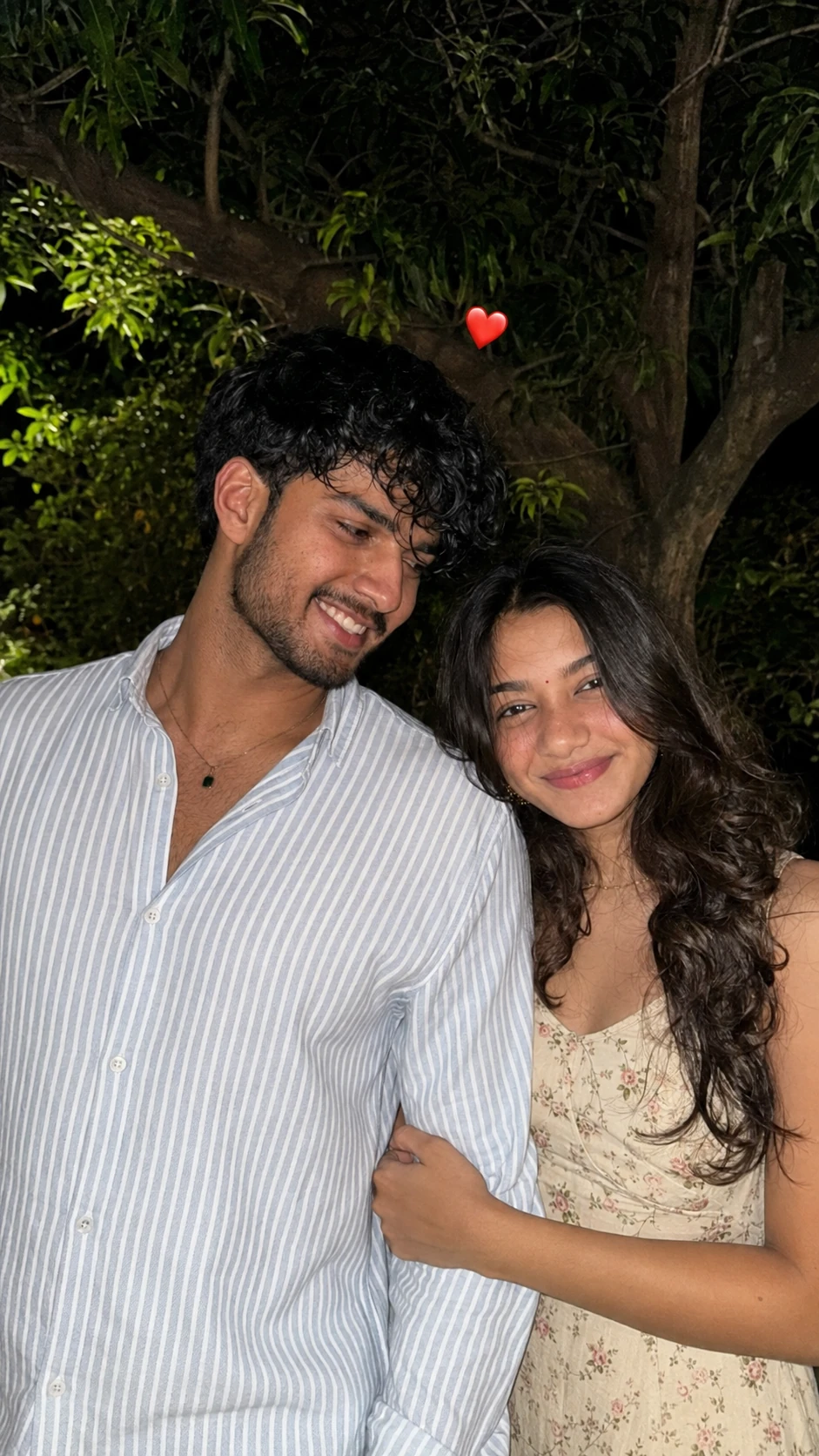
The story behind this one: the whole look rests on one deliberately unglamorous choice — direct camera flash at night. That single decision is what makes it read as a photo someone actually took rather than a rendered portrait, because the flash throws hard light onto their faces and clothing while the tree line behind them falls away into darkness, which is exactly how a phone behaves in a garden after sunset. The styling follows the same logic: a loose striped shirt with the top buttons open against a small-print floral dress, everyday clothes rather than a coordinated shoot, and the little red heart floating between their heads is the kind of thing people genuinely add before posting.
Copy this portrait prompt below and paste it into ChatGPT with your own photo.
Create an ultra-realistic candid night-time portrait of a young couple standing closely together outdoors in a natural garden setting. Use the uploaded reference photo as the identity reference and preserve the same facial identity, facial structure, skin tone, hairstyle, and recognizable features of both people.

The young man is standing on the left, slightly turned toward the girl, looking at her affectionately. He has naturally styled slightly messy black hair and light facial stubble. He is wearing a loose-fitting light blue and white vertically striped button-up shirt with the top buttons casually open, creating a relaxed everyday look.

The young woman is standing beside him on the right, facing the camera with a soft, natural expression. She has long, voluminous dark curly/wavy hair falling naturally around her shoulders, subtle elegant makeup, defined eyes, and natural lips. She is wearing a delicate cream/off-white floral sleeveless dress with small pink and green flower patterns. Her arm is gently wrapped around the man's arm/waist, creating a sweet and intimate couple pose.

Capture the image as a spontaneous smartphone/DSLR-style photograph taken at night with direct camera flash. The flash should naturally illuminate their faces and clothing while the background remains dark and atmospheric. Behind them, include dense green tree branches, leaves, and a large tree trunk, creating a realistic outdoor garden atmosphere.

Use a natural close-up portrait composition, with both people filling most of the frame. Preserve realistic skin texture, individual hair strands, natural shadows, realistic fabric details, accurate anatomy, and authentic facial expressions. Add a small red heart emoji/sticker floating naturally above and between their heads.

Photography style: ultra-realistic, candid couple photography, nighttime flash photography, realistic smartphone camera look, natural colors, sharp facial details, subtle background blur, authentic lighting, high detail, 4K quality, photorealistic.

Important: Do not make the faces look artificial or overly beautified. Maintain the exact identity and natural appearance of the uploaded people. Avoid distorted hands, extra fingers, duplicated body parts, unnatural eyes, plastic skin, excessive HDR, or cartoon-like features.
Best with: ChatGPT
This portrait prompt turns an ordinary photo into a polished portrait image in a single generation. You get the same look you see above — no editing skills needed. It leans on moody low light and an outdoor setting.
What this prompt creates
The instruction places the subject in an outdoor setting, lights them with moody low light and and frames it as a vertical 9:16 frame. At roughly 335 words it is a detailed prompt, so expect the model to follow it closely — either way, the result stays recognisably you because the source photo drives the likeness.
How to use this portrait prompt
- Tap Copy prompt above to copy the full text.
- Open ChatGPT and start a new chat.
- Upload the photo you want to transform.
- Paste the prompt and send it.
- If the first result is not quite right, regenerate once or twice — small changes in wording shift the style a lot.
Tips for a better result
- Match the light. This prompt asks for moody low light, so a source photo shot in similar conditions needs far less correction.
- Mind the background. It replaces your backdrop with an outdoor setting — a source photo with a plain or blurred background swaps over most cleanly.
- Shoot for the crop. The output is a vertical 9:16 frame, so leave headroom in your original rather than filling the frame.
- Start from the highest-resolution copy you have. Detail the model can see is detail it can keep.
- Crop before you generate. Removing clutter from the edges usually beats asking the model to remove it.
Who this portrait prompt suits
This one works especially well for Couple. It suits Instagram posts, profile pictures, and WhatsApp display photos, and it holds up on both phone and desktop screens.
More prompts like this
Browse every portrait prompt in this collection, or head back to the PromptPin homepage for the newest AI photo prompts. All of them are free to copy and use.
What makes this portrait style work
Three things do most of the heavy lifting here. The lighting is described precisely rather than left to chance. The framing and camera angle are stated up front, which keeps the subject in proportion. And the finish — grain, contrast, and colour grade — is spelled out at the end, which is what separates a snapshot from something that looks deliberately shot.
You can reuse this structure for your own ideas. Keep the sentence order — subject, setting, lighting, camera, finish — and swap the descriptive words. Prompts written this way behave far more predictably than one long sentence.
More prompts like this
- Black & White Portrait AI Photo Prompt for Boys
- Ivory Calm Portrait AI Photo Prompt for Girls
- Silver Fox Stroll Portrait AI Photo Prompt for Girls
- Queen’s Gambit Portrait AI Photo Prompt for Girls
- Monochrome Strength Portrait AI Photo Prompt for Boys
- Midnight Poise Portrait AI Photo Prompt for Girls
- Trending Black Devil Photo Editing Prompt